AUDIO / VIDEO AUDIO AND VISUAL SYSTEM SYSTEM DESCRIPTION
CD (Compact Disc) PLAYER OUTLINE (w/ CD Player)
A compact disc player uses a laser pickup to read digital signals recorded on a compact disc (CD). By converting the digital signals to analog, it can play music and audio.
- CAUTION:
-
Do not look directly at the laser pickup because the CD player uses an invisible laser beam. Be sure to operate the player only as instructed.
- NOTICE:
-
·
Do not disassemble any part of the CD player.
·Do not apply oil to the CD player.
·Do not insert anything but a CD into the CD player.
Usable discs
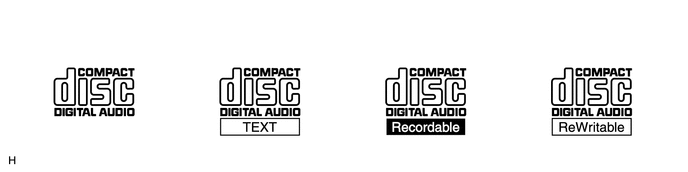
This player can play only audio CDs, CD-Rs (CD-Recordable) and CD-RWs (CD-ReWritable) that have any of the following marks:
Precautions for use of discs
- NOTICE:
-
·
Copy-protected CDs cannot be played.
·CD-Rs and CD-RWs may not be played depending on the recording conditions or characteristics of the discs, or due to damage, dirt or deterioration caused by leaving the discs in the cabin for a long time.
·Unfinalized CD-Rs and CD-RWs cannot be played.
·DualDiscs that mate DVD recorded material on one side with CD digital audio material on the other cannot be played.
·Keep the discs away from dirt. Be careful not to damage the discs or leave fingerprints on them.
·Hold discs by the outer edge and center hole with the label side up.
·Leaving the disc exposed halfway out of the slot for a long time after pressing the disc eject button may cause deformation of the disc, making the disc unusable.
·If discs have adhesive tape, stickers, CD labels or any traces of such labels attached, the discs may not be ejected or player malfunctions may result.
·Keep the discs away from direct sunlight. (Exposure to direct sunlight may cause deformation of the disc, making the disc unusable.)
·Do not use odd-shaped CDs because these may cause player malfunctions.
·Do not use discs whose recording portion is transparent or translucent because they may not be inserted, ejected or played normally.
·Use only 4.7 in. (12 cm) CDs.
·Do not use 3 in. (8 cm) CDs either with or without adaptors.
- HINT:
-
·
When it is cold or it is raining, if the windows mist up, mist and condensation may form in the player. In such cases, the CD may skip or stop in the middle of play. Ventilate or dehumidify the cabin for a while before using the player.
·The CD may skip if the player experiences strong vibrations when the vehicle is driven on rough roads or similar uneven surfaces.
Cleaning
- NOTICE:
-
Do not use a lens cleaner because it may cause a malfunction in the pickup portion of the player.
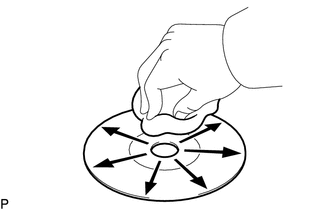
If dirt is on the disc surface, wipe it clean with a soft dry cloth such as an eyeglass cleaner for plastic lenses from the inside to the outside in a radial direction.
- NOTICE:
-
·
Pressing on the disc by hand or rubbing the disc with a hard cloth may scratch the disc surface.
·Use of solvents such as record spray, antistatic agents, alcohol, benzine, thinners or a chemical cloth may cause damage to the disc, making the disc unusable.
MP3/WMA OUTLINE (w/ CD Player)
Playable MP3 file standards
| Compatible standard | MPEG1 LAYER3, MPEG2 LSF LAYER3 |
| Compatible sampling frequency |
·
MPEG1 LAYER3: 32, 44.1, 48 (kHz)
·
MPEG2 LSF LAYER3: 16, 22.05, 24 (kHz) |
| Compatible bit rate |
·
MPEG1 LAYER3: 32 to 320 (kbps)
·
MPEG2 LSF LAYER3: 8 to 160 (kbps)
·
Compatible with VBR |
| Compatible channel mode | Stereo, joint stereo, dual channel, monaural |
Playable WMA file standards
| Compatible standard | WMA Ver. 7, 8 and 9 |
| Compatible sampling frequency | 32, 44.1, 48 (kHz) |
| Compatible bit rate (Only compatible with 2-channel playback) |
·
Ver. 7, 8: CBR48 to 192 (kbps)
·
Ver. 9: CBR48, 64, 80, 96, 128, 160, 192, 256, 320 (kbps)
·
Compatible with VBR |
ID3 tag and WMA tag
Additional text information called an ID3 tag can be input to MP3 files. Information such as song titles and artist names can be stored.
- HINT:
-
This player is compatible with ID3 tags of ID3 Ver. 1.0 and 1.1 and ID3 Ver. 2.2 and 2.3. (Number of characters complies with ID3 Ver. 1.0 and 1.1.)
Additional text information called a WMA tag can be input to WMA files. Information such as song titles and artist names can be stored.
Usable media
Only CD-ROMs, CD-Rs (CD-Recordable), CD-RWs (CD-ReWritable) and USB devices can be used to play MP3/WMA files.
- NOTICE:
-
·
CD-Rs and CD-RWs are more easily affected by a hot and humid environment than discs used for normal audio CDs. For this reason, some CD-Rs and CD-RWs may not be played.
·If there are fingerprints or scratches on a disc, the disc may not be played or the CD may skip.
·Some CD-Rs and CD-RWs may deteriorate if they are left in the cabin for a long time.
·Keep CD-Rs and CD-RWs in an opaque case.
Usable media format
Usable media format
| Disc format | CD-ROM Mode 1, CD-ROM XA Mode 2 Form 1 |
| File format | ISO9660 Level 1 and Level 2 (Joliet, Romeo) |
- HINT:
-
·
MP3/WMA files written in any unlisted format may not be played normally or the file names or folder names may not be displayed correctly.
·This player is compatible with multi-session discs and can play CD-Rs and CD-RWs on which MP3/WMA files have been added. However, only the first session can be played.
·Discs whose first session includes both music data and MP3 and WMA format data may not be played.
Standards and restrictions
| Maximum directory levels | 8 levels |
| Maximum number of characters for a folder name/file name | 32 characters |
| Maximum number of folders | 192 (Including empty folders, root folders, and folders that do not contain MP3/WMA files) |
| Maximum number of files in a disc | 255 (Including non-MP3/WMA files) |
File names
Only files with an extension of ".mp3" and ".wma" can be recognized and played as MP3 or WMA.
Save MP3 or WMA files with an extension of ".mp3" or ".wma".
- NOTICE:
-
If non-MP3 or non-WMA files are saved with an extension of ".mp3" or ".wma", those files may be wrongly recognized as MP3 or WMA files and played. A loud noise may occur and damage to the speakers may result.
RADIO DESCRIPTION
Radio frequency band
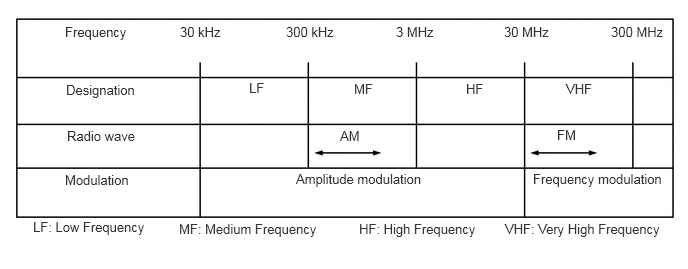
Radio broadcasts use the radio frequency bands shown in the table below.
Service area
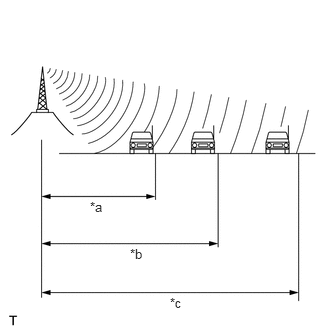
| *a | FM (Stereo) |
| *b | FM (Monaural) |
| *c | AM |
The service areas of AM and FM broadcasts are vastly different. Sometimes an AM broadcast can be received very clearly but an FM stereo broadcast cannot. An FM stereo broadcast has the smallest service area, and is prone to pick up static and other types of interference such as noise.
Radio reception problems
- HINT:
-
In addition to static, other problems such as "phasing", "multipath", and "fade out" exist. These problems are not caused by electrical noise, but by the radio signal propagation method itself.
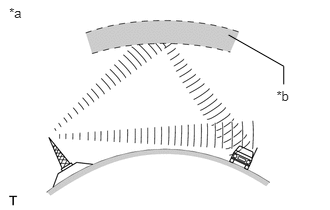
| *a | Phasing |
| *b | Ionosphere |
Phasing
AM broadcasts are susceptible to electrical interference and another kind of interference called phasing. Occurring only at night, phasing is the interference created when a vehicle receives 2 radio wave signals from the same transmitter. One signal is reflected off the ionosphere and the other signal is received directly from the transmitter.
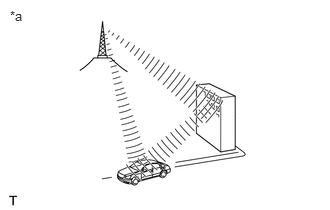
| *a | Multipath |
Multipath
Multipath is a type of interference created when a vehicle receives 2 radio wave signals from the same transmitter. One signal is reflected off buildings or mountains and the other signal is received directly from the transmitter.
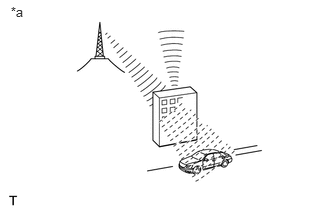
| *a | Fade Out |
Fade out
Fade out is caused by objects (buildings, mountains, and other such large obstacles) that deflect away part of a signal, resulting in a weaker signal when the object is between the transmitter and vehicle. High frequency radio waves, such as FM broadcasts, are easily deflected by obstructions. Low frequency radio waves, such as AM broadcasts, are much more difficult to deflect.
Noise problem
Technicians must have a clear understanding about the noise complaint of each customer. Use the following table to diagnose noise problems.
| Radio Frequency | Noise Occurrence Condition | Presumable Cause |
|---|---|---|
| AM | Noise occurs in a specific area | Foreign noise |
| Noise occurs when listening to an intermittent broadcast | An identical program transmitted from multiple towers can cause noise where the signals overlap | |
| Noise occurs only at night | Music beat from a distant broadcast | |
| FM | Noise occurs while driving in a specified area | Multipath resulting from a change in FM frequency |
USB AUDIO SYSTEM FUNCTION OUTLINE (w/ CD Player)
The stereo jack adapter on radio receiver assembly is equipped with a USB terminal. Connecting a USB device or "iPod" to the stereo jack adapter allows music files to be played. Not only is it possible to play music from a USB device with audio functions, it is also possible to play MP3 or WMA music files that are stored on a USB device. In addition, "iPod" control software is installed, allowing file selection from playlists and operation using shuffle mode.
- HINT:
-
Operation through the controls of a USB device or "iPod" cannot be performed while it is connected.
USB audio system compatible model
USB Device
The following device formats can be used:
MP3 and WMA files written to a USB device with any format other than those listed above may not play correctly, and their names and folder names may not be displayed correctly. Items related to standards and limitations are as follows:
Maximum directory hierarchy: 8 levels
Maximum number of folders in device: 3000 (including the root folder)
Maximum number of files in device: 9999
Maximum number of files per folder: 255
| Compatible USB device formats |
·
USB communication format: USB 2.0 HS (480 Mbps) and FS (12 Mbps)
·
File format: FAT16/32 (Windows)
·
Class: Mass storage class |
"iPod"
"iPhone", "iPod", "iPod classic", "iPod nano" and "iPod touch" are trademarks of Apple Inc., registered in the U.S. and other countries.
The following "iPod", "iPod nano", "iPod classic", "iPod touch" and "iPhone" devices can be used with this system.
Made for
"iPod touch" (5th generation)
"iPod touch" (4th generation)
"iPod touch" (3rd generation)
"iPod touch" (2nd generation)
"iPod touch" (1st generation)
"iPod classic"
"iPod with video"
"iPod nano" (7th generation)
"iPod nano" (6th generation)
"iPod nano" (5th generation)
"iPod nano" (4th generation)
"iPod nano" (3rd generation)
"iPod nano" (2nd generation)
"iPod nano" (1st generation)
"iPhone 5"
"iPhone 4S"
"iPhone 4"
"iPhone 3GS"
"iPhone 3G"
"iPhone"
- HINT:
-
Depending on differences between models or software versions etc., some models might be incompatible with this system.