AUDIO / VIDEO RADIO RECEIVER REMOVAL
PROCEDURE

 1.DISCONNECT CABLE FROM NEGATIVE BATTERY TERMINAL
55412D 2.REMOVE CENTER INSTRUMENT CLUSTER FINISH PANEL
86120 3.REMOVE RADIO RECEIVER ASSEMBLY WITH BRACKET
w/ USB Audio System:
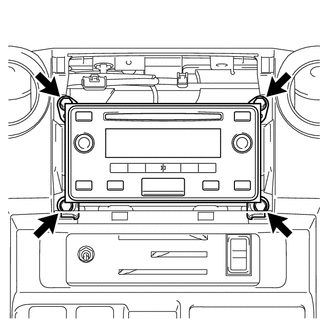
Remove the 2 screws and 2 bolts.
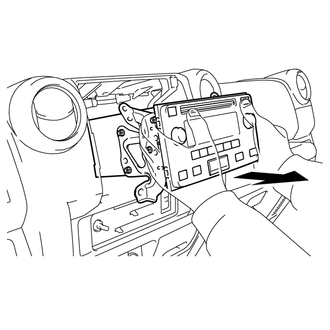
Disconnect all the connectors and remove the radio receiver assembly with bracket.
w/o USB Audio System:
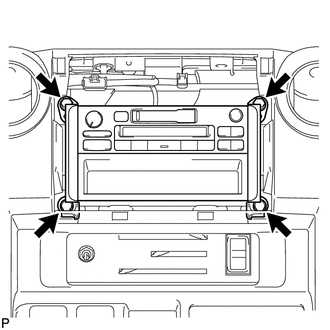
Remove the 2 screws and 2 bolts.
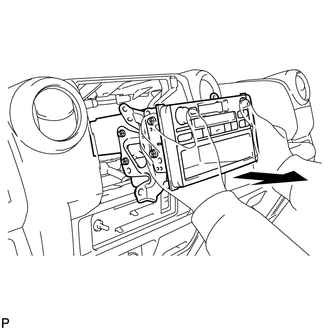
Disconnect all the connectors and remove the radio receiver assembly with bracket.
86211 4.REMOVE NO. 1 RADIO BRACKET
w/ USB Audio System:
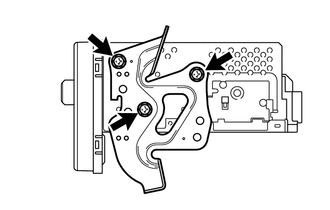
Remove the 3 screws and No. 1 radio bracket from the radio receiver assembly.
w/o USB Audio System:
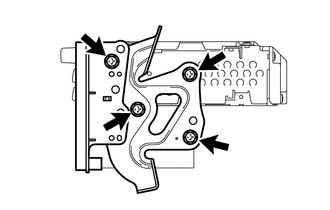
Remove the 4 screws, radio receiver panel RH and No. 1 radio bracket from the radio receiver assembly.
86212 5.REMOVE NO. 2 RADIO BRACKET
w/ USB Audio System:
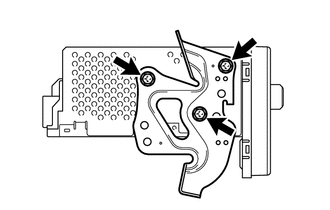
Remove the 3 screws and No. 2 radio bracket from the radio receiver assembly.
w/o USB Audio System:
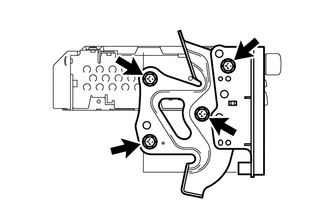
Remove the 4 screws, radio receiver panel LH and No. 2 radio bracket from the radio receiver assembly.