SEAT BELT SEAT BELT WARNING SYSTEM CUSTOMIZE PARAMETERS
PROCEDURE

 1. CUSTOMIZING FUNCTION WITH ODO/TRIP SWITCH (REFERENCE)
- NOTICE:
-
When the customer requests a change in function, first make sure that the function can be customized.
Turn the ignition switch to ON and press the ODO/TRIP switch until the odometer appears. Then, within 6 seconds, press and hold the ODO/TRIP switch for 10 seconds or more.
Fasten the driver side seat belt (the driver side seat belt buckle switch is turned on) to enter buzzer cancel mode.
- HINT:
-
·
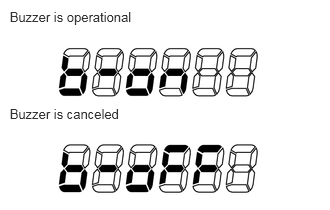 0.101,0.098 1.452,0.275 1.351,0.177 10 Buzzer is operational 0.101,1.104 1.361,1.26 1.26,0.156 10 Buzzer is canceled
·The mode is displayed on the LCD.
·In buzzer cancel mode, the setting changes between "b-on" and "b-oFF" each time the ODO/TRIP switch is pressed.
·Buzzer cancel mode continues until 10 seconds pass without the ODO/TRIP switch being operated, or until the ignition switch is turned off.
·The buzzer setting is backed up by a power supply from the battery (the buzzer is on by default).
·Even if the buzzer is canceled, the warning light blinks when the driver side seat belt is not fastened.