BRAKE CONTROL / DYNAMIC CONTROL SYSTEMS DECELERATION SENSOR(w/ ABS) INSPECTION
PROCEDURE

 89441A 1.CHECK DECELERATION SENSOR
Check the deceleration sensor.
Under any of the following conditions, replace the sensor with a new one.
The surface of the sensor is cracked, dented or chipped.
The connector is scratched, cracked or damaged.
The sensor has been dropped.
89441A 2.INSPECT DECELERATION SENSOR
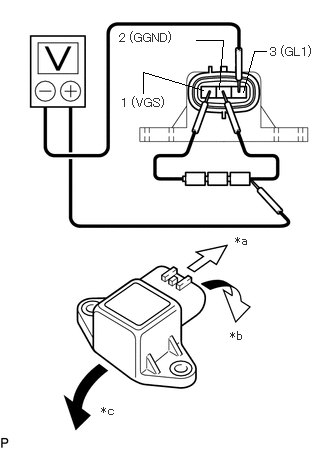
| *a | Front |
| *b | Forward |
| *c | Rearward |
Connect 3 dry cell batteries of 1.5 V in series (approximately 4.5 V total).
Connect the batteries' positive (+) lead to terminal 1 (VGS) and the negative (-) lead to terminal 2 (GGND).
- NOTICE:
-
Do not apply 6 V or higher to terminals 1 (VGS) and 2 (GGND).
Connect the voltmeter's positive (+) lead to the negative (-) lead of the batteries, and the negative (-) lead to terminal 3 (GL1).
Check the output voltage of terminal 3 (GL1) when the sensor is tilted forward and rearward.
- Standard Voltage:
-
Tester Connection Sensor Position Specified Condition 3 (GL1) - Battery negative (-) lead Horizontal Approx. 2.25 V 3 (GL1) - Battery negative (-) lead Tilted forward Approx. 0.45 to 2.25 V 3 (GL1) - Battery negative (-) lead Tilted rearward Approx. 2.25 to 4.05 V
If the result is not as specified, replace the deceleration sensor.
- HINT:
-
·
If voltage drops, the sensor should be replaced with a new one.
·When replacing the sensor, it should not be placed upside down.