LIGHTING (EXT) LICENSE PLATE LIGHT ASSEMBLY(for Pickup) REMOVAL
PROCEDURE

 1.REMOVE LICENSE PLATE BRACKET WITH LICENSE PLATE LIGHT ASSEMBLY (except Step Type)
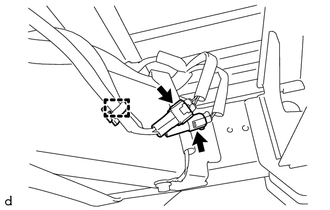
Disconnect the 2 connectors and detach the wire harness clamp.
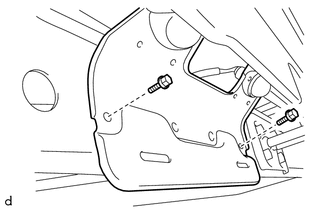
Remove the 2 bolts and license plate bracket with license plate light assembly.
81270 2.REMOVE LICENSE PLATE LIGHT ASSEMBLY (except Step Type)
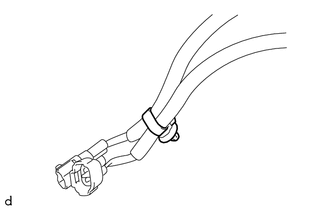
Cut off the wire harness clamp.
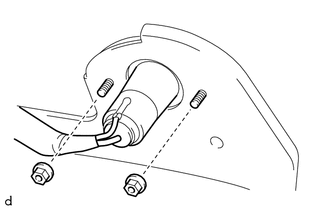
Remove the 2 nuts and license plate light assembly from the license plate bracket.
- HINT:
-
Use the same procedure to remove the license plate light assembly on the other side.
81270 3.REMOVE LICENSE PLATE LIGHT ASSEMBLY (for Step Type)
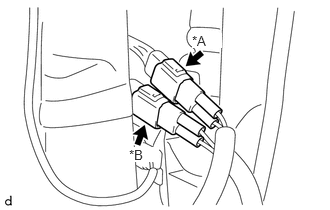
| *A | for LH Side |
| *B | for RH Side |
Disconnect the connector.
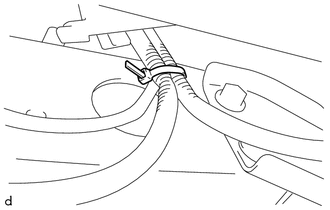
Cut off the cable tie.
for LH Side:
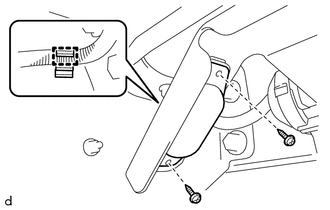
Detach the wire harness clamp.
Remove the 2 screws.
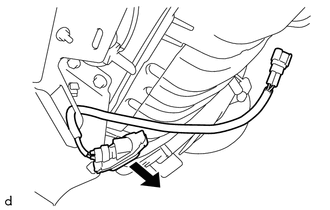
Pull the license plate light assembly to remove it.
for RH Side:
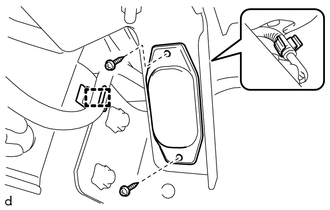
Detach the 2 wire harness clamps.
Remove the 2 screws.
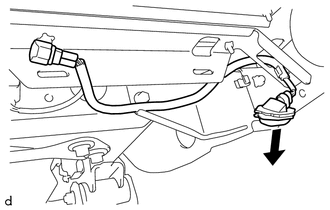
Pull the license plate light assembly to remove it.