LIGHTING (EXT) LICENSE PLATE LIGHT ASSEMBLY(for Pickup) INSTALLATION
CAUTION / NOTICE / HINT
- HINT:
-
A bolt without a torque specification is shown in the standard bolt chart.
PROCEDURE

 81270 1.INSTALL LICENSE PLATE LIGHT ASSEMBLY (except Step Type)
Install the license plate light assembly to the license plate bracket with the 2 nuts.
- HINT:
-
Use the same procedure to install the license plate light assembly on the other side.
Install a new wire harness clamp.
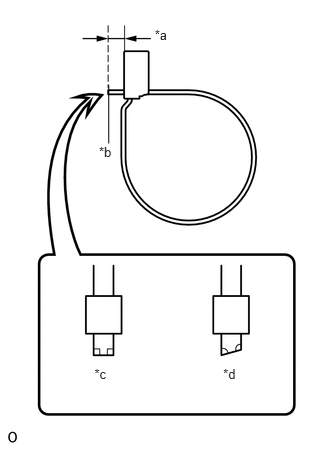
| *a | 1 to 3 mm (0.0394 to 0.1181 in.) |
| *b | Cut |
| *c | Correct |
| *d | Incorrect |
Cut off the wire harness clamp as shown in the illustration.
81270 2.INSTALL LICENSE PLATE LIGHT ASSEMBLY (for Step Type)
for LH Side:
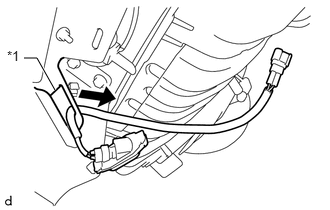
| *1 | License Plate Bracket |
Pass the license plate light assembly wire harness through the license plate bracket.
Set the license plate light socket and wire to the license plate bracket.
Set the license plate light lens together with the license plate light lens gasket to the license plate light socket and wire.
While holding the license plate light lens with one hand, install the 2 screws.
Attach the wire harness clamp.
for RH Side:
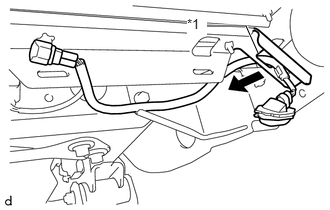
| *1 | License Plate Bracket |
Pass the license plate light assembly wire harness through the license plate bracket.
Set the license plate light socket and wire to the license plate bracket.
Set the license plate light lens together with the license plate light lens gasket to the license plate light socket and wire.
While holding the license plate light lens with one hand, install the 2 screws.
Attach the 2 wire harness clamps.
Install a new cable tie.
| *a | 1 to 3 mm (0.0394 to 0.1181 in.) |
| *b | Cut |
| *c | Correct |
| *d | Incorrect |
Cut off the cable tie as shown in the illustration.
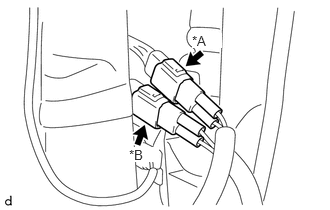
| *A | for LH Side |
| *B | for RH Side |
Connect the connector.
3.INSTALL LICENSE PLATE BRACKET WITH LICENSE PLATE LIGHT ASSEMBLY (except Step Type)
Install the license plate bracket with license plate light assembly with the 2 bolts.
- Torque:
- 18 N*m (184 kgf*cm, 13 ft.*lbf)
Connect the 2 connectors and attach the wire harness clamp.