NAVIGATION / MULTI INFO DISPLAY NAVIGATION SYSTEM CONTROL AUDIO CONTROL
FUNCTION OF MAIN COMPONENTS
| Component | Function | |
|---|---|---|
|
*1: Models with Dagital Audio Broadcast (DAB) tuner *2: Models with headup display |
||
| Multi-display Assembly | ·
Displays image information received from the audio head unit. ·
Sends touch operation signals to the integration control sub-assembly and audio head unit. |
|
| Audio Head Unit (Radio Receiver Assembly) | ·
Outputs the audio signal of the selected audio source to the stereo component amplifier assembly. ·
Sends each sound source and hands-free system status to the combination meter assembly. ·
Receives navigation information, etc. image and audio signals and operation status via direct line from the navigation ECU assembly or USB communication. ·
Displays the map screen and the operation screen on the multi-display assembly based on the image signal sent from the navigation ECU assembly. ·
Sends the operation signals input via the capacitive touch display panel to the navigation ECU assembly. |
|
| Navigation ECU Assembly | ·
Contains the navigation ECU, gyro sensor, GPS signal receiver and storage device, manages the radio and operation signals received from the audio head unit, and controls the navigation system. ·
Sends navigation information, etc. image and sound signals and the operation status to the audio head unit. |
|
| Major Components of Navigation ECU Assembly | Navigation ECU | ·
Corrects the vehicle location based on location information calculated from the GPS information, vehicle speed signal, information from equipped sensors and the shift status. ·
Using the calculated vehicle location mark and map database, sends the information and operation status to the audio head unit. ·
Sends the audio signals such as voice guidance provided based on the vehicle location to the audio head unit. ·
Sends the voice guidance audio signal to the audio head unit. ·
Sends navigation information such as the vehicle direction and route guidance, etc. to the combination meter assembly via the audio head unit. |
| Gyro Sensor | Detects the vehicle rotational speed around the vertical axis (yaw moments) and sends it to the navigation ECU. | |
| GPS Receiver | Demodulates the GPS information received by the navigation antenna assembly, calculates the vehicle position and sends the position signal to the navigation ECU. | |
| Storage Device | Stores map data and the navigation system control program. | |
| Speakers | Output the audio sounds. | |
| Stereo Component Amplifier Assembly | Amplifies audio signals sent from the audio head unit. | |
| Back Window Glass Antenna Wire
·
AM/FM-main ·
FM-sub ·
DAB-main*1 ·
DAB-sub*1 |
·
Receives radio broadcasting signals. (AM/FM-main) ·
Receives radio broadcasting signals. (FM-sub) ·
Receives digital audio broadcasts via the back window glass antenna printed antenna array. (DAB-main)*1 ·
Receives digital audio broadcasts via the back window glass antenna printed antenna array. (DAB-sub)*1 |
|
| No. 1 Amplifier Antenna Assembly | Amplifies radio broadcasting signals from the radio antenna and sends them to the audio head unit. | |
| No. 2 Amplifier Antenna Assembly | ||
| Digital Audio Broadcasting Antenna Assembly RH/LH*1 | Amplifies digital audio broadcasts signals from the DAB antenna and sends them to the audio head unit. | |
| Navigation Antenna Assembly
·
GPS |
Receives signals from GPS satellites and transmits these signals to the navigation ECU assembly. | |
| Steering Pad Switch Assembly | Sends operation signals such as volume adjustment, mode selection and song selections to the audio head unit. | |
| Integration Control Sub-assembly | Relays display image information from the audio head unit to the multi-display assembly. | |
| Telephone Microphone Assembly | ·
Detects voice during hands-free conversations and voice commands. ·
Is installed in the roof headlining and converts sound waves to an electrical signal and sends it to the audio head unit. |
|
| No. 1 Stereo Jack Adapter Assembly | When a USB memory device, portable audio player (USB type) or Apple device is connected, communicates with the audio head unit via USB. | |
| Combination Meter Assembly | ·
Displays various information and operation signals on the multi-information display sent from the audio head unit via local bus communication. ·
Sends the vehicle speed signal to the audio head unit, stereo component amplifier assembly and navigation ECU assembly. |
|
| Brake Actustor Assembly
·
No. 2 Skid Control ECU |
Sends the parking brake signal to the audio head unit. | |
| EV Control ECU | Sends the R shift position signal to the audio head unit. | |
| Meter Mirror Sub-assembly*2 | Displays various information on the head up display sent from the audio head unit via local bus communication. | |
FUNCTION
When guidance is being performed, traffic information and route information such as distance to the destination, traveling time, etc. are displayed on the map screen route guidance bar.
When the amount of fuel is low, a warning message is displayed and nearby gas stations are displayed on the multi-display. The user can set a nearby gas station as a destination by selecting from a list of nearby gas stations.
When route guidance is being performed and an alternative route is driven, the alternative route is memorized. When an alternative route other than the suggested route was chosen, the navigation system learns the route after it has been driven multiple times and displays it as a suitable route search result.
Memory Points Export/Import Function (Models with Memory Points Export/Import Function)
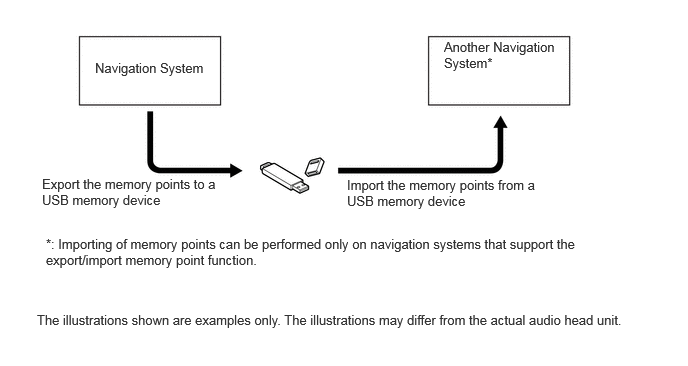
The navigation system supports functions to export/import memory points. This function allows memory points stored in the audio head unit to be transferred to another navigation system (such as another audio head unit, etc.) via USB.
Memory points export/import procedure
Toyota Online (Models with Toyota Online)
The following services are available by accessing the Toyota portal site from a wireless clients (User's tethering-compatible cellular phone or mobile Wi-Fi router), which is connected to the audio head unit via Bluetooth or Wi-Fi communication.
To use these Toyota online, Bluetooth registration and a portal account are required.
To get a portal account, access the Toyota portal site (www.my.toyota.eu).
Available Toyota online are listed in the following table:
- HINT:
- ·
The Wi-Fi communication function is a best-effort type function.
·Wi-Fi is a registered trademark of Wi-Fi Alliance.
| Contents | Outline | |
|---|---|---|
|
*: This function is not available for hydrogen station information. |
||
| Online Search | New establishments, such as restaurants and bars, that are not registered in the navigation system can be set as a destination. | |
| Importing Memory Points and Routes | Downloading via a cellular phone or mobile Wi-Fi router | Memory points and routes that were searched for using a personal computer can be set as a destination and can be registered as memory points. |
| Downloading from a USB memory device | ||
| Information Search | Street View | Street view, which shows panoramic images along streets. By selecting a location on the map while the street view icon is displayed on the multi-display, up to 6 street view images of the location can be displayed. |
| Weather | Weather information for the selected areas, such as present vehicle position, destination or a searched areas, for the next 5 days can be displayed on the multi-display. In addition, up to 20 selected areas can be registered as favorites. | |
| Fuel Price* | Fuel price information for an area around a selected point, such as the present vehicle position, destination or a searched area, can be displayed on the multi-display. | |
| Parking | Parking information for an area around a selected point, such as the present vehicle position, destination or a searched area, can be displayed on the multi-display. | |
| Remote Customization | The vehicle equipment operation settings can be partially changed by remote operation via the Toyota portal site. | |
DIAGNOSIS
For details on the procedure required to enter the Service Menu screen, refer to the Repair Manual.