ADVANCED PARK ADVANCED PARK CONTROL ADVANCED PARK CONTROL
FUNCTION OF MAIN COMPONENTS
| Component | Function | |
|---|---|---|
| Front Television Camera Assembly | Captures images of the area to the front of the vehicle and sends a video signal to the parking assist ECU. | |
| Rear Television Camera Assembly | Captures images of the area to the front of the vehicle and sends a video signal to the parking assist ECU. | |
| Outer Rear View Mirror Assembly RH | Side Television Camera Assembly RH | Captures images of the area to the right side of the vehicle and sends a video signal to the parking assist ECU. |
| Parking Assist Light RH | Emits infrared rays to the right side of the vehicle to improve image recognition performance at night. | |
| Outer Rear View Mirror Assembly LH | Side Television Camera Assembly LH | Captures images of the area to the left side of the vehicle and sends a video signal to the parking assist ECU. |
| Parking Assist Light LH | Emits infrared rays to the left side of the vehicle to improve image recognition performance at night. | |
| Front Center Ultrasonic Sensor RH | Transmits ultrasonic waves to detect a parking space and sends signals to the clearance warning ECU assembly. | |
| Front Center Ultrasonic Sensor LH | ||
| Front Corner Ultrasonic Sensor RH | ||
| Front Corner Ultrasonic Sensor LH | ||
| Front Side Ultrasonic Sensor RH | ||
| Front Side Ultrasonic Sensor LH | ||
| Rear Center Ultrasonic Sensor RH | ||
| Rear Center Ultrasonic Sensor LH | ||
| Rear Center Ultrasonic Sensor RH | ||
| Rear Corner Ultrasonic Sensor LH | ||
| Rear Side Ultrasonic Sensor RH | ||
| Rear Side Ultrasonic Sensor LH | ||
| Advanced Park Main Switch (Automated Parking Switch Assembly) | Switches the advanced park on/off. | |
| No. 1 Clearance Warning Buzzer | Sounds the buzzer according to the control of the clearance warning ECU assembly, in order to notify the driver of the approximate distance from the vehicle to an obstacle. | |
| No. 2 Clearance Warning Buzzer | ||
| Clearance Warning ECU Assembly | ·
Combines parking spot detection information by signals from the ultrasonic sensors and parking line detection signals. ·
Controls advanced park based on the signals input from switches and sensors, combined parking space detection information and parking line detection information. ·
Sends a display request signal to the parking assist ECU based on stationary object detection judgment. |
|
| Parking Assist ECU | ·
Sends parking line and parking space detection signals to the clearance warning ECU assembly based on the signals from each television camera assembly. ·
Creates a composite image which combines images (guide lines) calculated from vehicle status information, such as the steering angle signals, with the overhead image (panoramic view) and images from the television camera assemblies, and outputs this to the multi-display assembly. |
|
| Light Parking Assist Circuit | Controls the parking assist light according to signals from the parking assist ECU. | |
| Blind Spot Monitor Sensor RH | Sends detection information signals about a vehicle approaching from the rear sides to the parking assist ECU. | |
| Multi-Display Assembly | Displays the video signal sent from the parking assist ECU on the display. | |
| Combination Meter Assembly
·
Multi-information Display ·
Meter buzzer |
·
Sends turn signal switch operation information to the clearance warning ECU assembly. ·
Displays on the multi-information display when the system is in operation to notify the driver that parking in reverse or parallel parking spot departure assistance is currently being performed. ·
Sounds the buzzer when assistance ends, in order to notify the driver that parking in reverse or parallel parking spot departure assistance has ended. |
|
| EV Control ECU | ·
Sends shift position signal and accelerator opening angle signal to the clearance warning ECU assembly. ·
Receives drive force command signals from the clearance warning ECU assembly and controls drive force. |
|
| Brake Actuator Assembly
·
No. 2 Skid Control ECU |
·
Sends vehicle speed signals to the clearance warning ECU assembly. ·
Sends vehicle's longitudinal acceleration signals input from the air bag sensor assembly to the clearance warning ECU assembly. ·
Receives braking force command signals from the clearance warning ECU assembly and controls braking force. |
|
| Airbag ECU Assembly | Sends vehicle's longitudinal acceleration signals to the no. 2 skid control ECU. | |
| Steering Sensor | Sends steering angle signals to the clearance warning ECU assembly. | |
| Shift Control ECU | ·
Sends shift position signal to the clearance warning ECU assembly. ·
Performs shift operations by inputting shift control signals, etc. from the clearance warning ECU assembly. |
|
| No. 2 Semiconductor Power Integration ECU | Sends shift position R signal to the parking assist ECU. | |
| Rack and Pinion Power Steering Gear Assembly
·
Power Steering ECU |
·
Sends power steering control status signals, etc. to the clearance warning ECU assembly. ·
Performs steering operation by inputting target steering angle signals, advanced park control command signals, etc. from the clearance warning ECU assembly. |
|
| Main Body ECU (Multiplex Network Body ECU) | Receives open/close signals from each door including the luggage compartment door, mirror open/close signals and driver side seat belt buckle switch signals, and sends them to the clearance warning ECU assembly. | |
| Air Conditioning Amplifier Assembly | Sends ambient temperature signals to the clearance warning ECU assembly. | |
| Central Gateway ECU (Network Gateway ECU) | Relays CAN communication data between each bus. | |
OPERATING CONDITION
Advanced Park Operating Conditions
The selected assistance function can be started when all of the following conditions are met.
The brake pedal is depressed
The vehicle is stopped
The driver's seat belt is fastened
The steering wheel is not being operated
The accelerator pedal is not being operated
All doors, including the luggage compartment door, are closed
The outside rear view mirrors are not retracted
Detection of the target parking spot or target departure completed position is complete
The parking brake is not applied
The pre-collision system, radar cruise control system, parking support brake system, ABS, VOC or TRC is not operated
The registration memory is not being deleted
The vehicle is not on a steep slope
Advanced park is on
VSC or TRC is not off
SYSTEM CONTROL
Reverse perpendicular parking function
When reverse perpendicular parking, once the vehicle has been stopped in a position where the center of the desired parking spot is visible almost directly to the side, and the target parking spot has been detected, the reverse perpendicular parking function can be used. Also, if it is required to turn the steering wheel depending on the parking spot conditions, it will be done automatically.
With the vehicle stopped in a position where the center of the desired parking spot is visible almost directly to the side, and with target parking spot detection completed, the advanced park main switch can be pressed to display the target parking spots on the multi-display. Select the desired parking spot from the displayed target parking spots, then press the start switch. Advanced park will perform parking assistance, and advancing assistance will start when the brake pedal is released.
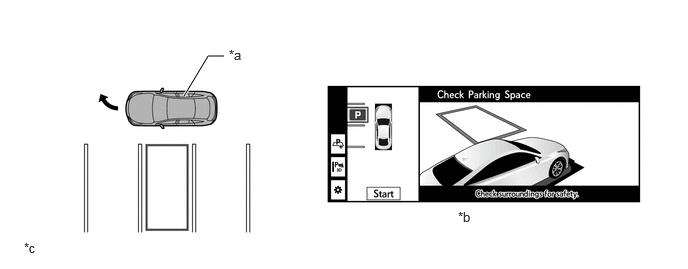
| *a | Own Vehicle | *b | Multi-display View |
| *c | This illustration is only for explanatory purposes. | - | - |
After moving to the reverse start position and stopping the vehicle, it automatically changes the shift position to R to start reversing assistance.
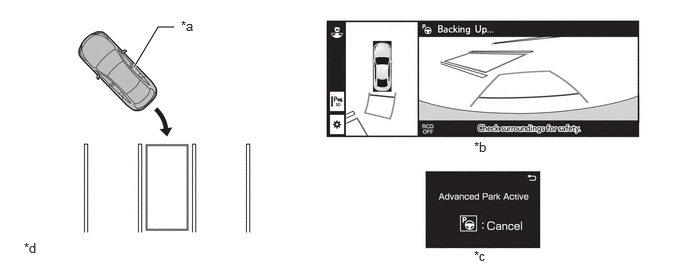
| *a | Own Vehicle | *b | Multi-display View |
| *c | Multi-information Display View | *d | This illustration is only for explanatory purposes. |
After moving to the target parking spot and stopping the vehicle, it automatically changes the shift position to P to end parking assistance.
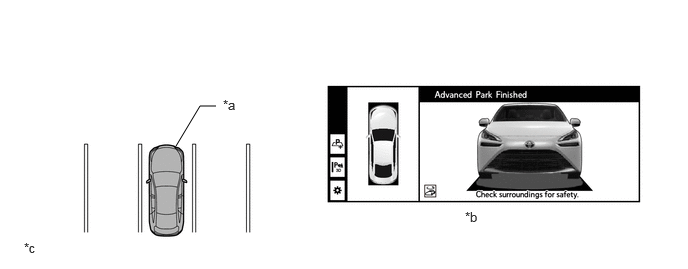
| *a | Own Vehicle | *b | Multi-display View |
| *c | This illustration is only for explanatory purposes. | - | - |
Parallel parking function
When parallel parking, once the vehicle has been stopped in a position where the center of the desired parking spot is visible almost directly to the side, and the target parking spot has been detected, the parallel parking function can be used. Also, if it is required to turn the steering wheel depending on the parking spot conditions, it will be done automatically.
Move the vehicle parallel to the road or the side of the road and stop in a position where the center of the desired parking spot is visible almost directly to the side. With target parking spot detection completed, the advanced park main switch can be pressed to display the target parking spots on the multi-display. Select the desired parking spot from the displayed target parking spots, then press the start switch. Advanced park will perform parking assistance, and advancing assistance will start when the brake pedal is released.
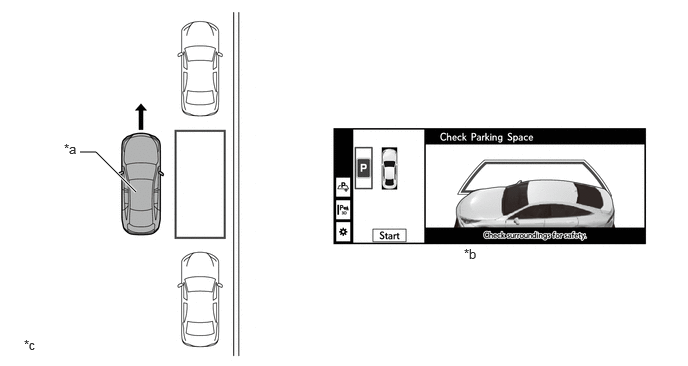
| *a | Own Vehicle | *b | Multi-display View |
| *c | This illustration is only for explanatory purposes. | - | - |
After moving to the reverse start position and stopping the vehicle, it automatically changes the shift position to R to start reversing assistance.
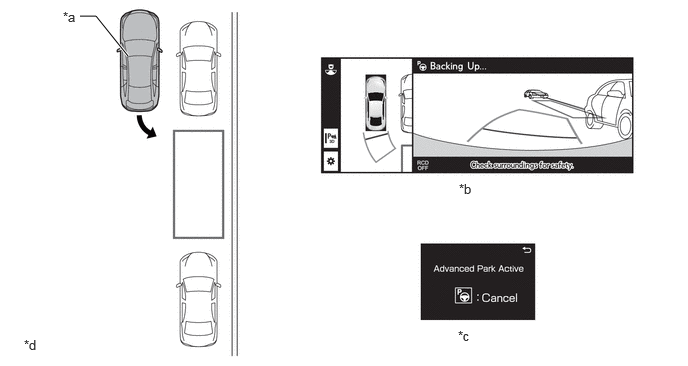
| *a | Own Vehicle | *b | Multi-display View |
| *c | Multi-information Display View | *d | This illustration is only for explanatory purposes. |
After moving to the steering wheel turning start position and stopping the vehicle, it automatically changes the shift position to D to start assistance with turning the steering wheel.
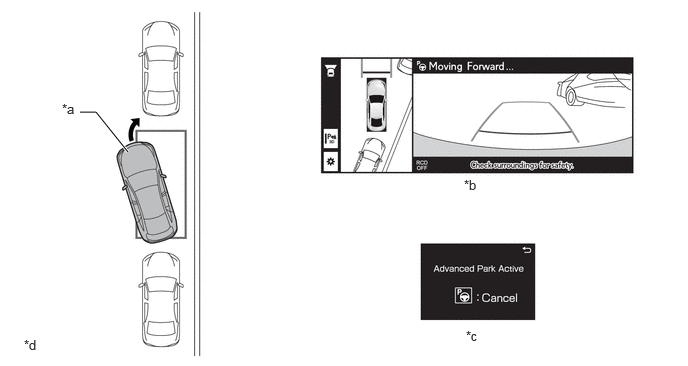
| *a | Own Vehicle | *b | Multi-display View |
| *c | Multi-information Display View | *d | This illustration is only for explanatory purposes. |
After moving to the target parking spot and stopping the vehicle, it automatically changes the shift position to P to end parking assistance.
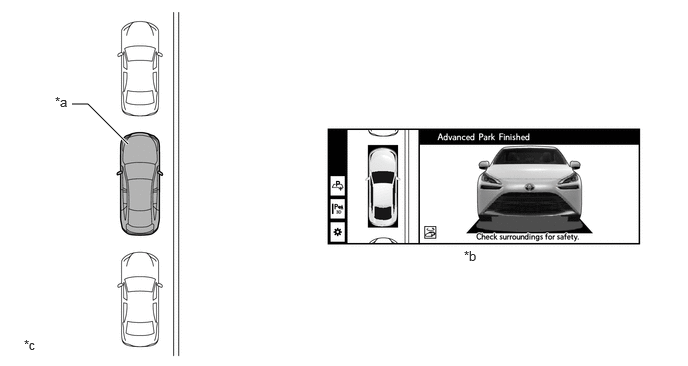
| *a | Own Vehicle | *b | Multi-display View |
| *c | This illustration is only for explanatory purposes. | - | - |
Parallel Parking Spot Departure Function
When departing from a parallel parking space, once the desired departure direction has been selected and the target departure completed position has been detected, the parallel parking spot departure function can be used. Also, if it is required to turn the steering wheel depending on the parking spot conditions, it will be done automatically.
While the vehicle stopped with the shift position in P, the advanced park main switch can be pressed to display the possible departure directions on the multi-display.
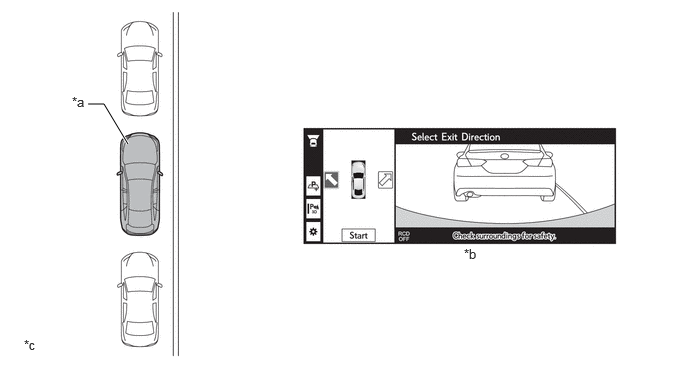
| *a | Own Vehicle | *b | Multi-display View |
| *c | This illustration is only for explanatory purposes. | - | - |
Operate the switch on the multi-display or the turn signal switch to select the desired departure direction, then press the start switch. Advanced park will perform departure assistance, and advancing or reversing assistance will start after the brake pedal released.
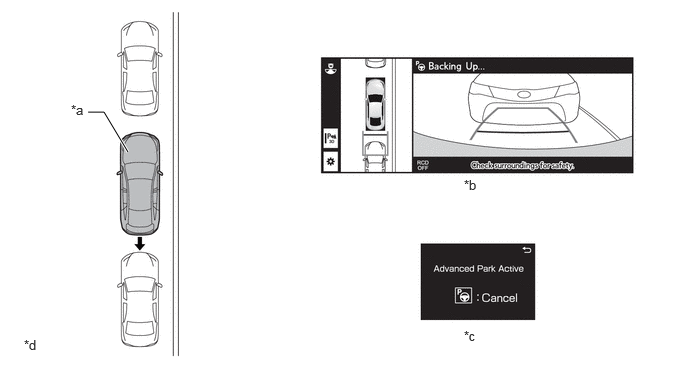
| *a | Own Vehicle | *b | Multi-display View |
| *c | Multi-information Display View | *d | This illustration is only for explanatory purposes. |
After moving to the advance start position and stopping the vehicle, it automatically changes the shift position to D to start advancing assistance.
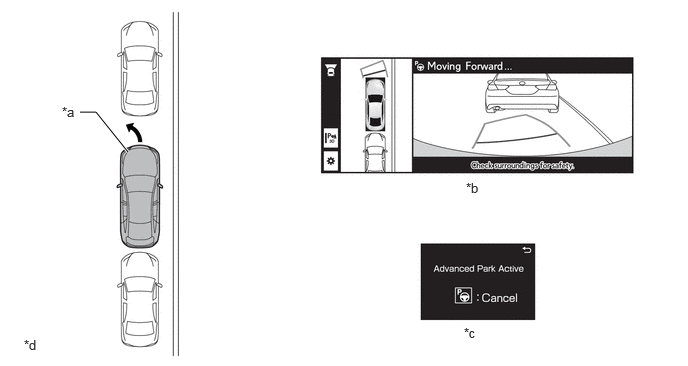
| *a | Own Vehicle | *b | Multi-display View |
| *c | Multi-information Display View | *d | This illustration is only for explanatory purposes. |
After moving to the target departure completed position and stopping the vehicle, operation guidance will display on the multi-display. According to operation guidance, depress the brake pedal or accelerator pedal to end departure assistance.
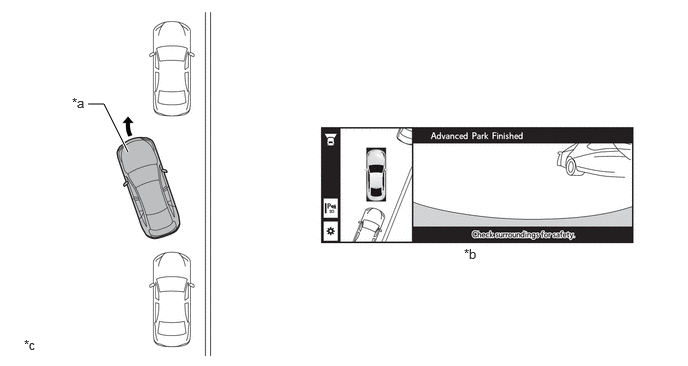
| *a | Own Vehicle | *b | Multi-display View |
| *c | This illustration is only for explanatory purposes. | - | - |
Memory Function (Parking Spot Registration)
The memory parking can be used for parking in reverse where there are no parking lines or neighboring vehicles, by registering a target parking spot in advance. Also, if it is required to turn the steering wheel depending on the parking spot conditions, the steering wheel will be turned to assist with parking in reverse.
With the vehicle stopped in a position where the center of the desired parking spot is visible almost directly to the side, the advanced park main switch can be pressed to display the registration button on the multi-display.
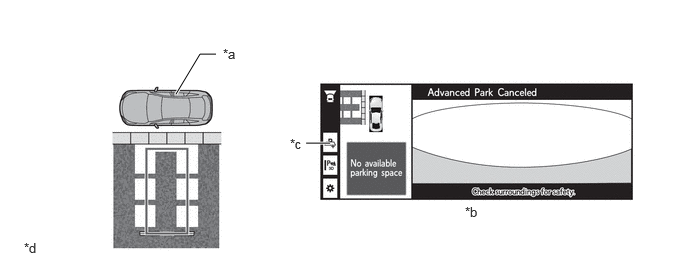
| *a | Own Vehicle | *b | Multi-display View |
| *c | Registration Button | *d | This illustration is only for explanatory purposes. |
Press the registration start switch on the multi-display, and select a parking spot.
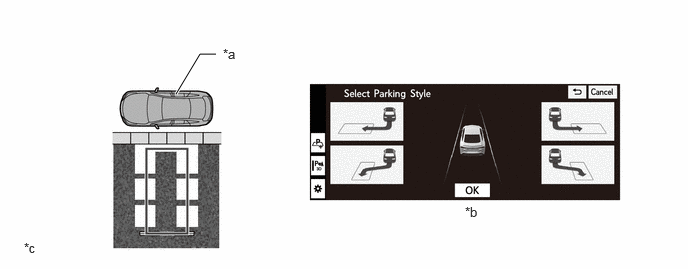
| *a | Own Vehicle | *b | Multi-display View |
| *c | This illustration is only for explanatory purposes. | - | - |
After selecting the parking spot, adjust the parking position.
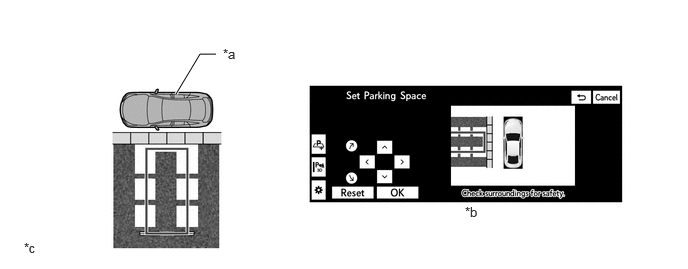
| *a | Own Vehicle | *b | Multi-display View |
| *c | This illustration is only for explanatory purposes. | - | - |
After adjusting the parking position, press the start switch on the multi-display. Advanced park will perform parking assistance, and advancing assistance will start when the brake pedal is released.
After moving to the reverse start position and stopping the vehicle, it automatically changes the shift position to R to start reversing assistance.
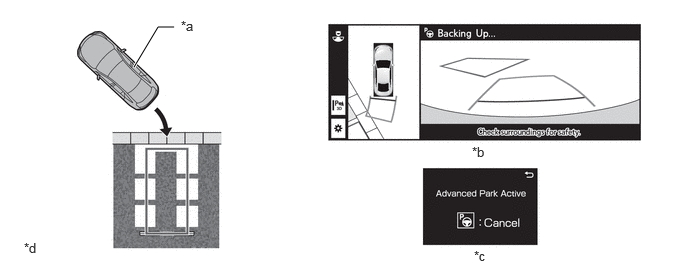
| *a | Own Vehicle | *b | Multi-display View |
| *c | Multi-information Display View | *d | This illustration is only for explanatory purposes. |
The parking assistance will end and the target parking spot adjustment screen will be displayed when the after moving to the target parking spot and stopping the vehicle.
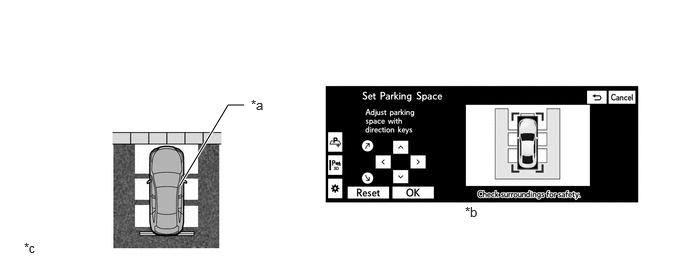
| *a | Own Vehicle | *b | Multi-display View |
| *c | This illustration is only for explanatory purposes. | - | - |
Adjust the target parking spot as necessary, then press the registration switch on the multi-display to register the target parking spot in which the vehicle is parked to memory.
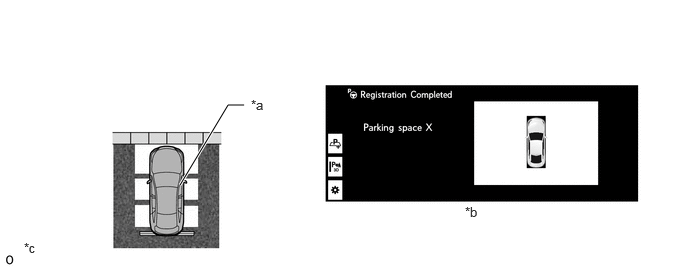
| *a | Own Vehicle | *b | Multi-display View |
| *c | This illustration is only for explanatory purposes. | - | - |
Delete Registered Parking Spot
Registration information saved using the memory function can be deleted by operating the customization setting switch displayed on the multi-display and selecting "delete registered parking spot".
To delete saved registration information, it is necessary to move to the customization setting item screen with the following operations.
When the shift position is in P, D or N
Press the panoramic view monitor main switch and operate the customization setting switch on the panoramic view monitor system screen displayed on the multi-display
When the shift position is in R
Operate the customization setting switch on the panoramic view monitor system screen displayed on the multi-display
- HINT:
-
Delete registered parking spot cannot be selected when advanced park is on (after the advanced park main switch has been pressed).
Memory Function (Parking in The Parking Location Registered Using The Memory Function)
The memory parking can be used for parking in reverse where there are no parking lines or neighboring vehicles, by registering a target parking spot in advance. Also, if it is required to turn the steering wheel depending on the parking spot conditions, the steering wheel will be turned to assist with parking in reverse.
With the vehicle stopped in a position where the center of the desired parking spot is visible almost directly to the side, and the target parking spot registered to memory has been detected, the advanced park main switch can be pressed to display the target parking spots on the multi-display. Select the desired parking spot from the displayed target parking spots, then press the start switch. Advanced park will perform parking assistance, and advancing assistance will start when the brake pedal is released.
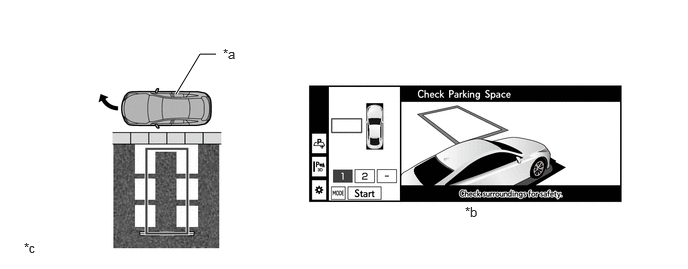
| *a | Own Vehicle | *b | Multi-display View |
| *c | This illustration is only for explanatory purposes. | - | - |
After moving to the reverse start position and stopping the vehicle, it automatically changes the shift position to R to start reversing assistance.
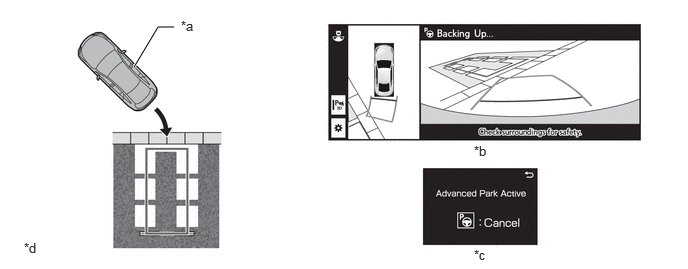
| *a | Own Vehicle | *b | Multi-display View |
| *c | Multi-information Display View | *d | This illustration is only for explanatory purposes. |
After moving to the target parking spot and stopping the vehicle, it automatically changes the shift position to P to end parking assistance.
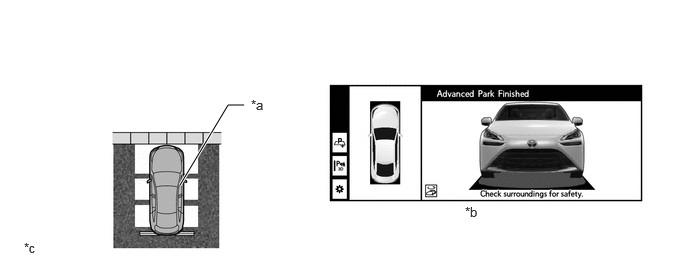
| *a | Own Vehicle | *b | Multi-display View |
| *c | This illustration is only for explanatory purposes. | - | - |
Assistance Cannot Start
The following messages will be displayed on the multi-display when advanced park cannot operate.
| Multi-display View | Description |
|---|---|
| Advanced Park malfunction. Visit your dealer. | When a system malfunction has occurred. |
| Parking brake is applied | When the advanced park main switch is pressed with the parking brake applied. |
| Remove dirt from camera | When there is ice, snow, dirt or other foreign matter on the camera lens. |
| Advanced Park unavailable | When the system cannot be used temporarily. |
| Side mirrors are retracted | When the advanced park main switch is pressed with the outside rear view mirrors retracted. |
| If side mirrors folded, unfold. Otherwise fold and unfold. | |
| Door is open | When the advanced park main switch is pressed while any door is open. |
| Boot is open | When the advanced park main switch is pressed while the luggage compartment door is open. |
| Seatbelt is unfastened | When the advanced park main switch is pressed with the driver's seat belt unfastened. |
| Brake pedal is not pressed | When the advanced park main switch is pressed while the brake pedal is not depressed. |
| Vehicle not stopped | When the advanced park main switch is pressed while driving. |
| Steering wheel was operated manually | When the advanced park main switch is pressed while the steering wheel was being operated. |
| Accelerator pedal was pressed | When the advanced park main switch is pressed while the accelerator pedal is depressed. |
| Shift position was changed manually | When the shift position is changed to a position in which the system cannot start. |
| Operation timed out | When a certain amount of time has elapsed after the advanced park main switch was pressed. |
| Advanced Park switch pushed | When the advanced park main switch has been pressed and the system has turned off. |
| Unavailable. Steep slope. | When the advanced park main switch is pressed on a steep slope. |
| No available parking space | When the advanced park main switch is pressed while there are no parking spots available. |
| Unavailable. Road too narrow | When the advanced park main switch is pressed for a parking spot on a narrow passage. |
| Unavailable. Road ahead too narrow. | When the advanced park main switch is pressed while in a parking spot without sufficient space to the front of the vehicle. |
| Narrow parking space | When the advanced park main switch is pressed for a parking spot that is too small to park the vehicle in. |
| Not enough space to exit | When the advanced park main switch is pressed for parallel departure but there is not sufficient space to the front or rear of the vehicle, or there is no vehicle to the front. |
| Unavailable. Obstacle nearby. | When the advanced park main switch is pressed for parallel departure but there are obstacles to the side of the vehicle that make departure impossible. |
| Accelerator pedal was pressed | When the accelerator pedal is depressed after the advanced park main switch has been pressed. |
| Unavailable in current condition | When the advanced park main switch is pressed in a location where the function cannot be used. |
| Cruise Control is on | When the advanced park main switch is pressed while the cruise control system is on. |
| TRC was turned off | When TRC is turned off after the advanced park main switch has been pressed. |
| VSC was turned off | When VSC is turned off after the advanced park main switch has been pressed. |
| TRC is off | When the advanced park main switch is pressed while TRC is turned off. |
| VSC is off | When the advanced park main switch is pressed while VSC is turned off. |
Assistance Canceled
The following messages will be displayed on the multi-display when advanced park operation is canceled.
| Multi-display View | Description |
|---|---|
| Door is open | When any door is opened while using advanced park. |
| Seatbelt is unfastened | When the driver's seat belt is unfastened while using advanced park. |
| Parking brake is applied | When the parking brake is applied while using advanced park. |
| Unavailable. Obstacle nearby. | When an obstacle is detected in the traveling direction while using advanced park. |
| Advanced Park malfunction Visit your dealer. | When an advanced park malfunction may have occurred. |
| Advanced Park malfunction. Press brake pedal. | |
| Advanced Park unavailable. Press brake pedal. | |
| Advanced Park unavailable | |
| Cannot control speed | When the function is used in an uneven location with a slope or difference in grade, and vehicle speed can no longer be adjusted. |
| Operation timed out | When a certain amount of time has elapsed while using advanced park. |
| TRC was turned off | When TRC is turned off while using advanced park. |
| VSC was turned off | When VSC is turned off while using advanced park. |
| Shift position was changed to P | When the shift position is changed to P while using advanced park. |
| Advanced Park switch pushed | When the advanced park main switch is pressed while using advanced park. |
| Boot is open | When the luggage compartment door is opened while using advanced park. |
| Side mirrors are retracted | When the outside rear view mirrors are retracted while using advanced park. |
| Press brake pedal firmly | When the brake pedal is not firmly depressed and assistance cannot be canceled. |
| Unavailable. Steep slope. | When the vehicle enters a steep slope while using advanced park. |
| Narrow parking space | When the parking spot has become too small to park the vehicle in due to the presence of obstacles, etc. while using advanced park. |
| No available parking space | When no available parking spot can be found due to the presence of obstacles, etc. while using advanced park. |
| Unavailable. Road too narrow | When the passage has become narrow due to the presence of obstacles, etc. while using advanced park. |
| Unavailable. Road ahead too narrow. | When there is not sufficient space to the front of the vehicle due to the presence of obstacles, etc. while using advanced park. |
| Unavailable in current condition | When the system cannot be used due to the presence of obstacles, etc. while using advanced park. |
| Not enough space to exit | When departure is impossible due to the presence of obstacles, etc. while using advanced park. |
Assistance Suspended
The following messages will be displayed on the multi-display when advanced park operation is suspended. According to the displayed instruction, press the resume switch on the multi-display to resume operation after suspension.
| Multi-display View | Description |
|---|---|
| Steering wheel was operated manually | When the driver turns the steering wheel while using advanced park. |
| Accelerator pedal was pressed | When the accelerator pedal is depressed while using advanced park. |
| Shift position was changed manually | When the shift position is changed to a position other than that instructed by the system while using advanced park. |
Parking Spot Registration Not Possible
The following messages will be displayed on the multi-display when memory registration cannot be performed.
| Multi-display View | Description |
|---|---|
| No available parking space to register | When the registration start switch is pressed in a parking lot in which no parking spots can be recognized. |
Warning
If the driver ignores the instruction from advanced park, depending on how the system is ignored or left unattended, it will give a warning by screen display. If this case, follow the instruction to perform necessary operation.
If the multi-display displays "Advanced Park malfunction. Press brake pedal." or "Advanced Park unavailable. Press brake pedal.", the system will not perform brake control. In this case, the driver should depress the brake pedal and stop the vehicle in a safe location.
FUNCTION
Parking Spot Change Function
If the advanced park main switch is pressed and the system detects multiple parking spots, a parking spot selection switch is displayed on the multi-display which can be used to change the parking spot. The selected target parking spot is displayed in blue and other parking spots are displayed in white.
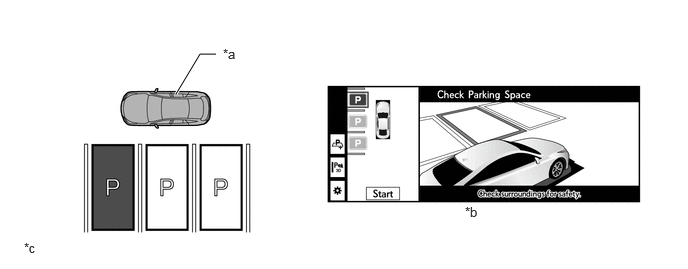
| *a | Own Vehicle | *b | Multi-display View |
| *c | This illustration is only for explanatory purposes. | - | - |
If the advanced park main switch is pressed and the system detects a target parking spot for which either the reverse perpendicular parking function or parallel parking function can be used, a parking style selection switch is displayed on the multi-display which can be used to change the parking assist function. If the reverse perpendicular parking function is selected, the parking space will be displayed in landscape orientation. If the parallel parking function is selected, the parking space will be displayed in portrait orientation.
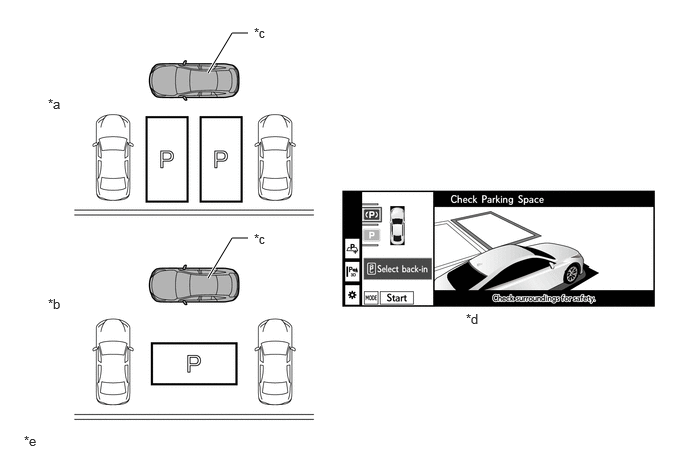
| *a | When the reverse perpendicular parking function is selected | *b | When the parallel parking function is selected |
| *c | Own Vehicle | *d | Multi-display View |
| *e | This illustration is only for explanatory purposes. | - | - |
If the advanced park main switch is pressed and the system detects multiple parking spots that have been registered to memory, registered spot selection switches are displayed on the multi-display which can be used to change the parking spot.
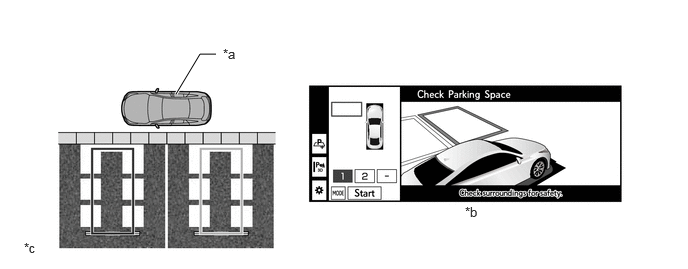
| *a | Own Vehicle | *b | Multi-display View |
| *c | This illustration is only for explanatory purposes. | - | - |
If the advanced park main switch is pressed and the system detects a parking spot that has been registered to memory, as well as a target parking spot for which either the reverse perpendicular parking function or parallel parking function can be used, a mode select switch is displayed on the multi-display which can be used to change between the memory function, and reverse perpendicular parking function or parallel parking function.
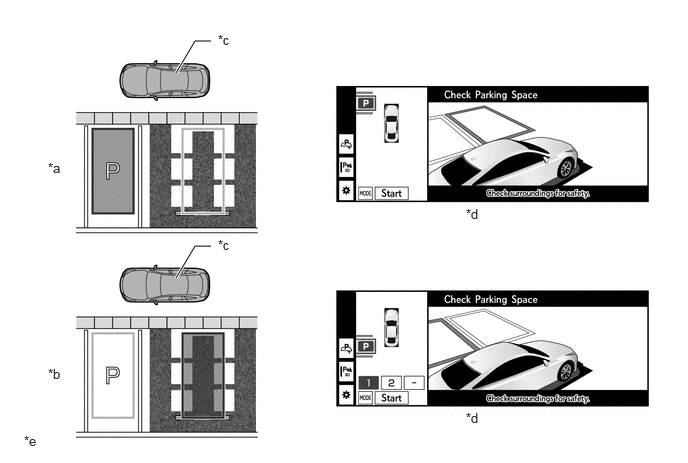
| *a | When the reverse perpendicular parking function or parallel parking function is selected | *b | When the memory function is selected |
| *c | Own Vehicle | *d | Multi-display View |
| *e | This illustration is only for explanatory purposes. | - | - |
Memory Registration Overwrite Function
If the registration start switch is pressed when the maximum number of parking spots have been registered to memory, a memory slot can be selected to overwrite, and a new parking spot can be registered to memory.
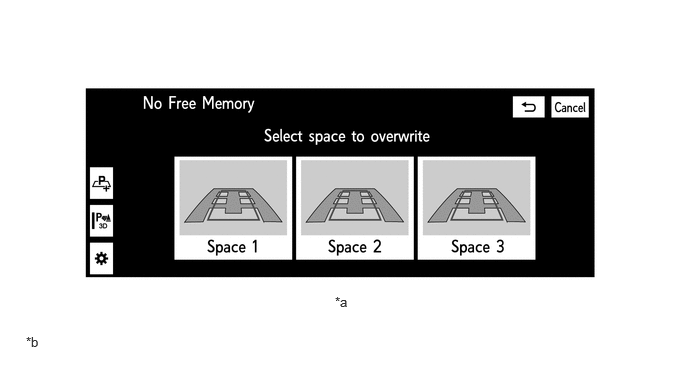
| *a | Multi-display View | *b | This illustration is only for explanatory purposes. |
Parking Space Detection and Parking Line Detection Compose Function
Parking space detection is performed by signals from the ultrasonic sensors and television camera assemblies installed on the front, rear and sides of the vehicle.
Parking line detection is performed by signals from the television camera assemblies installed on the front, rear and sides of the vehicle.
The target parking spot is determined by combining the detected parking spot information and parking line information.
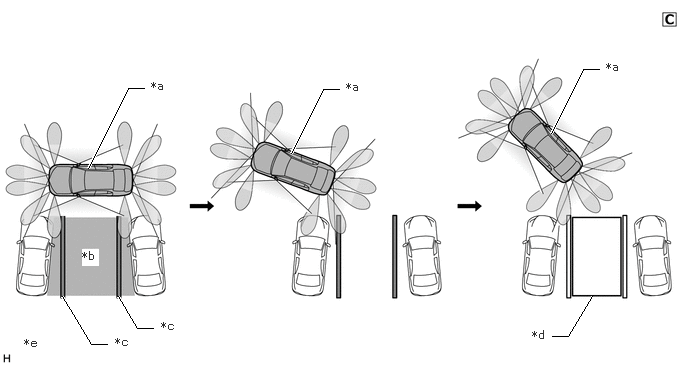
| *a | Own Vehicle | *b | Detected Parking Space |
| *c | Detected Parking Lines | *d | Determined Target Parking Spot |
| *e | This illustration is only for explanatory purposes. | - | - |
Multi-information Display View
Assist function operation is displayed on the multi-information display on the combination meter assembly when the system is in operation to notify the driver that parking in reverse or parallel parking spot departure assistance is currently being performed.

| *a | Multi-information Display View | *b | This illustration is only for explanatory purposes. |
Multi-display View
When the advanced park main switch is pressed while the system operation conditions are met, the parking spot selection screen or departure direction selection screen will be displayed.
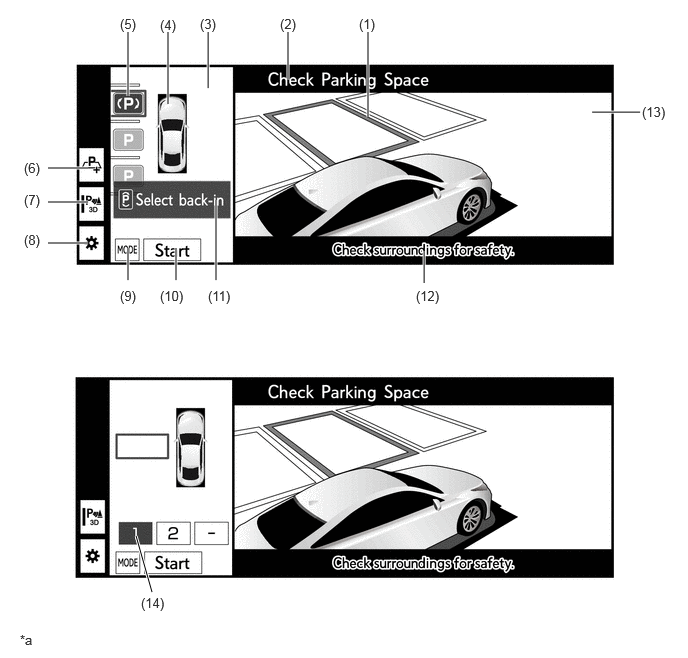
| *a | This illustration is only for explanatory purposes. | - | - |
| Display | Description | |
|---|---|---|
|
*: The color of the panoramic view vehicle icon can be changed. Refer to the Repair Manual for the details. For details, see the Panoramic View Monitor System (w/ Advanced Park) section. |
||
| (1) | Target Parking Space Box (Blue) | Displays the target parking spot during parking assist. |
| (2) | Advanced Park Assistance Message Display | Displays the current status of advanced park. |
| (3) | Panoramic View | Displays an overhead image created by combining images from the vehicle front, rear and side cameras. |
| (4) | Panoramic View Vehicle Icon* | Displays the vehicle position in the panoramic view display. |
| (5) | Parking Space Selection/Parking Type Change Button | ·
Switches between the reverse perpendicular parking function and parallel parking function. ·
Changes the target parking space. |
| (6) | Registration Button | Starts memory registration. |
| (7) | Toyota Parking Assist-sensor 3D Indicator Button | Switches the Toyota parking assist-sensor 3D indicator on/off. |
| (8) | Customize Setting Button | Switches to the customization setting screen. |
| (9) | Mode Button | Switches between the memory function and reverse perpendicular parking function or parallel parking function. |
| (10) | Start Button | Starts advanced park. |
| (11) | Advice/reason for Suspension or Cancellation Display | Displays advice for the driver. |
| (12) | Caution Message Display | A message is displayed to warn the driver. |
| (13) | Parking Spot Display | Displays an image captured by the television camera assemblies of the parking spot on the side of the vehicle. |
| (14) | Registered Spot Selection Switch | Switches between the target parking spots registered to memory. |
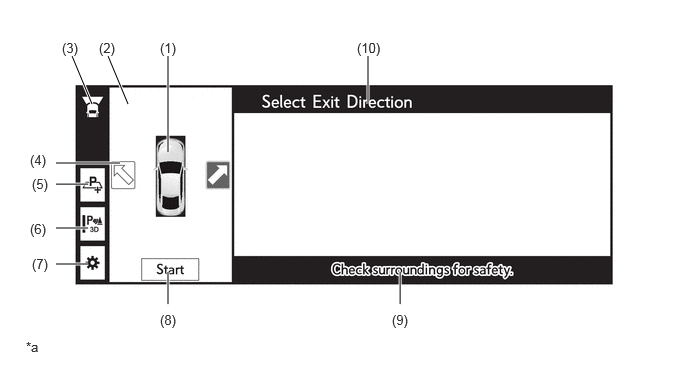
| *a | This illustration is only for explanatory purposes. | - | - |
| Display | Description | |
|---|---|---|
|
*: The color of the panoramic view vehicle icon can be changed. Refer to the Repair Manual for the details. For details, see the Panoramic View Monitor System (w/ Advanced Park) section. |
||
| (1) | Panoramic View Vehicle Icon* | Displays the vehicle position in the panoramic view display. |
| (2) | Panoramic View | Displays an overhead image created by combining images from the vehicle front, rear and side cameras. |
| (3) | Camera Direction Display Vehicle Icon | Indicates that the wide front view is displayed. |
| (4) | Departure Direction Indicator Switch | Changes the departure direction. |
| (5) | Registration Button | Starts memory registration. |
| (6) | Toyota Parking Assist-sensor 3D Indicator Button | Switches the Toyota parking assist-sensor 3D indicator on/off. |
| (7) | Customize Setting Button | Switches to the customization setting screen. |
| (8) | Start Button | Starts advanced park. |
| (9) | Caution Message Display | A message is displayed to warn the driver. |
| (10) | Advanced Park Assistance Message Display | Displays the current status of advanced park. |
When the system is in operation, the multi-display displays the panoramic view and wide front view screen when driving forward, and the panoramic view and rear view screen when driving in reverse.
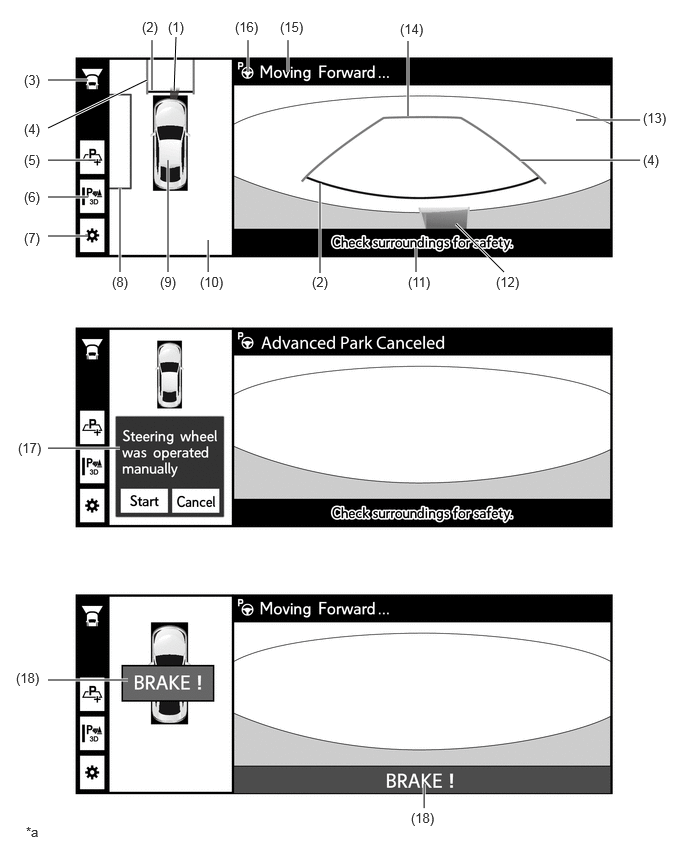
| *a | This illustration is only for explanatory purposes. | - | - |
| Display | Description | |
|---|---|---|
|
*: The color of the panoramic view vehicle icon can be changed. Refer to the Repair Manual for the details. For details, see the Panoramic View Monitor System (w/ Advanced Park) section. |
||
| (1) | Toyota Parking Assist-sensor Information | If a stationary object is detected when the Toyota parking assist-sensor is activated, the approximate distance between the vehicle and the stationary object is displayed. |
| (2) | Front Distance Guide Line (Red) | These lines are distance guide lines showing the distance from the edge of the front bumper. [Approximately 0.3 m (1.0 ft.)] |
| (3) | Camera Direction Display Vehicle Icon | Indicates that the wide front view is displayed. |
| (4) | Front Estimated Course Line (Yellow) | Displays the vehicle's estimated course line calculated from the steering angle. |
| (5) | Registration Button | Starts memory registration. |
| (6) | Toyota Parking Assist-sensor 3D Indicator Button | Switches the Toyota parking assist-sensor 3D indicator on/off. |
| (7) | Customize Setting Button | Switches to the customization setting screen. |
| (8) | Target Parking Space Box (Blue) | Displays the target parking spot during parking assist. |
| (9) | Panoramic View Vehicle Icon* | Displays the vehicle position in the panoramic view display. |
| (10) | Panoramic View | Displays an overhead image created by combining images from the vehicle front, rear and side cameras. |
| (11) | Caution Message Display | A message is displayed to warn the driver. |
| (12) | Toyota Parking Assist-sensor 3D Indicator | Provides a 3D display of the position of a stationary object detected by the Toyota parking assist-sensor, and the approximate distance to the stationary object. |
| (13) | Wide Front View | An image captured by the front television camera assembly of the area in front of the vehicle. |
| (14) | Front Distance Guide Line (yellow) | Guide line showing the distance from the edge of the front bumper. (Remaining distance to the stop position) |
| (15) | Advanced Park Assistance Message Display | Displays the current status of advanced park. |
| (16) | Operation Icon | Displayed when the Advanced Park is operating. |
| (17) | Advice/reason for Suspension or Cancellation Display | Displays advice for the driver. |
| (18) | PKSB System Information | Displayed when the PKSB system detects an operation target with which the vehicle could collide. |
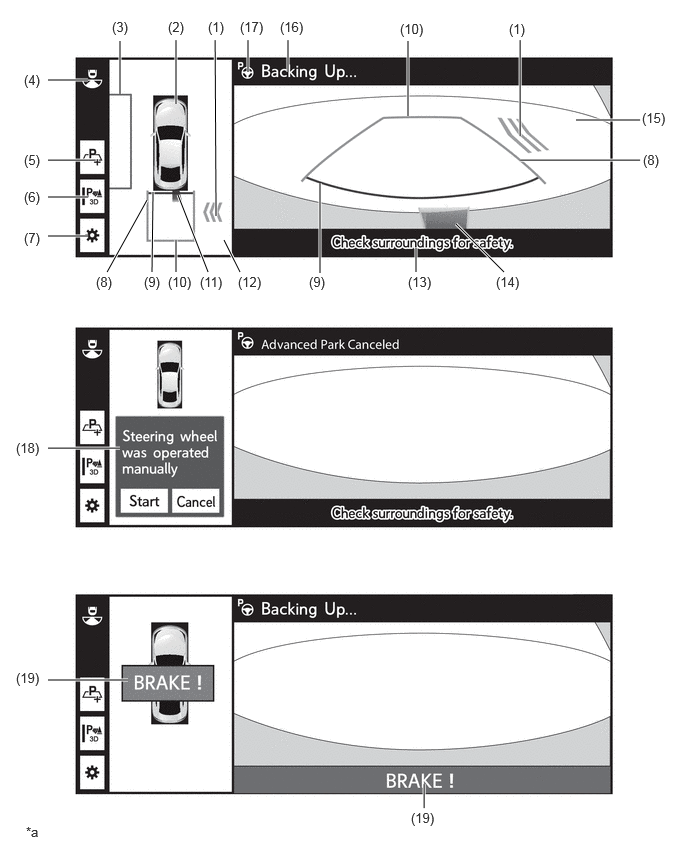
| Display | Description | |
|---|---|---|
|
*: The color of the panoramic view vehicle icon can be changed. Refer to the Repair Manual for the details. For details, see the Panoramic View Monitor System (w/ Advanced Park) section. |
||
| (1) | RCTA Icon | This icon is displayed if RCTA detects a vehicle or obstacle approaching from the rear right or left. |
| (2) | Panoramic View Vehicle Icon* | Displays the vehicle position in the panoramic view display. |
| (3) | Target Parking Space Box (Blue) | Displays the target parking spot during parking assist. |
| (4) | Camera Direction Display Vehicle Icon | Indicates that the rear view is displayed. |
| (5) | Registration Button | Starts memory registration. |
| (6) | Toyota Parking Assist-sensor 3D Indicator Button | Switches the Toyota parking assist-sensor 3D indicator on/off. |
| (7) | Customize Setting Button | Switches to the customization setting screen. |
| (8) | Rear Estimated Course Line (Yellow) | Displays the vehicle's estimated course line calculated from the steering angle. |
| (9) | Rear Distance Guide Line (Red) | These lines are distance guide lines showing the distance from the edge of the rear bumper. [Approximately 0.3 m (1.0 ft.)] |
| (10) | Rear Distance Guide Line (Yellow) | Guide line showing the distance from the edge of the rear bumper. (Remaining distance to the stop position) |
| (11) | Toyota Parking Assist-sensor Information | If a stationary object is detected when the Toyota parking assist-sensor is activated, the approximate distance between the vehicle and the stationary object is displayed. |
| (12) | Panoramic View | Displays an overhead image created by combining images from the vehicle front, rear and side cameras. |
| (13) | Caution Message Display | A message is displayed to warn the driver. |
| (14) | Toyota Parking Assist-sensor 3D Indicator | Provides a 3D display of the position of a stationary object detected by the Toyota parking assist-sensor, and the approximate distance to the stationary object. |
| (15) | Rear View | An image captured by the rear television camera assembly of the area to the rear of the vehicle. |
| (16) | Advanced Park Assistance Message Display | Displays the current status of advanced park. |
| (17) | Operation Icon | Displayed when the Advanced Park is operating. |
| (18) | Advice/reason for Suspension or Cancellation Display | Displays advice for the driver. |
| (19) | PKSB System Information | Displayed when the PKSB system detects an operation target with which the vehicle could collide. |
Toyota Parking Assist-sensor Cooperative Control
The Toyota parking assist-sensor icon is displayed on the multi-display via an interrupt display when the system is in operation and the Toyota parking assist-sensor system operation conditions are met, regardless of whether the Toyota parking assist-sensor system is operating or not.
Parking Support Brake System Cooperative Control
Braking control is performed and the system is suspended when the parking support brake system operation conditions are met while the system is in operation, regardless of whether the parking support brake system is operating or not.
The parking support brake system operation status is displayed on the multi-display and a buzzer is sounded when the parking support brake system is in operation.
If advanced park can be resumed after canceling the parking support brake system, operate the resume switch on the multi-display to resume the system.
Advanced park is canceled when the parking support brake system executes brake control 3 or more times while the system is in operation.
RCTA Cooperative Control
The RCTA icon is displayed on the multi-display via an interrupt display when the system is in operation and the RCTA function operation conditions are met while driving in reverse.
Customization Function
Advanced park settings can be changed by operating the customization setting button on the multi-display.
| Setting Item | Selection Items | |
|---|---|---|
| Speed Mode | ·
Fast ·
Standard ·
Slow |
|
| Obstacle Avoidance Distance | ·
Standard ·
Far |
|
| Prioritized Parking Method | ·
Perpendicular ·
Parallel |
|
| Parking Path Adjustment | ·
+3 ·
+2 ·
+1 ·
0 ·
-1 ·
-2 ·
-3 |
|
| Road Width Adjustment
Advanced Park Perpendicular Parking Control Area |
Advanced Park | ·
Standard ·
Slightly Narrow ·
Narrow |
| Memory Parking | ·
Standard ·
Slightly Narrow ·
Narrow |
|
Advanced Park Perpendicular Parking Control Area and other settings can be changed for advanced park by connecting Global TechStream (GTS). Refer to the Repair Manual for details.
DIAGNOSIS
A diagnostic function has been provided to simplify system inspections. Diagnosis results are output as Diagnostic Trouble Codes (DTCs) using Global TechStream (GTS).