RM37H0E
_58
Vehicle Interior
_095306
LIGHTING (INT)
_0448224
AMBIENT LIGHT
G
LIGHTING (INT) AMBIENT LIGHT INSPECTION
PROCEDURE

 8130A
1.INSPECT NO. 1 INSTRUMENT PANEL LIGHT SUB-ASSEMBLY
a.
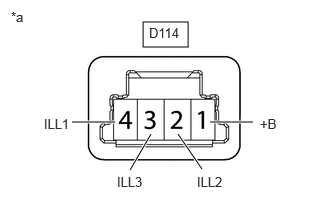
Check the illumination.
i.
1.49,0.229 1.958,0.49
0.469,0.26
2.188,1.271 2.635,1.271
true
1.854,1.396 2.104,1.76
true
1.573,1.396 1.354,1.771
true
0.75,1.271 1.198,1.271
true
2.708,1.208 2.979,1.427
0.271,0.219
10
false
+B
2.052,1.813 2.385,2.031
0.333,0.219
10
false
ILL2
1.219,1.813 1.552,2.031
0.333,0.219
10
false
ILL3
0.458,1.208 0.792,1.427
0.333,0.219
10
false
ILL1
1.552,0.26 2.01,0.458
0.458,0.198
10
false
D114
0.115,0.094 0.427,0.292
0.313,0.198
10
false
*a
| *a | Component without harness connected
(No. 1 Interior Illumination Light Sub-assembly) |
Apply auxiliary battery voltage to the connector and check the light illumination condition.
- OK:
Tester Connection Specified Condition Click Location & Routing(D114)Location & Routingewd_type=routing;type=c;code=D114
Click Connector(D114)Instrument Panel>Instrument Panel Wire>Instrument Panel Light Sub-Assembly No. 1ewd_type=component;type=c;code=D114;pinno=1,2,3,4
D114-1 (+B) - Auxiliary battery positive (+)
D114-2 (ILL2) - Auxiliary battery negative (-)Red light illuminates D114-1 (+B) - Auxiliary battery positive (+)
D114-3 (ILL3) - Auxiliary battery negative (-)Green light illuminates D114-1 (+B) - Auxiliary battery positive (+)
D114-4 (ILL1) - Auxiliary battery negative (-)Blue light illuminates
If the result is not as specified, replace the No. 1 interior illumination light sub-assembly.