RM37H0E
_56
Audio / Visual / Telematics
_095262
TELEMATICS
_0454673
INSTRUMENT PANEL SPEAKER
G
TELEMATICS INSTRUMENT PANEL SPEAKER INSPECTION
PROCEDURE

 86150D
1.INSPECT NO. 4 SPEAKER WITH BOX ASSEMBLY
a.
With the speaker in the installed condition, check there are no abnormalities such looseness or rattling.
b.
Check that there is no foreign matter inside the speaker.
c.
Check that the speaker cone is not damaged.
d.
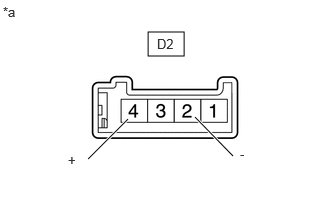
1.542,0.333 1.917,0.583
0.375,0.25
0.917,1.656 1.333,1.24
true
2.427,1.625 2.031,1.219
true
0.031,0.042 0.302,0.271
0.271,0.229
10
false
*a
1.635,0.375 1.906,0.563
0.271,0.188
10
false
D2
0.708,1.583 0.865,1.781
0.156,0.198
10
false
+
2.5,1.521 2.656,1.719
0.156,0.198
10
false
-
| *a | Component without harness connected
(No. 4 Speaker with Box Assembly) |
Measure the resistance according to the value(s) in the table below.
- Standard Resistance:
Tester Connection Condition Specified Condition Click Location & Routing(D2)Location & Routingewd_type=routing;type=c;code=D2
Click Connector(D2)Instrument Panel>Instrument Panel Wire>No. 4 Speaker with Box Assemblyewd_type=component;type=c;code=D2;pinno=2,4
D2-2(-) - D2-4(+) Always 4 Ω
If the result is not as specified, replace the No. 4 speaker with box assembly.