NAVIGATION / MULTI INFO DISPLAY NAVIGATION SYSTEM CUSTOMIZE PARAMETERS
CUSTOMIZING WITH COOLER CONTROL SWITCH ASSEMBLY (SENSITIVITY LEVEL)
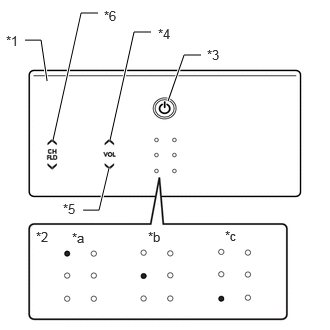
| *1 | Cooler Control Switch Assembly |
| *2 | Indicator Illumination Pattern |
| *3 | "HOME" switch |
| *4 | "VOL UP" switch |
| *5 | "VOL DWN" switch |
| *6 | "CH UP" switch |
| *a | Pattern A |
| *b | Pattern B |
| *c | Pattern C |
Turn the ignition switch to ACC.
Press and hold the "CH UP" switch and "VOL DWN" switch for 10 seconds or more with the "home" switch pressed.
- HINT:
-
Do not touch any other switches other than the "HOME" switch, "CH UP" switch and "VOL DWN" switch.
After a beep sounds 2 times, the system changes to the customize mode after the "home" switch, "CH UP" switch and "VOL DWN" switch are released.
Operate the "VOL UP" switch or "VOL DWN" switch to adjust the switch sensitivity level.
| Sensitivity Level | Indicator Illumination Pattern |
|---|---|
| Level 3 (Default) | A |
| Level 2 | B |
| Level 1 | C |
Exit from the customize mode by performing any of the following operations.
Leave the "VOL UP" switch and "VOL DWN" switch untouched for 10 seconds or more
Press the "HOME" switch
Turn the ignition switch off
Turn the ignition switch to ON