FC CONTROL HYDROGEN DETECTOR(for Motor Room Side) ON-VEHICLE INSPECTION
PROCEDURE

 G4151
1.INSPECT HYDROGEN DETECTOR
Check using the GTS
Connect the GTS to the DLC3.
Turn the ignition switch on (IG).
Enter the following menus: Powertrain / EV / Data List / Motor Room Hydrogen Density
- Powertrain > EV > Data List
-
Tester Display Motor Room Hydrogen Density - 50003 397 977
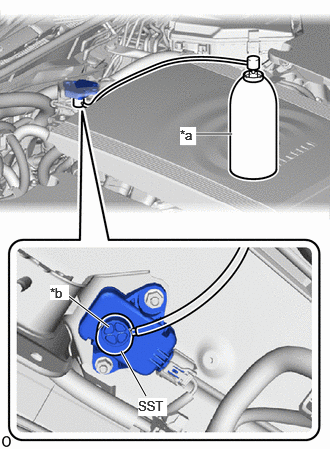
| *a | Hydrogen Gas for Inspection |
| *b | Hydrogen Detecting Portion |
Cover the hydrogen detecting portion of the hydrogen detector with SST.
- SST
- 09405-62010 (09405-06010)
Check the motor room side hydrogen detector density displayed on the GTS while injecting hydrogen gas for 5 seconds or more.
- OK:
0.9 % or more
- NOTICE:
-
Use hydrogen gas at 1.3% concentration.
- HINT:
-
The value stabilizes approximately 5 seconds after hydrogen gas injection.
If the result is not as specified, replace the hydrogen detector.
Check without using the GTS
Put the engine in inspection mode.
| *a | Hydrogen Gas for Inspection |
| *b | Hydrogen Detecting Portion |
Cover the hydrogen detecting portion of the hydrogen detector with SST.
- SST
- 09405-62010 (09405-06010)
Inject hydrogen gas for 5 seconds or more and check the condition of the hazard warning lights and the sounding of the wireless buzzer.
- OK:
Detection Status Specified Condition Detected (check result is OK) ·Hazard warning light illuminates (each light turns on 6 times or more for 5 seconds)
·Wireless buzzer sounds (each buzzer sounds 6 times or more for 5 seconds)
Not detected (check result is NG) ·Hazard warning light does not illuminate
·Wireless buzzer does not sound
- NOTICE:
- ·
Use hydrogen gas at 1.3% concentration.
·Perform with the ignition switch ON, READY OFF, and the FC system stopped.
If the result is not as specified, replace the hydrogen detector.