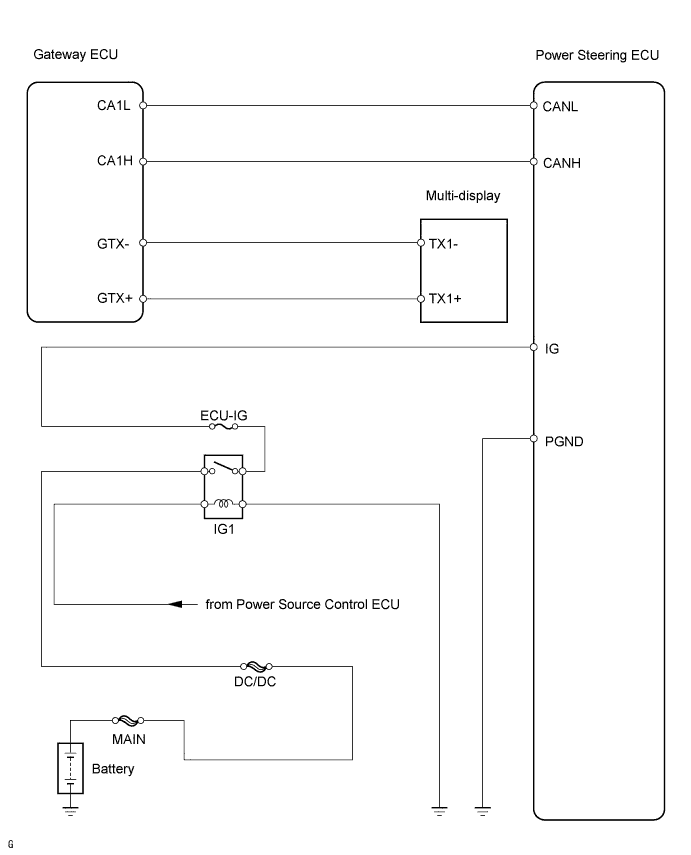
ELECTRONIC POWER STEERING SYSTEM > PS Warning is Always Shown on Multi-Display |
| 1.CHECK CONNECTOR CONNECTION CONDITION |
Check the indication condition of the PS warning while wiggling the power steering ECU connector and wire harness up and down, and right and left.
|
| ||||
| OK | |
 |
| 2.INSPECT CAN COMMUNICATION SYSTEM |
Using the Techstream (with CAN VIM), check for DTCs and confirm that there are no problems in the CAN communication system.
|
| ||||
| OK | |
|
| 3.INSPECT MULTIPLEX COMMUNICATION SYSTEM (BEAN) |
Using the Techstream (with CAN VIM), check for DTCs and confirm that there are no problems in the multiplex communication system (BEAN).
|
| ||||
| OK | |
|
| 4.CHECK WIRE HARNESS (POWER STEERING ECU - BATTERY) |
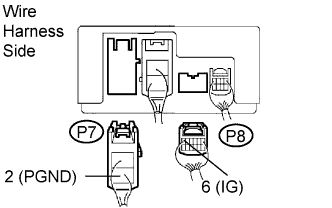 |
Disconnect the P7 and P8 power steering ECU connectors.
Turn the power switch ON (IG).
Measure the voltage of the wire harness side connectors.
| Tester Connection | Condition | Specified Condition |
| P8-6 (IG) - P7-2 (PGND) | Power switch ON (IG) | 10 to 16 V |
|
| ||||
| OK | |
|
| 5.REPLACE POWER STEERING ECU |
| NEXT | |
|
| 6.CHECK PS WARNING ON MULTI-DISPLAY |
Check for the PS warning indication on the multi-display.
|
| ||||
| NG | ||
 | ||
| ||
