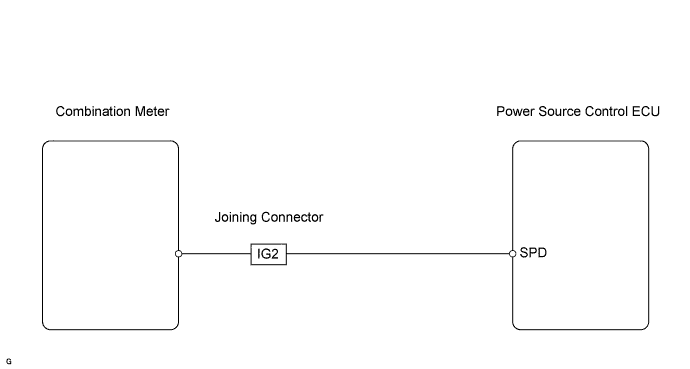
DTC B2282 Vehicle Speed Signal Malfunction |
| DTC No. | DTC Detection Condition | Trouble Area |
| B2282 | Both conditions below are met:
|
|
| 1.READ VALUE OF DATA LIST (VEHICLE SPEED SIGNAL) |
Connect Techstream to the DLC3.
Turn the power switch ON (IG) and press Techstream main switch ON.
Read the DATA LIST according to the displays on the tester.
| Tester Display | Measurement Item/Range | Normal Condition | Diagnostic Note |
| Vehicle Speed Signal | Vehicle speed signal / Stop or Run | Stop: Vehicle is stopped Run: Vehicle is running | - |
|
| ||||
| NG | |
 |
| 2.CHECK WIRE HARNESS (POWER SOURCE CONTROL ECU - IG2 JOINING CONNECTOR) |
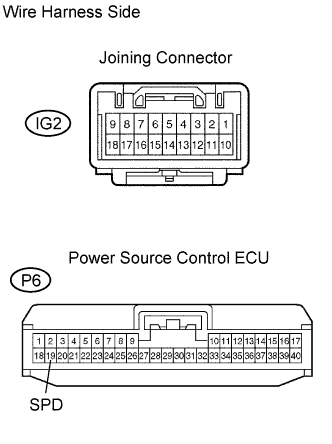 |
Disconnect the P6 connector.
Disconnect the IG2 connector.
Measure the resistance of the wire harness side connectors.
| Tester Connection | Specified Condition |
| P6-19 (SPD) - IG2-16 | Below 1 Ω |
| P6-19 (SPD) or IG2-16 - Body ground | 10 kΩ or higher |
|
| ||||
| OK | |
|
| 3.CHECK OPERATION OF POWER SOURCE CONTROL ECU |
After replacing the power source control ECU with a normally functioning ECU, check that the hybrid control system can start normally.
|
| ||||
| OK | ||
 | ||
| ||
