Home › ENGINE › 1NZ-FXE STARTING › SMART KEY SYSTEM

SMART KEY SYSTEM > ON-VEHICLE INSPECTION

for Preparation Click here


1. CHECK POWER SWITCH MODE CHANGE FUNCTION
  1. Check the function of the power switch.

    1. Check that power switch mode changes in accordance with the conditions of the shift position and brake pedal.

      HINT:
      For the vehicles with the smart key system (for door lock), the power switch functions not only when the key is inserted into the key slot but also when the driver carries the key.


      Shift Position
      Brake Pedal
      Change of power switch mode (Arrow "→" means 1 press of power switch)
      P
      Released
      OFF → ON (ACC) → ON (IG) → OFF (Repeated)
      P
      Depressed
      OFF → Hybrid system starts
      P
      Depressed
      ON (ACC) → Hybrid system starts
      P
      Depressed
      ON (IG) → Hybrid system starts
      P
      Depressed
      Hybrid system operating → OFF
      P
      Released
      Hybrid system operating → OFF
      Any position other than P
      Released
      ON (ACC) → ON (IG)
      Any position other than P
      Depressed
      ON (ACC) → ON (IG)
      Any position other than P
      Released
      ON (IG) → OFF after shift position switched to P (shift-linked OFF function)
      Any position other than P
      Released
      Hybrid system operating → OFF after shift position switched to P (auto P control function)
      Any position other than P
      Depressed
      Hybrid system operating → OFF after shift position switched to P (auto P control function)

  1. Check if power switch mode changes without pressing the power switch.

    1. With power switch mode ON (ACC) and the shift position in P, pull out the key. Check that power switch mode changes from ON (ACC) to OFF automatically.

    2. With power switch mode ON (ACC) and the shift position in P, wait for at least 1 hour. Check that power switch mode changes from ON (ACC) to OFF automatically.


2. CHECK KEY INTERLOCK FUNCTION
  1. Insert the key into key slot, and change power switch modes and shift position according to the table below. Check whether or not the key is locked in the key slot.

    Power Switch Mode
    Shift Position
    Key Status
    OFF
    P
    Not locked in
    OFF
    Any position except P
    -
    ON (ACC)
    P
    Not locked in
    ON (ACC)
    Any position except P
    Locked in
    ON (IG)
    P
    Locked in
    ON (IG)
    Any position except P
    Locked in
    READY (hybrid system ON)
    P
    Locked in
    READY (hybrid system ON)
    Any position except P
    Locked in


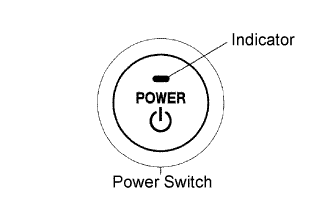
3. CHECK INDICATOR CONDITION


    B080592E01
  1. Check the power indicator on the power switch.

    1. Check that the power indicator illuminates and changes its color according to the table below.
      Power Switch Mode
      Indicator Status
      OFF
      OFF
      ON (ACC)
      Green illumination
      ON (IG)
      Amber illumination
      Hybrid System ON
      OFF
      Push button start system malfunctioning
      Flashes continuously in amber