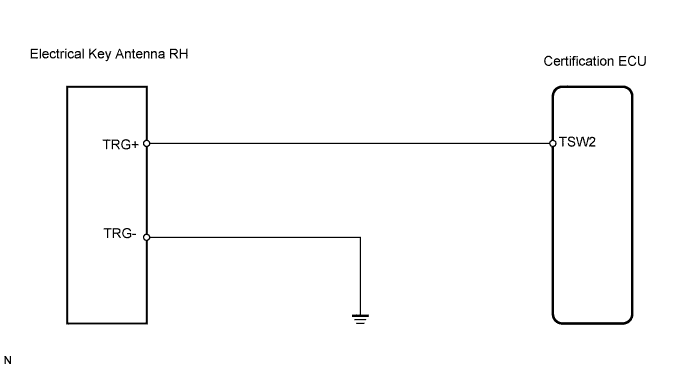
SMART KEY SYSTEM > Front Passenger Side Door Entry Lock Function does not Operate |
| 1.CHECK MANUAL DOOR LOCK OPERATION |
Check that the manual door lock function operates normally.
|
| ||||
| OK | |
 |
| 2.READ VALUE OF TECHSTREAM (LOCK SWITCH) |
Check the Data List for proper functioning of the certification ECU.
| Tester Display | Measurement Item/Range | Normal Condition | Diagnostic Note |
| P Trigger SW | P-door trigger switch / ON or OFF | ON: Lock switch is pushed OFF: Lock switch is not pushed | - |
|
| ||||
| NG | |
|
| 3.CHECK WIRE HARNESS (ELECTRICAL KEY ANTENNA RH - CERTIFICATION ECU AND BODY GROUND) |
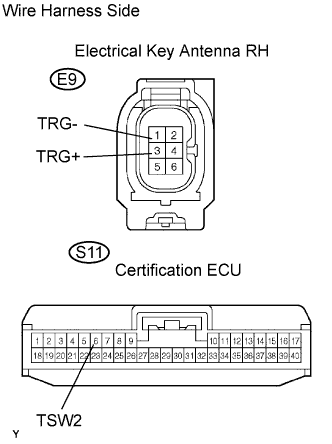 |
Disconnect the E9 antenna connector.
Disconnect the S11 ECU connector.
Measure the resistance of the wire harness side connectors.
| Tester Connection | Specified Condition |
| E9-3 (TRG+) - S11-6 (TSW2) | Below 1 Ω |
| E9-1 (TRG-) - Body ground | Below 1 Ω |
| E9-3 (TRG+) or S11-6 (TSW2) - Body ground | 10 kΩ or higher |
|
| ||||
| OK | |
|
| 4.INSPECT ELECTRICAL KEY ANTENNA RH |
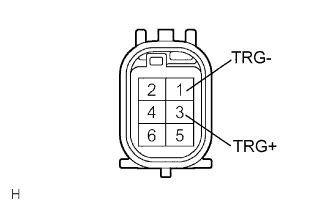 |
Measure the resistance of the outside door handle.
| Tester Connection | Switch Condition | Specified Condition |
| 1 (TRG-) - 3 (TRG+) | Switch pushed | Below 1 Ω |
| 1 (TRG-) - 3 (TRG+) | Switch not pushed | 10 kΩ or higher |
|
| ||||
| OK | ||
 | ||
| ||
