Check entry door unlock function.
Use the wireless lock operation to lock doors. With the key in your possession, touch a door's outside handle (touch sensor) and check that the door unlocks.
 |
SMART KEY SYSTEM > ON-VEHICLE INSPECTION |
| 1. SMART KEY SYSTEM OPERATION INSPECTION |
Check entry door unlock function.
|
Use the wireless lock operation to lock doors. With the key in your possession, touch a door's outside handle (touch sensor) and check that the door unlocks.
Check the entry door unlock operation's detection area.
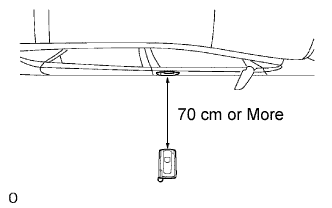
Step 1: Hold the key at the same height as the door's outside handle (approximately 0.8 m (2.6 ft.)).
Step 2: Pay attention to the direction of the key in the illustration on the left. Check that when the key is brought within 0.7 to 1.0 m (2.3 to 3.3 ft.) of the vehicle, the system enters unlock standby mode.
Step 3: Once the system enters unlock standby mode, touch the outside handle's sensor within 3 seconds. Check that the door unlocks.
Step 4: Repeat step 2 and step 3 for the remaining doors.
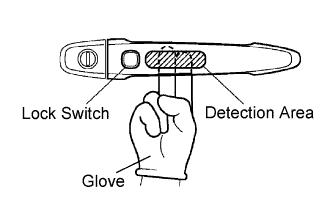 |
Step 5: Inspect the door electrical key oscillator's response sensitivity. Wear protective gloves, set the system to unlock standby mode, and check that touching the inner side of the outside handle (the highlighted area in the illustration) with two fingers causes the door to unlock.
Step 6: Repeat step 5 for the remaining doors.
Check entry door lock function.
Step 1: Close all of the vehicle's doors. With the key in your possession outside of the vehicle, check that pressing the lock switch locks front doors.
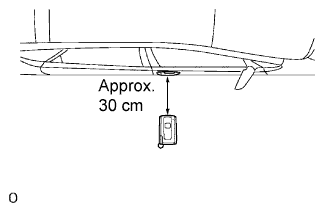 |
Step 2: Inspect the entry door lock operation's detection area and the indoor electrical key oscillator for wave leaks. Hold the key at a height of 1 m (3.3 ft.) above the lower edge of the window frame). Pay attention to the direction and position of the key in the illustration on the left. Check that when the key is approximately 0.3 m (0.9 ft.) from the vehicle and the lock switch is pressed, the front doors lock and the warning buzzer (for when the key is forgotten) does not sound. If the warning buzzer sounds, the indoor electrical key oscillator may have a wave leak.
Step 3: Repeat step 1 and step 2 for the remaining doors.
Check entry back door open function.
Close the back door. With the key in your possession, check that pressing the back door opener switch opens the back door.
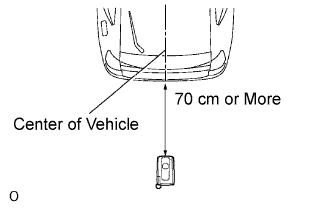 |
Inspect the entry back door open operation's detection area. Hold the key at the same height as the back door opener switch (approximately 0.8 m (2.6 ft.)) and aligned with the center of the rear of the vehicle. Pay attention to the direction of the key in the illustration on the left. Check that when the key is brought within 0.7 to 1.0 m (2.3 to 3.3 ft.) of the vehicle, pressing the back door opener switch opens the back door.
Check entry ignition function.
With the key in your possession, check that pressing the power switch will release the steering wheel lock. Then, check that depressing the brake pedal while pressing the power switch starts the hybrid control system.
With the key in your possession and the vehicle stopped, check that pressing the power switch stops the hybrid control system.
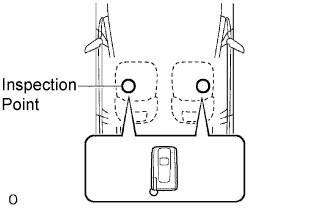 |
Inspect the entry ignition operation's detection area. Pay attention to the direction of the key in the illustration on the left. When the key is in either of the two locations in the illustration, check that the engine can start.
Check key lock-in prevention function.
Place the key in the trunk. Check that: 1) closing the back door triggers the key's wireless buzzer (which lasts approximately 10 seconds), and 2) pressing the back door opener switch opens the back door.
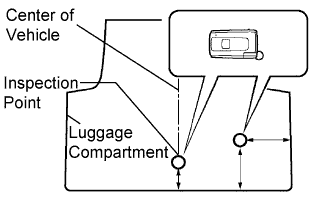 |
Inspect the key lock-in prevention's detection area. Pay attention to the direction of the key in the illustration on the left. When the key is in either of the two locations in the illustration, check that: 1) closing the back door sounds the key's wireless buzzer, and 2) pressing the back door opener switch opens the back door.
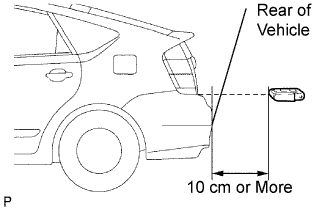 |
Inspect the key lock-in prevention's detection area and the trunk interior's door control receiver for wave leaks. Hold the key at the same height as the lower edge of the back door and aligned with the center of the rear of the vehicle. Pay attention to the direction and position of the key in the illustration on the left. Check that when the key is over 0.1 m (0.3 ft.) from the vehicle's rear bumper, the key's wireless buzzer does not sound.
Check key cancel function.
While the power switch is ON (IG), check that the entry back door opener switch is the only switch in the smart key system that can be operated.
While the key cancel switch (smart key system cancel switch) is ON, check that all switches in the smart key system cannot be operated.
Check key warning light function.
| Condition | Indicator |
| Power switch is in ON (IG) mode and vehicle interior check is OK. | Illuminated |
| Power switch is in OFF mode and one of the doors is open. | Blinking |
| Power switch is in ON (ACC) / ON (IG) mode and all doors are locked. | Off |
Check answer-back function (hazard warning light flashing and buzzer sounding).
| Smart Operation | Hazard Warning Light | Buzzer |
| Entry Door Lock | Flashes once | Sounds once |
| Entry Door Unlock | Flashes twice | Sounds twice |
| Entry Back Door Open | Does not flash | Sounds once |