WIRELESS DOOR LOCK CONTROL SYSTEM (w/o Smart Key System) > REGISTRATION |
| 1. DESCRIPTION OF CODE REGISTRATION |
| 2. REGISTER RECOGNITION CODE (USING TECHSTREAM) |
Turn the power switch ON (IG).
Select the menu on the Techstream.
Select "PRIUS" from the menu.
Select "W/O SMART KEY".
Select "BODY".
Select "WIRELESS REGIST".
Press both LOCK and UNLOCK switches between 1 to 1.5 seconds.
Press either switch for more than 1 second within 3 seconds.
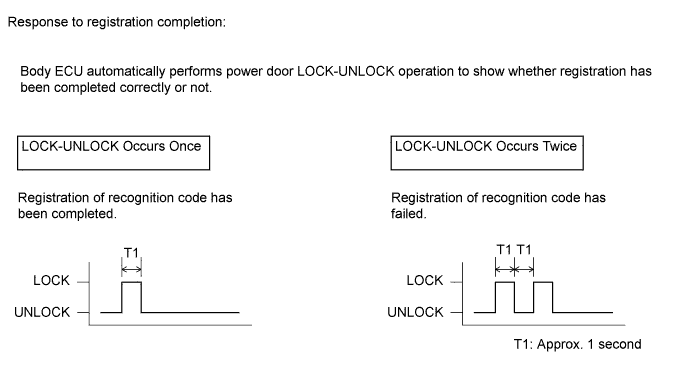
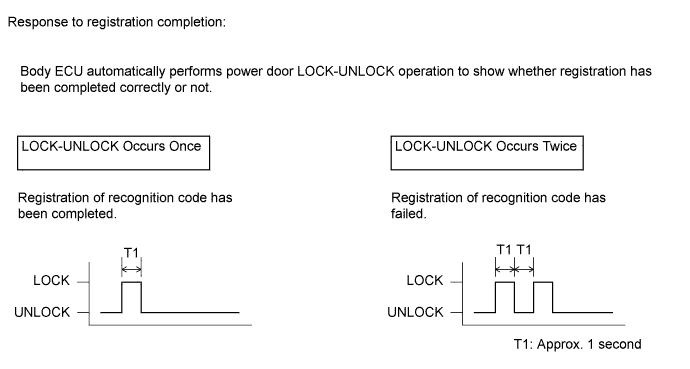
Check the response to the registration completion.
Perform the either of following to complete the registration of recognition codes:
| 3. REGISTER RECOGNITION CODE (USING SWITCH OPERATION) |
The following the conditions should be met.
Insert and remove the key into / from the key slot twice (Insert → Remove → Insert → Remove) within 5 seconds.
Perform the following operations within 40 seconds.
Close and open the driver side door twice (Close → Open → Close → Open).
Insert and remove the key into / from the key slot twice (Insert → Remove → Insert → Remove).
Close and open the driver side door twice (Close → Open → Close → Open).
Insert and remove the key into / from the key slot twice (Insert → Remove → Insert → Remove).
Insert the key into the key slot and close the all doors.
Perform the following operations within 40 seconds.
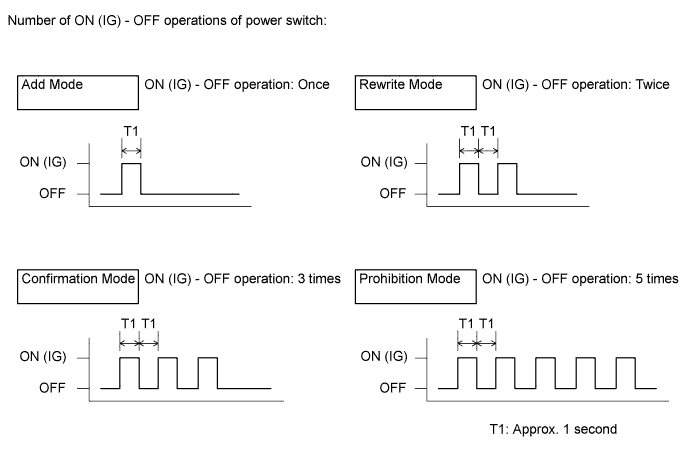
Turn the power switch from ON (IG) to OFF at approximately 1 second intervals, operate the power switch according to the number of times shown below.

Remove the key from the key slot.
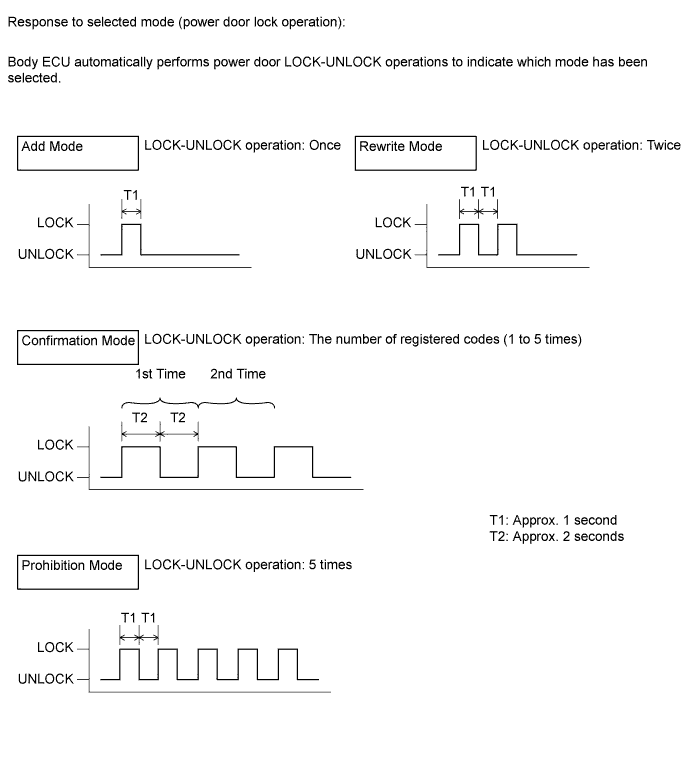
Check the response of the selected mode within 5 seconds.

Within 40 seconds of completing the confirmation mode operation, press the LOCK and UNLOCK switches on the transmitter simultaneously.
After completing the step above, press a single switch (LOCK or UNLOCK) within 5 seconds.
After completing the step above, check the response to the registration completion within 3 seconds.

Perform either of the following to complete the registration of recognition codes: