Home › SECURITIES › THEFT DETERRENT › THEFT DETERRENT SYSTEM

THEFT DETERRENT SYSTEM > OPERATION CHECK


OUTLINE OF THEFT DETERRENT SYSTEM
  1. When the theft deterrent system detects that the vehicle is being tampered with, the vehicle horns and security horn will sound and hazard warning lights will flash continuously.

  2. The system has 2 modes: active arming mode (refer to "ACTIVE ARMING MODE") and passive arming mode (refer to "PASSIVE ARMING MODE"). Passive arming mode can be turned on and off.

  3. Each mode has 4 states: disarmed state, arming preparation state, armed state and alarm sounding state.

    1. Disarmed state:

      1. The alarm function is not operating.
      2. The theft deterrent system is not operating.

    2. Arming preparation state:

      1. The theft deterrent system is not operating.

    3. Armed state:

      1. The theft deterrent system is operating.

    4. Alarm sounding state:

      1. The theft deterrent system is operating (60 +-5 seconds).

      Refer to table below for alarm method and time:  
      Alarm Method
      Hazard Warning Light
      Blinking (cycle of flasher relay)
      Vehicle Horn
      Sounding (cycle of 0.4 seconds)
      Security Horn
      Headlight
      Blinking (cycle of 0.4 seconds)
      Taillight
      Room Light
      Illuminating
      Alarm Time
      60 +-5 seconds

      HINT:
      If, during the alarm sounding state, one of the doors is unlocked and no key is in the key slot, a forced door lock signal will be output (refer to "FORCED DOOR LOCK CONTROL").


ACTIVE ARMING MODE

HINT:
Active arming mode starts the alarm control immediately after the doors are locked.


System State
State Switching Condition
Switches to
Disarmed state
Performing any of following will cause system to go into "Arming preparation state"
  1. With all doors and engine hood closed, lock all doors by key operation
  2. With all doors and engine hood closed, lock all doors by wireless operation
  3. With any door or engine hood open, lock all doors and close all doors and engine hood
Arming preparation state
Performing any of following will cause system to go into "Disarmed state"
  1. Unlock all doors by wireless operation
  2. Unlock all doors by key operation
  3. Unlock any door
  4. Open any door
  5. Open engine hood
  6. Insert key into key slot
  7. Reconnect battery
  8. Turn power switch from OFF to ON (IG)
Disarmed state
Performing following will cause system to go into "Armed state"
  1. With all doors and engine hood closed, lock all doors. Allow 30 (+-1.5) seconds to elapse.
Armed state
Armed State
Performing any of following will cause system to return to "Disarmed state"
  1. Insert key into key slot, turn power switch ON (IG). Run engine over 550 rpm for 10 to 12 seconds.
  2. Unlock any door by wireless operation
  3. Unlock any door by key operation
  4. Insert key into key slot and turn power switch from OFF to ON (IG)
Disarmed state
Performing any of following will cause system to start "Alarm sounding state"
  1. Open engine hood
  2. Reconnect battery
  3. Open any door
  4. Unlock any door without key and wireless operation
  5. Directly connect power switch without key (or turn power switch ON (IG) without key)
Alarm sounding state
Performing any of following will cause system to return to "Disarmed state"
  1. Unlock any door by wireless operation
  2. Unlock any door by key operation
  3. Insert key into key slot and turn power switch from OFF to ON (IG)
Disarmed state (alarm operation is canceled)
When system detects tampering, horns sound and lights illuminate or blink.
After 60 (+-5) seconds, alarm stops and system return to "Armed state".
Armed state (alarm stops sounding)

PASSIVE ARMING MODE

HINT:
  1. Passive arming mode can be turned on and off (refer to "METHOD FOR CHANGING OF PASSIVE MODE (ON OR OFF)).
  2. The vehicle's initial alarm setting is active arming mode.
  3. During passive arming mode, the theft deterrent system enters the armed state even if the doors are not locked.
  4. Passive arming mode starts the alarm control after the doors are closed.
  5. Detecting that the doors are unlocked does not set off the alarm during passive arming mode.
  6. A forced door lock signal is not output during passive arming mode (refer to "FORCED DOOR LOCK CONTROL").
  7. When the theft deterrent system detects that the doors are opened during passive arming mode, the alarm is not set off immediately depending on the entry delay time setting.
  8. If one of the following conditions is fulfilled during passive arming mode, the theft deterrent system will be changed to active arming mode.
    1. With all doors and engine hood closed, lock all doors by wireless operation.
    2. With all doors and engine hood closed, lock all doors by key operation.
    3. With any doors or engine hood open, lock all doors and close all doors and engine hood.


System State
State Switching Condition
Switches to
Disarmed state (1)*1 (no key in key slot and smart key system is canceled)
Performing any of following will cause system to go into "Disarmed state (2)"
  1. With power switch OFF, open any door engine hood, and pull out key from key slot
  2. With power switch OFF, pull out key from key slot, and open any door or engine hood
Disarmed state (2)
Disarmed state (2)*2
Performing following will cause system to go into "Arming preparation state"
  1. Close all doors and engine hood
Arming preparation state
Performing any of following will cause system to return to "Disarmed state (1)"
  1. Unlock all doors by wireless operation
  2. Unlock all doors by key operation
  3. Reconnect battery
  4. Turn power switch from OFF to ON (IG)
  5. Insert key into key slot
Disarmed state (1)
Arming preparation state
Performing any of following will cause system to return to "Disarmed state (1)"
  1. Unlock all doors by wireless operation
  2. Unlock all doors by key operation
  3. Reconnect battery
  4. Turn power switch from OFF to ON (IG)
  5. Insert key into key slot
Disarmed state (1)
Performing following will cause system to go into "Armed state"
  1. With all doors and engine hood closed, allow 30 (+-1.5) seconds to elapse
Armed state
Performing any of following will cause system to return to "Disarmed state (2)"
Disarmed state (2)
Armed state
Performing any of following will cause system to return to "Disarmed state (1)"
  1. Unlock all doors by wireless operation
  2. Unlock all doors by key operation
  3. Insert key into key slot and turn power switch from OFF to ON (IG)
Disarmed state (1)
Performing any of following will cause system to "Alarm sounding state"
  1. Open any door and allow entry delay time*3 to elapse
  2. Open engine hood
  3. Reconnect battery
  4. Directly connect power switch without key (or push power switch ON without key)
Alarm sounding state (tampering is detected)
Alarm sounding state
Performing any of following will cause system to return to "Disarmed state (1)"
  1. Unlock all doors by wireless operation
  2. Unlock all doors by key operation
  3. Insert key into key slot and turn power switch from OFF to ON (IG)
Disarmed state (1)
When system detects tampering, horns sounds and lights illuminate or blink.
After 60 (+-5) seconds, alarm stops and system return to "Armed state"
Armed state (alarm stops)

HINT:
*1: "Disarmed state (1)" is the normal disarmed state.
*2: "Disarmed state (2)" is set from either the "Disarmed state (1)" or the "Arming preparation state".
*3: When a door is opened while all doors are closed during passive arming mode, the entry delay time starts. If the state switching condition [from armed state to disarmed state (1)] is fulfilled during the entry delay time, the theft deterrent system will return to disarmed state (1). However, if the state switching condition is not fulfilled, the theft deterrent system will assume that a break-in or theft is occurring and sound the alarm.
The entry delay time can be selected among the following: 0, 14 or 30 seconds.


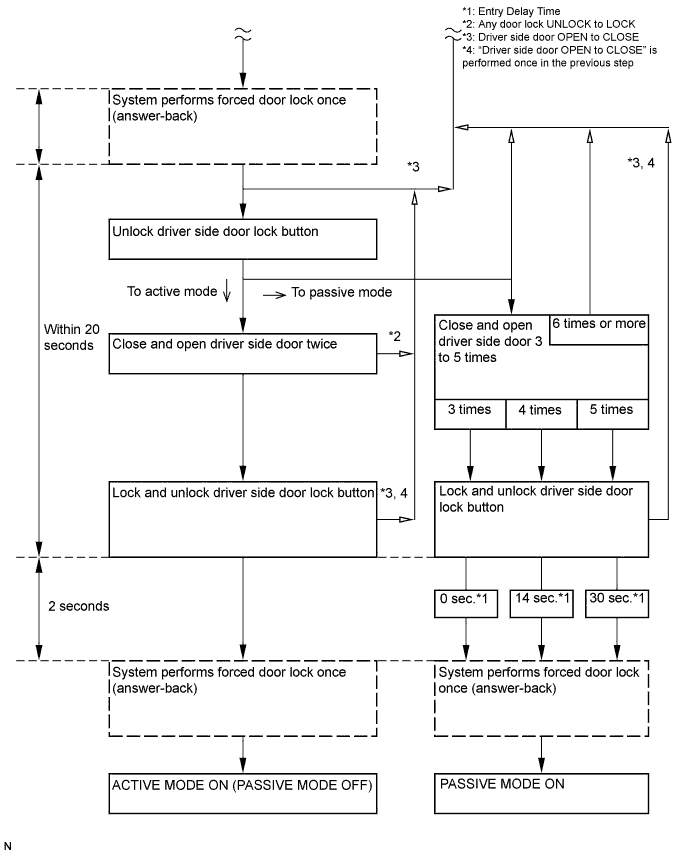
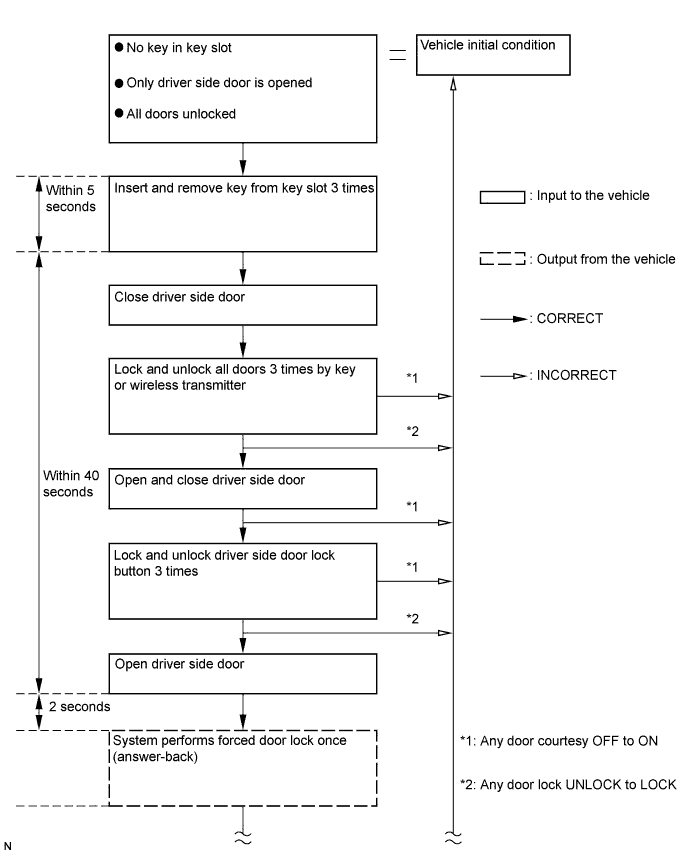
METHOD FOR CHANGING OF PASSIVE MODE (ON OR OFF)

E112668E02


E112669E02


FORCED DOOR LOCK CONTROL
  1. The forced door lock control also helps to prevent the vehicle from being tampered with. When a door is unlocked and the alarm starts, the door is forced to lock by a forced door lock signal.

    1. Conditions that force the doors to lock:

      1. No key is in the key slot.
      2. 0.4 seconds have elapsed after the previous output of a forced door lock signal.
      3. The theft deterrent system is in the alarm sounding state of active arming mode.
      4. Any door is unlocked.


ALARM MEMORY FUNCTION
  1. If the alarm is set off (tampering is detected) while the theft deterrent system is in the armed state, the alarm memory function will record it. Whenever the theft deterrent system is canceled, the alarm memory function causes the taillights to illuminate for 2 seconds in order to inform you that the alarm has been set off.

    1. Conditions of the alarm memory function that cause the taillights to illuminate:
      When the theft deterrent system has entered into the alarm sounding state (tampering has been detected) even once, the taillights will illuminate for 2 seconds if any of the following conditions is fulfilled:

      1. Switched to the disarmed state from the armed state during active arming mode.
      2. Switched to the disarmed state (1) from the armed state during passive arming mode.

      HINT:
      For mode information about the active arming mode, refer to "ACTIVE ARMING MODE". For more information about the passive arming mode, refer to "PASSIVE ARMING MODE".


PANIC ALARM CONTROL
  1. The panic alarm control activates the panic alarm when the wireless transmitter PANIC switch is pressed. The panic alarm control operates independently from the theft deterrent system's alarm control's change from the armed state to the alarm sounding state.

    1. Conditions that cause the panic alarm control to set off the panic alarm:
      The panic alarm control sets off the panic alarm when the PANIC switch on the wireless transmitter is pressed for over 2.4 seconds under the following conditions.

      1. The power switch is OFF or ON (ACC).
      2. The theft deterrent system is not in the alarm sounding state (same for active arming mode and passive arming mode).
      3. The panic alarm control is not operating (the alarm is not set OFF).

    2. Conditions that cause the panic alarm control to shut the alarm:

      1. Turn the power switch ON (IG).
      2. Any of the wireless transmitter switches are pressed.
      3. 60 +- 5 seconds have pressed and the panic alarm has ended.
      4. The theft deterrent system switches to the alarm sounding state (same for active arming mode and passive arming mode). However, the alarm is still sounding, because the theft deterrent system has switched to the alarm sounding state. Conditions for canceling the panic alarm are the same as for the alarm control.

      HINT:
      For mode information about the active arming mode, refer to "ACTIVE ARMING MODE". For more information about the passive arming mode, refer to "PASSIVE ARMING MODE".


SECURITY INDICATOR LIGHT OUTPUT
  1. The security indicator light turns on and off based on output signals from the main body ECU. However, in some cases the actual status of the security indicator light is different from the output signals of the main body ECU.

    Output: 
    State of Theft Deterrent System*
    Security Indicator Light
    Output Signals from Main Body ECU
    Actual Lighting Condition
    Disarmed state (1), (2)
    OFF
    OFF (immobiliser system is not set)
    BLINKING (immobiliser system is set)
    Arming preparation state
    ON
    ON
    Armed state
    OFF
    BLINKING
    Alarm sounding state
    ON
    ON
    Flashing cycle: 
    Time
    Security Indicator Light
    0.2 seconds
    ON
    1.8 seconds
    OFF

    HINT:
    1. *: Same for active arming mode and passive arming mode.
    2. When the immobiliser system is set, the security indicator blinks during the disarmed state and the armed state due to the output signals from the immobiliser system.