AUDIO / VIDEO MICROPHONE REMOVAL
PROCEDURE

 81260A
1.REMOVE MAP LIGHT ASSEMBLY (except Glass Roof)
81260A
2.REMOVE MAP LIGHT ASSEMBLY (for Glass Roof)
86730A
3.REMOVE TELEPHONE MICROPHONE ASSEMBLY (except Glass Roof)
w/o Intrusion Sensor:
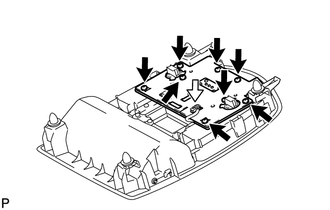
Remove the 8 screws.
Disconnect the connector and remove the board and cover.
w/ Intrusion Sensor:
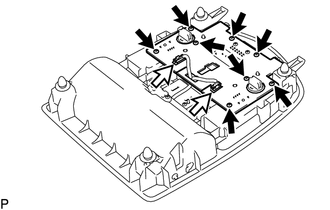
Remove the 8 screws.
Disconnect the 2 connectors and remove the board and cover.
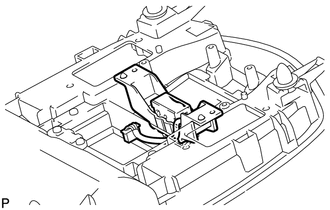
Remove the microphone holder with telephone microphone assembly.
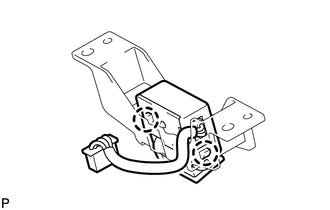
Disengage the 2 claws and remove the telephone microphone assembly from the microphone holder.
86730A
4.REMOVE TELEPHONE MICROPHONE ASSEMBLY (for Glass Roof)
w/o Intrusion Sensor:
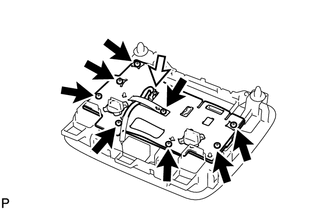
Remove the 8 screws.
Disconnect the connector and remove the board and cover.
w/ Intrusion Sensor:
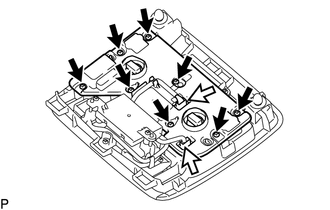
Remove the 8 screws.
Disconnect the 2 connectors and remove the board and cover.
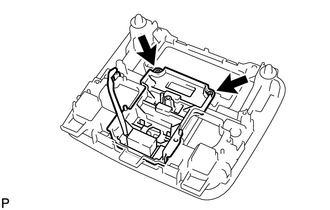
Remove the 2 screws, knob guide with telephone microphone assembly.
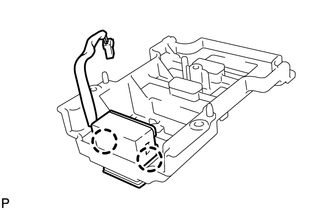
Disengage the 2 claws and remove the telephone microphone assembly from the knob guide.
86250E
5.REMOVE AMPLIFIER MICROPHONE ASSEMBLY
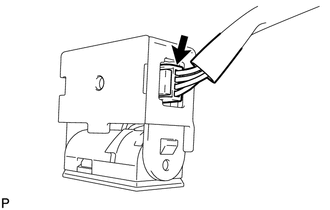
Disconnect the connector and remove the amplifier microphone assembly from the wire.