RM2070E
_56
Audio / Visual / Telematics
_061932
NAVIGATION / MULTI INFO DISPLAY
_0301737
NAVIGATION SYSTEM
J
NAVIGATION / MULTI INFO DISPLAY NAVIGATION SYSTEM Cursor or Map Rotates when Vehicle Stopped
PROCEDURE
1.CHECK CONDITION
a.
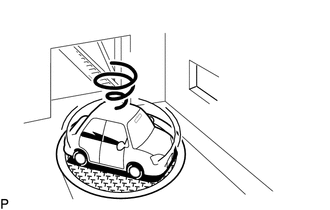
Check with the customer if the vehicle has been turned by a turntable.
- OK:
Vehicle has not been turned by a turntable.
- HINT:
-
If the vehicle is turned on a turntable with the power switch on (IG or ACC), the system may store the angular velocity. As a result, the vehicle position cursor may deviate. In this case, the vehicle position cursor will return to normal by turning the power switch off and back to on (IG or ACC) again with the vehicle completely stopped.
OK
PROCEED TO NEXT SUSPECTED AREA SHOWN IN PROBLEM SYMPTOMS TABLE
(See pageAudio / Visual / Telematics>NAVIGATION / MULTI INFO DISPLAY>NAVIGATION SYSTEM>PROBLEM SYMPTOMS TABLE)
NG
TURN POWER SWITCH ON (IG OR ACC) WHEN VEHICLE IS COMPLETELY STOPPED