Home › Vehicle Interior › SUPPLEMENTAL RESTRAINT SYSTEMS › STEERING PAD

STEERING PAD > INSTALLATION

for Preparation Click here


1. INSTALL HORN BUTTON ASSEMBLY
  1. Check that the ignition switch is off.

  1. Check that the cable is disconnected from the negative (-) auxiliary battery terminal.

    CAUTION:
    Wait at least 90 seconds after disconnecting the cable from the negative (-) auxiliary battery terminal to disable the SRS system.


    B296305E01
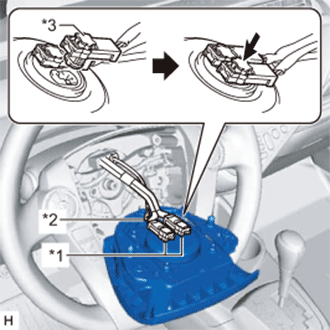
  1. Connect the 2 airbag connectors to the horn button assembly.
    Text in Illustration 
    *1
    Airbag Connector
    *2
    Horn Connector
    *3
    Airbag Connector Lock

    NOTICE:
    1. When connecting any airbag connector, take care not to damage the airbag wire harness.
    2. Be sure to only connect the connectors to each corresponding color.
  1. Push in the 2 airbag connector locks to install the 2 airbag connectors.

  1. Connect the horn connector to the horn button assembly.


    B296302
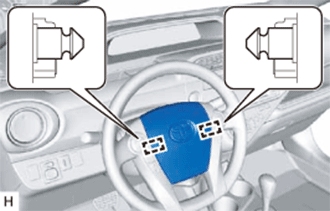
  1. Push the horn button assembly to engage the 2 pins carefully.

    NOTICE:
    1. Make sure that the pins are securely inserted into the steering holes.
    2. Make sure that the horn button assembly is securely installed.


2. INSTALL LOWER NO. 3 STEERING WHEEL COVER
  1. Engage the claw and guide to install the lower No. 3 steering wheel cover.


3. INSTALL LOWER NO. 2 STEERING WHEEL COVER
  1. Engage the claw and guide to install the lower No. 2 steering wheel cover.


4. CONNECT CABLE TO NEGATIVE AUXILIARY BATTERY TERMINAL

NOTICE:
When disconnecting the cable, some systems need to be initialized after the cable is reconnected (Click here).


5. INSTALL FRONT FLOOR COVER RH
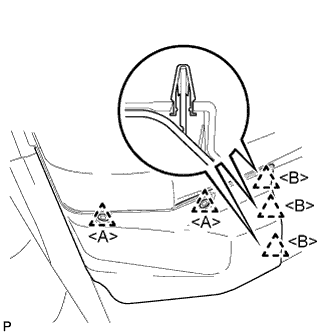
  1. Engage the 3 guides.


    B301488E01
  1. Engage the 3 clips <B> to install the front floor cover RH.

  1. Install the 2 clips <A>.


6. INSPECT HORN BUTTON ASSEMBLY
  1. Make sure that the horn sounds.

    HINT:
    If the horn does not sound, inspect the horn system (Click here).


7. PERFORM DIAGNOSTIC SYSTEM CHECK
(Click here)


8. INSPECT SRS WARNING LIGHT
(Click here)