Home › Vehicle Exterior › EXTERIOR PANELS / TRIM › NAME PLATE

NAME PLATE > INSTALLATION

for Preparation Click here


HINT:
When installing the name plates or emblems, heat the vehicle body and name plates or emblems using a heat light.

Heating Temperature 
Item
Temperature
Vehicle Body
40 to 60°C (104 to 140°F)
Name Plate or Emblem
20 to 30°C (68 to 86°F)

NOTICE:
Do not heat the vehicle body, name plates or emblems excessively.


1. INSTALL LUGGAGE COMPARTMENT DOOR EMBLEM
  1. Clean the vehicle body surface.

    1. Using a heat light, heat the vehicle body surface.

    2. Remove the double-sided tape from the vehicle body.

    3. Wipe off any tape adhesive residue with cleaner.

  1. Clean the luggage compartment door emblem. (If reusing the luggage compartment door emblem)

    1. Using a heat light, heat the luggage compartment door emblem.

    2. Remove the double-sided tape from the luggage compartment door emblem.

    3. Wipe off any tape adhesive residue with cleaner.

    4. Apply new double-sided tape to the luggage compartment door emblem.


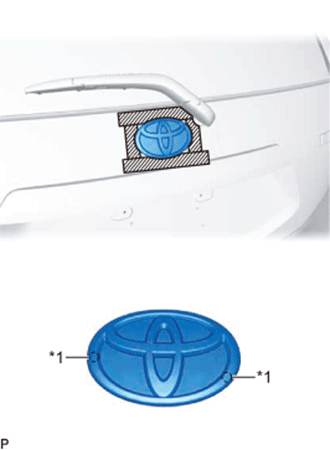
  1. Install the luggage compartment door emblem.

    1. Using a heat light, heat the vehicle body and luggage compartment door emblem.

    2. Remove the release paper from the luggage compartment door emblem.

      HINT:
      After removing the release paper, keep the exposed adhesive free from foreign matter.


    3. B307369E01
    4. Install the luggage compartment door emblem as shown in the illustration.
      Text in Illustration 
      *1
      Location Pin


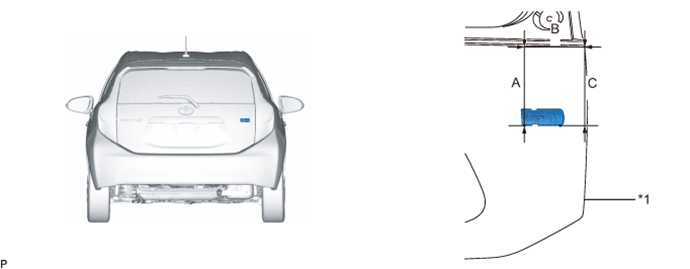
2. INSTALL NO. 2 LUGGAGE COMPARTMENT DOOR NAME PLATE
  1. Clean the vehicle body surface.

    1. Using a heat light, heat the vehicle body surface.

    2. Remove the double-sided tape from the vehicle body.

    3. Wipe off any tape adhesive residue with cleaner.

  1. Clean the No. 2 luggage compartment door name plate. (If reusing the No. 2 luggage compartment door name plate)

    1. Using a heat light, heat the No. 2 luggage compartment door name plate.

    2. Remove the double-sided tape from the No. 2 luggage compartment door name plate.

    3. Wipe off any tape adhesive residue with cleaner.

    4. Apply new double-sided tape to the No. 2 luggage compartment door name plate.


  1. Install the No. 2 luggage compartment door name plate.

    1. Using a heat light, heat the vehicle body and No. 2 luggage compartment door name plate.

    2. Remove the release paper from the No. 2 luggage compartment door name plate.

      HINT:
      After removing the release paper, keep the exposed adhesive free from foreign matter.


    3. Install the No. 2 luggage compartment door name plate as shown in the illustration.


      B307373E01


      Text in Illustration 
      *1
      Profile of Back Door Panel
      -
      -

      Reference Measurement:
      Area
      Measurement
      A
      150.1 mm (5.91 in.)
      B
      165.9 mm (6.53 in.)
      C
      150.0 mm (5.91 in.)


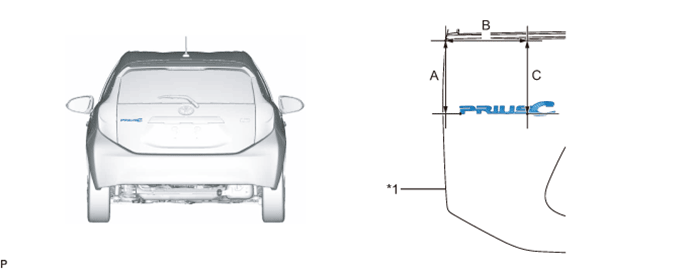
3. INSTALL NO. 1 LUGGAGE COMPARTMENT DOOR NAME PLATE
  1. Clean the vehicle body surface.

    1. Using a heat light, heat the vehicle body surface.

    2. Remove the double-sided tape from the vehicle body.

    3. Wipe off any tape adhesive residue with cleaner.

  1. Clean the No. 1 luggage compartment door name plate. (If reusing the No. 1 luggage compartment door name plate)

    1. Using a heat light, heat the No. 1 luggage compartment door name plate.

    2. Remove the double-sided tape from the No. 1 luggage compartment door name plate.

    3. Wipe off any tape adhesive residue with cleaner.

    4. Apply new double-sided tape to the No. 1 luggage compartment door name plate.


  1. Install the No. 1 luggage compartment door name plate.

    1. Using a heat light, heat the vehicle body and No. 1 luggage compartment door name plate.

    2. Remove the release paper from the No. 1 luggage compartment door name plate.

      HINT:
      After removing the release paper, keep the exposed adhesive free from foreign matter.


    3. Install the No. 1 luggage compartment door name plate as shown in the illustration.


      B307372E01


      Text in Illustration 
      *1
      Profile of Back Door Panel
      -
      -

      Reference Measurement:
      Area
      Measurement
      A
      159.2 mm (6.27 in.)
      B
      125.5 mm (4.94 in.)
      C
      159.0 mm (6.26 in.)


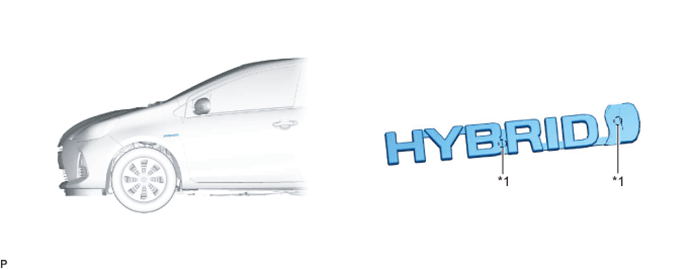
4. INSTALL SIDE PANEL EMBLEM (for LH Side)
  1. Clean the vehicle body surface.

    1. Using a heat light, heat the vehicle body surface.

    2. Remove the double-sided tape from the vehicle body.

    3. Wipe off any tape adhesive residue with cleaner.

  1. Clean the side panel emblem. (If reusing the side panel emblem)

    1. Using a heat light, heat the side panel emblem.

    2. Remove the double-sided tape from the side panel emblem.

    3. Wipe off any tape adhesive residue with cleaner.

    4. Apply new double-sided tape to the side panel emblem.


  1. Install the side panel emblem.

    1. Using a heat light, heat the vehicle body and side panel emblem.

    2. Remove the release paper from the side panel emblem.

      HINT:
      After removing the release paper, keep the exposed adhesive free from foreign matter.


    3. Install the side panel emblem as shown in the illustration.


      B307370E01


      Text in Illustration 
      *1
      Location Pin
      -
      -


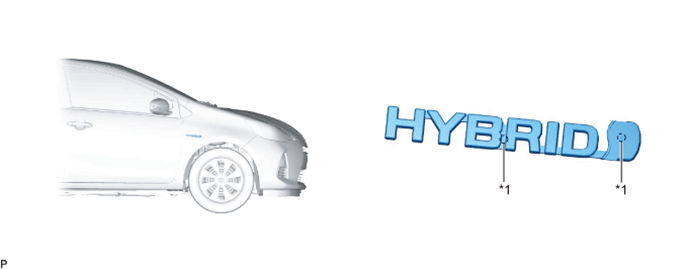
5. INSTALL SIDE PANEL EMBLEM (for RH Side)
  1. Clean the vehicle body surface.

    1. Using a heat light, heat the vehicle body surface.

    2. Remove the double-sided tape from the vehicle body.

    3. Wipe off any tape adhesive residue with cleaner.

  1. Clean the side panel emblem. (If reusing the side panel emblem)

    1. Using a heat light, heat the side panel emblem.

    2. Remove the double-sided tape from the side panel emblem.

    3. Wipe off any tape adhesive residue with cleaner.

    4. Apply new double-sided tape to the side panel emblem.


  1. Install the side panel emblem.

    1. Using a heat light, heat the vehicle body and side panel emblem.

    2. Remove the release paper from the side panel emblem.

      HINT:
      After removing the release paper, keep the exposed adhesive free from foreign matter.


    3. Install the side panel emblem as shown in the illustration.


      B307371E01


      Text in Illustration 
      *1
      Location Pin
      -
      -