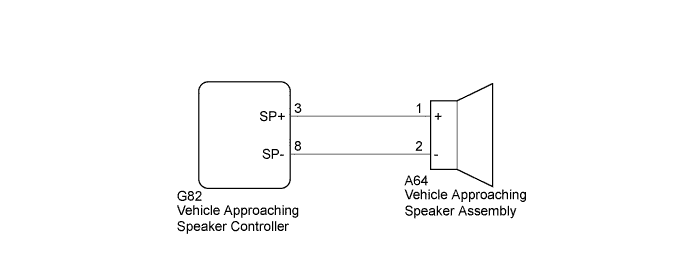
DTC B1350 Speaker Circuit |
| DTC No. | DTC Detection Condition | Trouble Area |
| B1350 | Either of the following conditions is met:
|
|
| 1.CHECK HARNESS AND CONNECTOR (VEHICLE APPROACHING SPEAKER CONTROLLER - VEHICLE APPROACHING SPEAKER ASSEMBLY) |
Disconnect the G82 vehicle approaching speaker controller connector.
Disconnect the A64 vehicle approaching speaker assembly connector.
Measure the resistance according to the value(s) in the table below.
| Tester Connection | Condition | Specified Condition |
| G82-3 (SP+) - A64-1 (+) | Always | Below 1 Ω |
| G82-8 (SP-) - A64-2 (-) | Always | Below 1 Ω |
| G82-3 (SP+) or A64-1 (+) - Body ground | Always | 10 kΩ or higher |
| G82-8 (SP-) or A64-2 (-) - Body ground | Always | 10 kΩ or higher |
|
| ||||
| OK | |
 |
| 2.INSPECT VEHICLE APPROACHING SPEAKER CONTROLLER |
Reconnect the G82 vehicle approaching speaker controller connector.
Connect the Techstream to the DLC3.
Turn the ignition switch on (IG).
Turn the Techstream on.
Enter the following menus: Body Electrical / Vehicle Proximity Notification System / Active Test.
Perform the Active Test according to the display on the Techstream.
| Tester Display | Test Part | Control Range | Diagnostic Note |
| Proximity Sound (Vehicle Stationary) | Proximity sound (Vehicle stationary) | OFF or ON | Produces warning sound when vehicle is stopped |
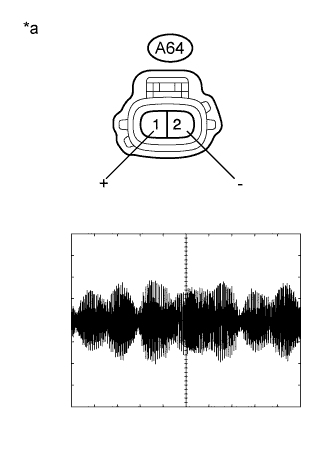 |
Check the signal waveform according to the condition(s) in the table below.
| Item | Condition |
| Tool setting | 1 V/DIV., 200 ms./DIV. |
| Vehicle condition | Vehicle approaching speaker operating |
| *a | Front view of wire harness connector (to Vehicle Approaching Speaker Assembly) |
|
| ||||
| OK | |
|
| 3.INSPECT VEHICLE APPROACHING SPEAKER ASSEMBLY |
Remove the vehicle approaching speaker assembly (Click here).
Inspect the vehicle approaching speaker assembly (Click here).
|
| ||||
| OK | ||
 | ||
| ||
