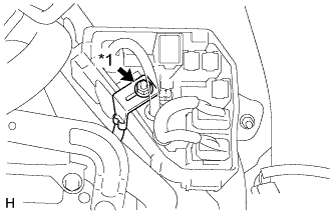
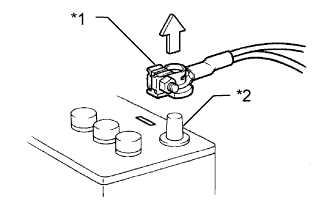
Before inspecting the high-voltage system or disconnecting the low voltage connector of the inverter with converter assembly, take safety precautions such as wearing insulated gloves and removing the service plug grip to prevent electrical shocks. After removing the service plug grip, put it in your pocket to prevent other technicians from accidentally reconnecting it while you are working on the high-voltage system.
- NOTICE:
- After turning the ignition switch off, waiting time may be required before disconnecting the cable from the negative (-) auxiliary battery terminal. Therefore, make sure to read the disconnecting the cable from the negative (-) auxiliary battery terminal notices before proceeding with work (Click here).
- After removing the service plug grip, turning the ignition switch to ON (READY) may cause a malfunction. Do not turn the ignition switch to ON (READY) unless instructed by the repair manual.
After disconnecting the service plug grip, wait for at least 10 minutes before touching any of the high-voltage connectors or terminals.
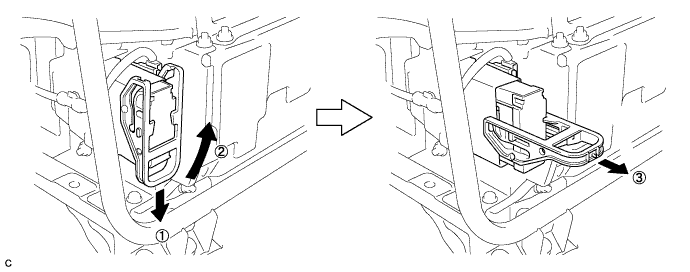
- HINT:
- Waiting for at least 10 minutes is required to discharge the high-voltage capacitor inside the inverter with converter assembly.
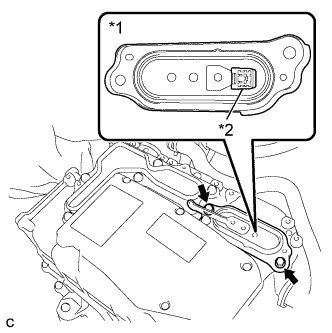
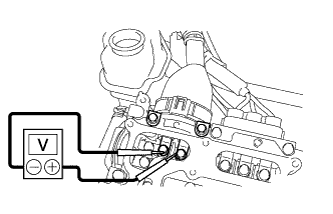
Check the voltage at the terminals in the inspection point in the inverter with converter assembly.
- CAUTION:
- Be sure to wear insulated gloves.
- NOTICE:
- Do not allow any foreign matter or water to enter the inverter with converter assembly.
Remove the 2 bolts and inverter terminal cover (Click here).
Text in Illustration *1 Inverter Terminal Cover *2 Interlock Connector - CAUTION:
- An interlock connector is installed to the inverter terminal cover. Make sure to remove the inverter terminal cover before removing the inverter cover.
- NOTICE:
- Make sure to pull the inverter cover straight up, as a connector is connected to the bottom of the cover.
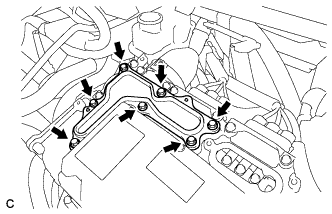
Remove the 7 bolts and inverter cover.
- CAUTION:
- An interlock connector is installed to the inverter terminal cover. Make sure to remove the inverter terminal cover before removing the inverter cover.
Measure the voltage according to the value(s) in the table below.
- Standard Voltage:
Tester Connection Condition Specified Condition Inspection point 10 minutes passed after removing the service plug 0 V
- HINT:
- Set the tester to DC 750 V or more to measure the voltage.
 |
 |
 |
When turning the ignition switch to ON (IG) during inspections, do not press the ignition switch with the brake pedal depressed.
- CAUTION:
- Turning the ignition switch with the brake pedal depressed causes the system to enter the READY-on state. This is very dangerous because high voltage may be applied to the inspection area.
Turn the ignition switch off, wear insulated gloves, and disconnect the cable from the negative (-) terminal of the auxiliary battery before touching any of the orange-colored wires of the high-voltage system.
- NOTICE:
- After turning the ignition switch off, waiting time may be required before disconnecting the cable from the negative (-) auxiliary battery terminal. Therefore, make sure to read the disconnecting the cable from the negative (-) auxiliary battery terminal notices before proceeding with work (Click here).
Turn the ignition switch off before performing any resistance checks.
Turn the ignition switch off before disconnecting or reconnecting any connectors.
When performing work involving high-voltage wires, use either a tool wrapping with vinyl insulation tape or a insulated tool.
When high-voltage connectors are removed, wrap the connectors with insulation tape to prevent them from contacting foreign matter.