Home › Audio / Visual / Telematics › NAVIGATION / MULTI INFO DISPLAY › NAVIGATION SYSTEM (for HDD)

NAVIGATION SYSTEM (for HDD) > Cursor or Map Rotates when Vehicle Stopped

for Preparation Click here


INSPECTION PROCEDURE

1.CHECK CONDITION


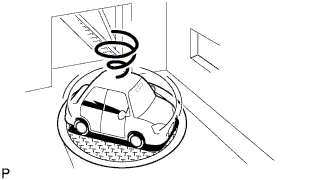
    E106418
  1. Check with the customer if the vehicle has been turned by a turntable.

    OK:
    Vehicle has not been turned by turntable.

    HINT:
    If the vehicle is turned on a turntable with the power switch on (IG), the system may store the angular velocity. As a result, the vehicle position cursor may deviate.


NG
TURN POWER SWITCH TO ON (IG) WHEN VEHICLE IS COMPLETELY STOPPED
OK

PROCEED TO NEXT SUSPECTED AREA SHOWN IN PROBLEM SYMPTOMS TABLE (Click here)