HV BATTERY THERMISTOR > INSTALLATION |
| 1. INSTALL HYBRID BATTERY THERMISTOR |
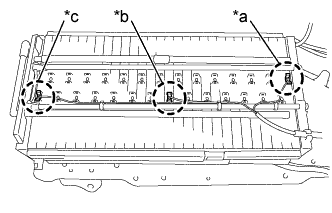
Install the sensor portions of the hybrid battery thermistor in the locations shown in the illustration.
![]() |
Engage the 2 claws of each hybrid battery thermistor sensor portion to the positioning holes of the battery module.
| *a | 1st module from the hybrid junction block side. (Wire harness color: White) |
| *b | 14th module from the hybrid junction block side. (Wire harness color: Black) |
| *c | 28th module from the hybrid junction block side. (Wire harness color: Blue) |
![]() |
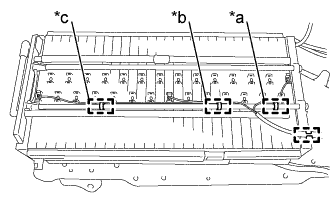
Engage the 4 clamps in the locations shown in the illustration.
| *a | 3rd module from the hybrid junction block side. |
| *b | 9th module from the hybrid junction block side. |
| *c | 21st module from the hybrid junction block side. |
| 2. INSTALL UPPER HYBRID BATTERY COVER SUB-ASSEMBLY |
Install the upper hybrid battery cover sub-assembly and No. 1 hybrid battery shield sub-assembly with the 3 bolts and 8 nuts.
| 3. INSTALL NO. 4 HYBRID VEHICLE BATTERY CARRIER BRACKET SUB-ASSEMBLY |
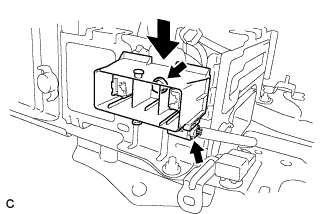
Install the HV battery thermistor to the No. 4 hybrid vehicle battery carrier bracket sub-assembly.
Install the No. 4 hybrid vehicle battery carrier bracket sub-assembly with the 3 bolts.
Connect the 3 wire harness clamps.
| 4. INSTALL NO. 1 HYBRID VEHICLE BATTERY CARRIER BRACKET SUB-ASSEMBLY |
![]() |
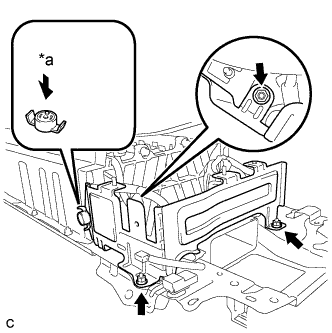
Install the No. 1 hybrid vehicle battery carrier bracket sub-assembly with the 3 nuts.
| *a | Push |
Install the battery cover lock striker, then push the button to lock it.
![]() |
Install the electric vehicle battery plug assembly with the bolt as shown in the illustration.
Connect the connector.
| 5. INSTALL BATTERY SMART UNIT |