 |
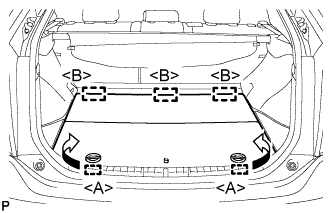
Disengage the 2 guides <A> as shown in the illustration.
AIRBAG CUT-OFF SWITCH > REMOVAL |
| 1. PRECAUTION |
| 2. REMOVE REAR NO. 2 FLOOR BOARD |
|
Disengage the 2 guides <A> as shown in the illustration.
Disengage the 3 guides <B> and remove the rear No. 2 floor board.
| 3. REMOVE REAR DECK FLOOR BOX |
Remove the rear deck floor box.
| 4. REMOVE REAR NO. 3 FLOOR BOARD |
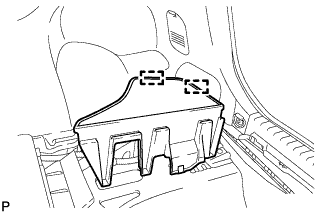 |
Disengage the 2 guides and remove the rear No. 3 floor board.
| 5. DISCONNECT CABLE FROM NEGATIVE BATTERY TERMINAL |
| 6. REMOVE INSTRUMENT PANEL FINISH PANEL END RH |
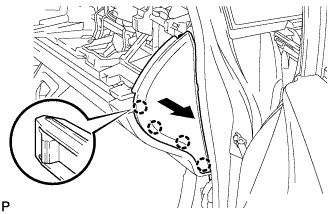 |
Pull the instrument panel finish panel end RH in the direction indicated by the arrow to disengage the 4 claws.
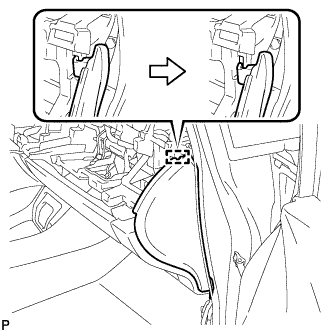 |
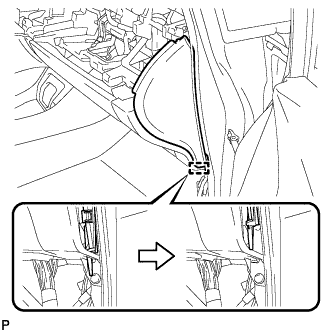
Disengage the guide as shown in the illustration.
 |
w/o Airbag Cut Off Switch:
Disengage the guide and remove the instrument panel finish panel end RH as shown in the illustration.
w/ Airbag Cut Off Switch:
Disengage the guide.
Disconnect the connector and remove the instrument panel finish panel end RH as shown in the illustration.
| 7. REMOVE AIRBAG CUT-OFF SWITCH CYLINDER SUB-ASSEMBLY |
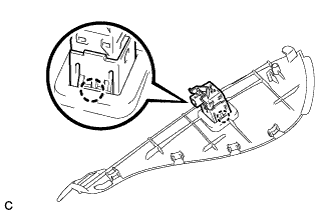 |
Disengage the 2 claws to remove the airbag cut-off switch cylinder sub-assembly.