 |
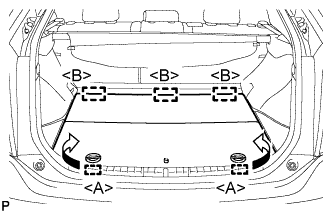
Disengage the 2 guides <A> as shown in the illustration.
AUXILIARY BATTERY > REMOVAL |
| 1. REMOVE REAR NO. 2 FLOOR BOARD (for Separate Type) |
|
Disengage the 2 guides <A> as shown in the illustration.
Disengage the 3 guides <B> and remove the rear No. 2 floor board.
| 2. REMOVE REAR DECK FLOOR BOX |
Remove the rear deck floor box.
| 3. REMOVE REAR NO. 3 FLOOR BOARD |
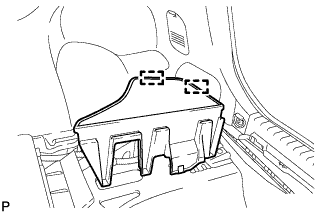 |
Disengage the 2 guides and remove the rear No. 3 floor board.
| 4. DISCONNECT CABLE FROM AUXILIARY BATTERY NEGATIVE TERMINAL |
| 5. REMOVE AUXILIARY BATTERY |
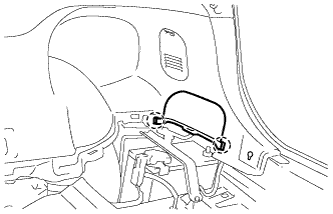 |
Disengage the 2 claws and remove the rear upper No. 3 floor board plate.
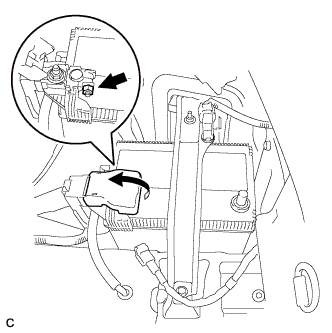 |
Open the battery terminal cap.
Loosen the nut, and disconnect the positive (+) battery terminal.
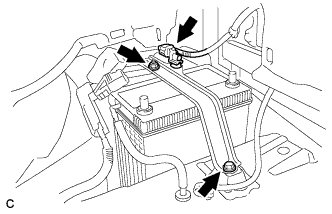 |
Remove the nut and bolt.
Remove the battery thermometer sensor connector.
Remove the battery clamp.
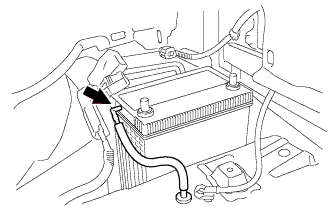 |
Disconnect the battery ventilation hose.
Remove the auxiliary battery.