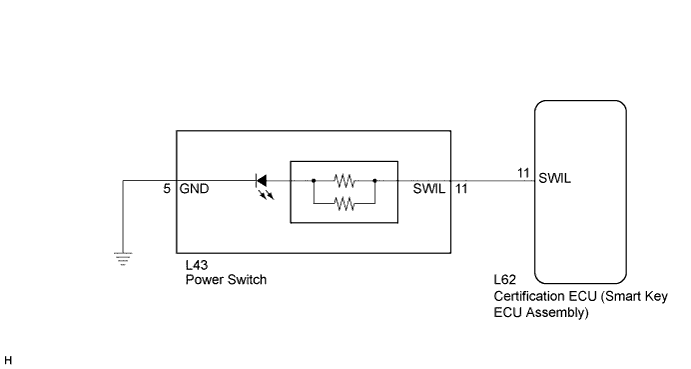
LIGHTING SYSTEM > Power Switch Illumination Circuit |
| 1.PERFORM ACTIVE TEST USING TECHSTREAM |
Connect the Techstream to the DLC3.
Turn the power switch on (IG).
Turn the Techstream on.
Enter the following menus: Body Electrical / Smart Key / Active Test.
Check that the illumination operates.
| Tester Display | Test Part | Control Range | Diagnostic Note |
| Power/Engine SW Light | Power switch illumination | ON/OFF | All doors closed |
|
| ||||
| OK | ||
 | ||
| ||
| 2.INSPECT POWER SWITCH |
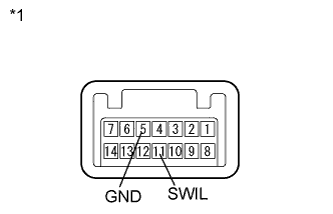 |
Remove the power switch (Click here).
Connect a positive (+) lead from the battery to terminal 11 and a negative (-) lead to terminal 5.
Check that the illumination comes on.
| *1 | Component without harness connected (Power Switch) |
|
| ||||
| OK | |
 |
| 3.CHECK HARNESS AND CONNECTOR (POWER SWITCH - CERTIFICATION ECU AND BODY GROUND) |
Disconnect the L62 certification ECU (smart key ECU assembly) connector.
Disconnect the L43 power switch connector.
Measure the resistance according to the value(s) in the table below.
| Tester Connection | Condition | Specified Condition |
| L43-11 (SWIL) - L62-11 (SWIL) | Always | Below 1 Ω |
| L43-11 (SWIL) - Body ground | Always | 10 kΩ or higher |
| L43-5 (GND) - Body ground | Always | Below 1 Ω |
|
| ||||
| OK | ||
| ||
| ||

