| B |  |
| Go to step 4 |
NAVIGATION SYSTEM (for Navigation Receiver Type) > Traffic Information is not Displayed |
| 1.CHECK DISPLAY |
Check the traffic information screen.
| Result | Proceed to |
| Traffic information is displayed but is not updated | A |
| Traffic information is not displayed | B |
|
| ||||
| A | |
 |
| 2.CHECK DISPLAY AGAIN |
Wait for 2.5 minutes, and check again if the actual traffic conditions match the display.
|
| ||||
| OK | ||
 | ||
| ||
| 3.CHECK DISPLAY AGAIN |
After 30 minutes have passed, check if all traffic information disappears.
| Result | Proceed to |
| Actual traffic conditions match display. | A |
| All traffic information disappears. | B |
| Some traffic information is wrong. | C |
|
| ||||
|
| ||||
| A | ||
| ||
| ||
| 4.CHECK SETTINGS OF TRAFFIC INFORMATION |
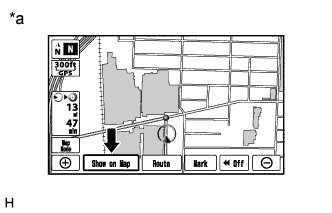 |
Press "Show on Map".
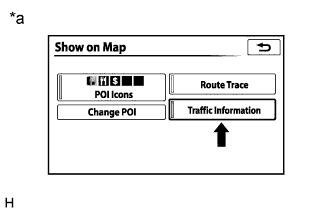 |
Check if "Traffic Information" is on.
| *a | Example |
|
| ||||
| OK | |
|
| 5.CHECK SCALE OF MAP DISPLAY |
Check if the traffic information that is currently not displayed can be displayed at the scale shown in the table below.
| Traffic Information to be Displayed | Display Scale |
| Traffic information list | 1:1280000 or below |
| Traffic information icon (Closed Road, Accidents, Danger, Road Conditions, Road Works, Weather) | 1:640000 or below |
| Traffic information icon (Stationary Traffic Jam, Delays, Parking, Other) | 1:80000 or below |
|
| ||||
| OK | ||
| ||
| ||
| 6.CHECK SURROUNDINGS |
Check if the vehicle is in an environment where reception is difficult due to something blocking the area above the vehicle.
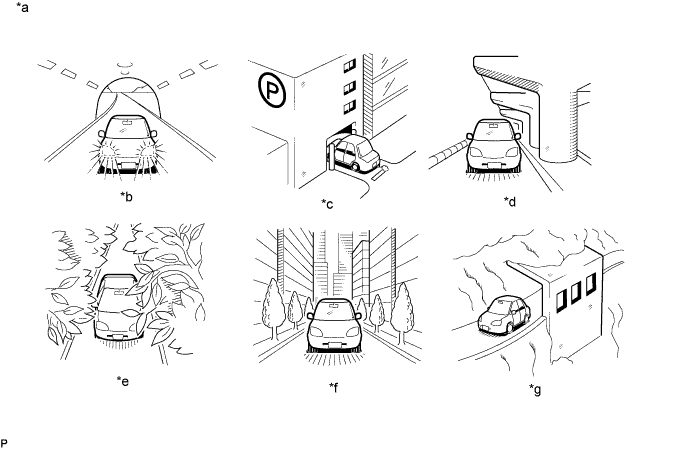
| *a | Example | *b | In a tunnel |
| *c | In a building | *d | Under an overpass |
| *e | On a forest or tree-lined path | *f | Between tall buildings |
| *g | Under a cliff or overhang | - | - |
|
| ||||
| OK | |
|
| 7.CHECK COVERAGE AREA |
Check that your current position is within the traffic information coverage area.
|
| ||||
| OK | |
|
| 8.CHECK CONTRACT CONDITIONS |
Check if the "XM Nav Traffic" contract has been extended, or if the contract period has ended.
|
| ||||
| OK | |
|
| 9.PERFORM ACTIVATION REFRESH |
Perform activation refresh by referring to the satellite radio company web site (http://www.xmradio.com/refresh/).
|
| ||||
| OK | ||
| ||
| ||
