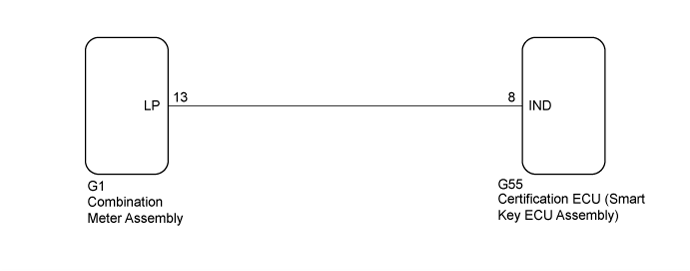
ENGINE IMMOBILISER SYSTEM > Security Indicator Light Does not Blink |
| 1.PERFORM ACTIVE TEST USING INTELLIGENT TESTER (SECURITY INDICATOR LIGHT) |
Connect the intelligent tester to the DLC3.
Turn the power switch on (IG).
Turn the intelligent tester on.
Enter the following menus: Body / Entry&Start / Active Test.
Perform the Active Test according to the display on the intelligent tester.
| Tester Display | Test Part | Control Range | Diagnostic Note |
| Immobiliser Indicator | Security indicator light | OFF/ON | - |
|
| ||||
| OK | ||
 | ||
| ||
| 2.CHECK HARNESS AND CONNECTOR (SECURITY INDICATOR LIGHT (COMBINATION METER ASSEMBLY) - CERTIFICATION ECU (SMART KEY ECU ASSEMBLY)) |
Disconnect the G1 combination meter assembly connector.
Disconnect the G55 certification ECU (smart key ECU assembly) connector.
Measure the resistance according to the value(s) in the table below.
| Tester Connection | Condition | Specified Condition |
| G55-8 (IND)- G1-13 (LP) | Always | Below 1 Ω |
| G55-8 (IND) - Body ground | Always | 10 kΩ or higher |
|
| ||||
| OK | |
 |
| 3.CHECK CERTIFICATION ECU (SMART KEY ECU ASSEMBLY) |
Reconnect the G55 certification ECU (smart key ECU assembly) connector.
Measure the voltage and check the pulse according to the value(s) in the table below.
| Tester Connection | Condition | Specified Condition |
| G1-13 (LP) - Body ground | Power switch off → power switch on (IG) | Pulse generation → Below 2 V |
|
| ||||
| OK | ||
| ||
| ||

