 |
Temporarily install the 2 wheel nuts.
 | Expand |
PARKING BRAKE SYSTEM > ADJUSTMENT |
| 1. ADJUST REAR DRUM BRAKE SHOE CLEARANCE |
|
Temporarily install the 2 wheel nuts.
| Expand |
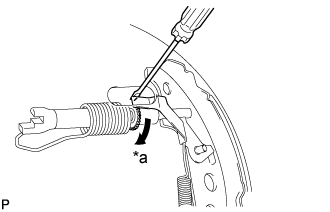
Remove the shoe adjusting hole plug, and turn the adjuster to expand the shoe until the drum locks.
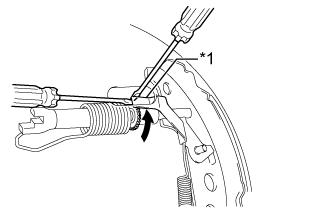 |
Hold the automatic adjust lever away from the adjuster, and contract the brake shoe by turning the adjust bolt using another screwdriver until the drum can rotate smoothly.
| *1 | Automatic Adjust Lever |
| Contract |
Install the hole plug.
| 2. INSPECT PARKING BRAKE LEVER TRAVEL |
Firmly pull the parking brake lever.
Release the parking brake lever lock and return it to its off position.
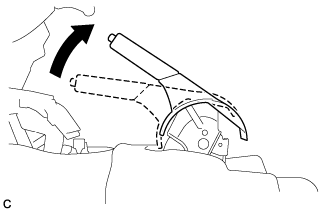 |
Slowly pull the parking brake lever to the fully applied position, counting the number of clicks.
| 3. ADJUST PARKING BRAKE LEVER TRAVEL |
Release the parking brake lever lock and return it to its off position.
Remove the rear console box (Click here).
Remove the No. 1 console box mounting bracket .
Remove the No. 3 console box mounting bracket .
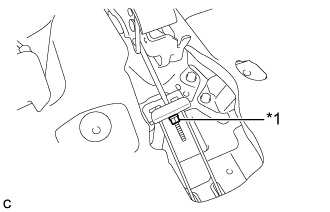 |
Turn the lock nut until the parking brake lever travel is corrected to within the specified range.
| *1 | Lock nut |
Operate the parking brake lever 3 to 4 times, and check the parking brake lever travel.
Check that the parking brake does not drag.
Install the No. 3 console box mounting bracket .
Install the No. 1 console box mounting bracket .
Install the rear console box (Click here).
| 4. INSPECT BRAKE WARNING LIGHT |
When operating the parking brake lever, check that the brake warning light illuminates.