 |
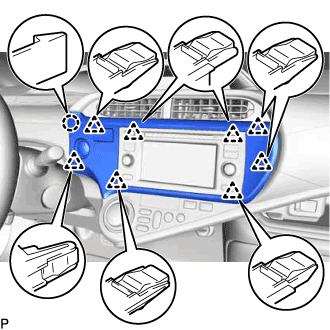
Engage the claw and 8 clips to install the center instrument cluster finish panel sub-assembly.
POWER SWITCH > INSTALLATION |
| 1. INSTALL POWER SWITCH (for RHD) |
Connect the power switch connector.
Engage the 2 claws to install the power switch.
| 2. INSTALL UPPER INSTRUMENT PANEL ASSEMBLY (for RHD) |
| 3. INSTALL POWER SWITCH (for LHD) |
Connect the power switch connector.
Engage the 2 claws to install the power switch.
| 4. INSTALL CLUSTER INSTRUMENT CLUSTER FINISH PANEL SUB-ASSEMBLY (for LHD) |
|
Engage the claw and 8 clips to install the center instrument cluster finish panel sub-assembly.
| 5. CONNECT CABLE TO NEGATIVE AUXILIARY BATTERY TERMINAL (for LHD) |
| 6. INSTALL FRONT FLOOR COVER RH (for LHD) |
Engage the 3 guides.
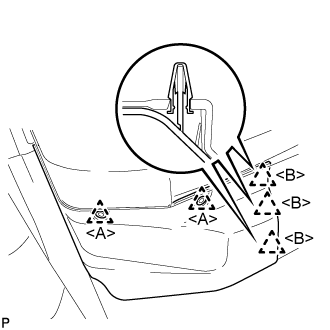 |
Engage the clip <B> to install the front floor cover RH.
Install the 2 clips <A>.