METER / GAUGE / DISPLAY METER / GAUGE SYSTEM DETAILS COMBINATION METER
FUNCTION
Buzzer
The table below shows the warning and reminder functions of the buzzer in the combination meter assembly.
| Priority | Item |
|---|---|
|
*1: Models with simple intelligent parking assist system *2: Models with lane departure alert system *3: Models for G. C. C. countries *4: Models with dynamic radar cruise control system |
|
| 1 | READY |
| 2 | Simple Advanced Parking Guidance System (2 times: Pattern 1)*1 |
| 3 | Simple Advanced Parking Guidance System (Once: Pattern 1)*1 |
| 4 | Simple Advanced Parking Guidance System (2 times: Pattern 2)*1 |
| 5 | Simple Advanced Parking Guidance System (Once: Pattern 2)*1 |
| 6 | Simple Advanced Parking Guidance System (Once: Pattern 3)*1 |
| 7 | Reverse Warning (Intermittent) |
| 8 | Reverse Warning (Once) |
| 9 | Accelerator Depression with P Position |
| 10 | Entry and Start System Warning 1 (Intermittent) |
| 11 | P Position Select Advice |
| 12 | Door Open when Shift not in P Warning |
| 13 | Front Seat Belt Warning (Level 2) |
| 14 | Rear Seat Belt Warning |
| 15 | Front Seat Belt Warning (Level 1) |
| 16 | Brake Force Reduction Warning |
| 17 | Brake Fluid Low Warning |
| 18 | EPS Warning |
| 19 | Emergency Stop Warning |
| 20 | Unexpected Vehicle Motion Warning*2 |
| 21 | Accelerator Depression with N Position |
| 22 | Accelerator Depression Hold Warning |
| 23 | Towing Prohibition Notification |
| 24 | Parking Brake Engaged Warning |
| 25 | HV Battery Low Warning (SOC: 18 %) |
| 26 | Sway Warning*2 |
| 27 | Brake System Temperature Warning/Active Test |
| 28 | Speed Limit Exceed Warning*3 |
| 29 | Speed Limit Exceed Warning (Full-speed Range Following Function)*4 |
| 30 | Hybrid System Warning (Continuous) |
| 31 | Hybrid System Warning (Intermittent: 0.2 seconds cycle) |
| 32 | Hybrid System Warning (Intermittent: 0.4 seconds cycle) |
| 33 | Hybrid System Warning (Intermittent: 0.7 seconds cycle) |
| 34 | Hybrid System Warning (Intermittent: 1.2 seconds cycle) |
| 35 | Hybrid System Warning (Once) |
| 36 | Engine Oil Pressure Warning |
| 37 | Entry and Start System Warning 2 (Intermittent) |
| 38 | HV Battery Low Warning (SOC: 25 %) |
| 39 | Lane Departure Alert System Warning*2 |
| 40 | Hybrid System Start while Driving Notice |
| 41 | Shift Reject Warning |
| 42 | EV Driving Mode Reject Warning |
| 43 | Low Speed Zone Leading Vehicle Lost Warning*4 |
| 44 | P Position Select Advice When Dynamic Radar Cruise Control Operating*4 |
| 45 | Low Speed Zone Leading Vehicle Lost Warning*4 |
| 46 | Lane Departure Alert System Cancel Warning*2 |
| 47 | EPS Warning (Once) |
| 48 | Hybrid Unit Overheat Warning |
| 49 | Hands off Steering Wheel Warning*2 |
| 50 | Multi-information Display Warning |
| 51 | HV Battery Diagnosis Request Notification |
| 52 | Brake System Temperature Warning/Active Test |
| 53 | N Position Select Notice |
| 54 | Entry and Start System Warning (Once) |
| 55 | Immobiliser Certification Reminder |
| 56 | Turn Signal/Hazard Warning Operation |
Multi-information Display
Display Function Flow
The multi-information display can be switched as shown in the flow chart below:
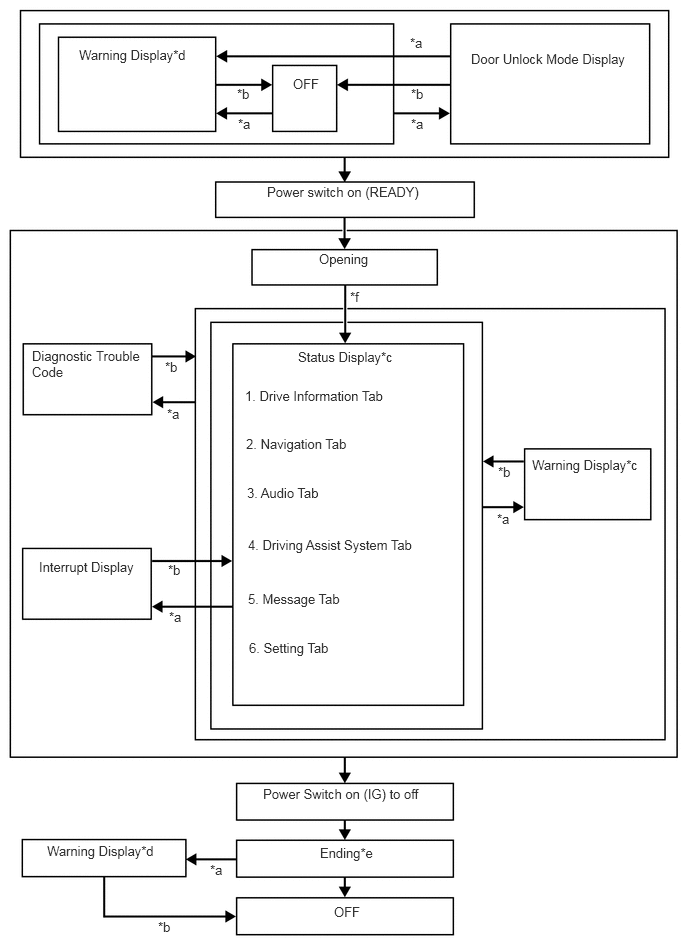
| Item | Display Change Condition |
|---|---|
| *a | Conditions are met. |
| *b | Conditions are not met. |
| *c | Item or display is selected by operating the steering pad switch. |
| *d | If there are multiple display requests, items will be displayed in sequence. |
| *e | Odometer, elapsed time (After start), distance (after start), average fuel consumption (after start) and eco score result are displayed. |
| *f | After power switch is turned on (IG) |
Display Tab Operation
The information currently displayed can be switched using the RIGHT/LEFT switch of the steering pad switch assembly.
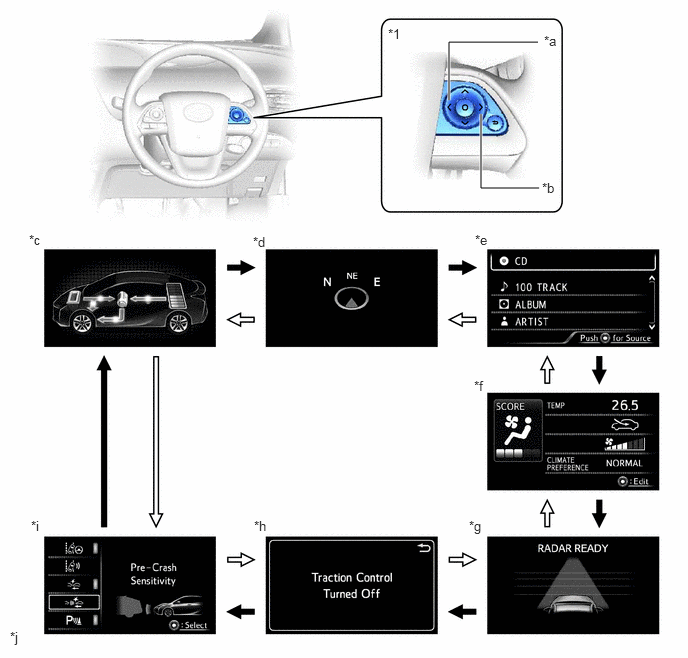
| *1 | Steering Pad Switch Assembly | - | - |
| *a | LEFT Switch | *b | RIGHT Switch |
| *c | Drive Information | *d | Navigation Information |
| *e | Audio Information | *f | Air Conditioning System Information |
| *g | Driving Assist System Information | *h | Message |
| *i | Settings | *j | The illustrations shown are examples only. |

|
LEFT switch operation | 
|
RIGHT switch operation |
Drive Information
The drive information tab shows vehicle information such as drivable range and fuel consumption.
The drive information display can be changed using the UP/DOWN switch of the steering pad switch assembly.
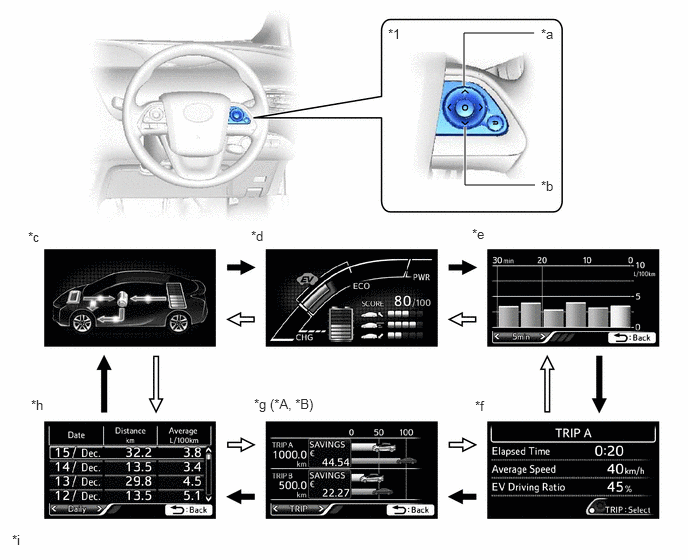
| *A | Except Models for G.C.C. Countries | *B | Except Destination Package for South Korea |
| *1 | Steering Pad Switch Assembly | - | - |
| *a | UP Switch | *b | DOWN Switch |
| *c | Energy Monitor | *d | Hybrid System Indicator/State Of Charge/Eco Score |
| *e | Fuel Consumption Record | *f | Drive Monitor |
| *g | Eco Savings | *h | Eco Diary |
| *i | The illustrations shown are examples only. | - | - |
|
|
UP switch operation |
|
DOWN switch operation |
| Item | Outline |
|---|---|
| Energy Monitor | ·
Displays the energy flow in the form of an arrow. ·
Engine to Tire ·
Engine to Motor ·
Motor to Tire ·
Tire to Motor ·
Motor to Battery ·
Battery to Motor ·
Displays the State Of Charge (SOC) of the HV battery in 8 levels. |
| Hybrid System Indicator/State Of Charge/Eco Score | Hybrid System Indicator
·
Displays the total of the HV battery and engine output as the hybrid system output. |
| State Of Charge
·
Displays the State Of Charge (SOC) of the HV battery in 8 levels. |
|
| Eco Score
·
Displays the driving score in each category (Eco-Start, Eco-Cruise or Eco Stop) to support eco driving. ·
SCORE: Displays an overall score out of 100 which is calculated based on the result of Eco-Start, Eco-Cruise and Eco Stop. ·
Eco-Start: Evaluates acceleration from when the vehicle starts off to when it reaches a constant speed, and shows the result in the bar graph. ·
Eco-Cruise: Evaluates constant speed driving and shows the result in the bar graph. ·
Eco Stop: Evaluates deceleration from constant speed driving to vehicle stop and shows the result in the bar graph. ·
Starting the vehicle off resets the eco score result. ·
When the power switch is turned off, displays the total eco score results. |
|
| Fuel Consumption Record | ·
Displays a value that has been calculated by the combination meter based on the distance driven and the volume of fuel consumed. ·
The following items can be displayed. ·
Fuel consumption per 5 minutes ·
Fuel consumption per 1 km ·
Fuel consumption per 5 km ·
Fuel consumption per month ·
The item shown can be changed using the steering pad switch. |
| Drive Monitor | ·
The following information can be displayed for TRIP A, TRIP B, after start or after reset: ·
Elapsed Time ·
Average Speed ·
EV Driving Ratio ·
The information shown (TRIP A, TRIP B, after start or after reset) can be changed using the TRIP switch. |
| Eco Saving | ·
Displays the consumed fuel cost and reduced fuel cost compared to the target vehicle information set by the user. ·
The fuel price and target vehicle fuel efficiency value for eco saving calculation, can be changed via the settings. ·
Displays monthly eco saving or TRIP A and TRIP B eco saving. ·
The eco saving for TRIP A and TRIP B and monthly can be changed using the steering pad switch. |
| Eco Diary | ·
Displays daily or monthly travel distance and fuel consumption. ·
Daily or monthly can be selected using the steering pad switch. |
Setting Function
The items displayed on the multi-information display can be customized.
The following items can be selected on the information setting screen.
| Item | Available Setting |
|---|---|
| Steering Assist | Setting for lane center can be set to on/off: ·
On ·
Off |
| Warning Sensitivity | Alert sensitivity of alert system can be changed: ·
High ·
Normal |
| Item | Available Setting |
|---|---|
| PCS | The pre-crash safety system can be set to on/off: ·
On ·
Off |
| Pre-crash warning timing | The pre-crash warning timing can be selected: ·
Far (Icon is displayed) ·
Middle (Icon is displayed) ·
Near (Icon is displayed) |
| Item | Available Setting |
|---|---|
| TOYOTA Parking Assist-sensor System | The TOYOTA parking assist-sensor system can be set to on/off: ·
ON ·
OFF |
| Item | Available Setting |
|---|---|
| Intelligent Clearance Sonar System | The intelligent clearance sonar system can be set to on/off: ·
ON ·
OFF |
| Item | Available Setting |
|---|---|
| BSM | The blind spot monitor system can be set to on/off: ·
ON ·
OFF |
| Item | Available Setting |
|---|---|
| Unsteady Driving Detection | Unsteady driving detection sensitivity can be selected: ·
On ·
Off |
| Unsteady Driving Detection Sensitivity | Unsteady driving detection sensitivity can be selected: ·
High ·
Medium ·
Low |
| Item | Available Setting |
|---|---|
| Display Brightness/Position | ·
The brightness and position of the headup display image can be changed: ·
When changing the brightness of the headup display image, press the RIGHT or LEFT switch of the steering pad switch assembly. ·
When changing the position of the headup display image, press the UP or DOWN switch of the steering pad switch assembly. |
| Item | Available Setting |
|---|---|
| Road Sign Assist | The road sign assist can be set to on/off: ·
ON ·
OFF |
| Item | Available Setting |
|---|---|
| Unit | The unit displayed on the multi-information display can be selected: ·
MPH ·
km/h |
| Brightness | ·
The brightness and position of the combination meter can be changed. ·
When changing the brightness of combination meter, press the RIGHT or LEFT switch of the steering pad switch assembly. |
| Clock | Select to adjust clock of the combination meter. |
| On the hour setting | ·
Sets the minute display to "00" via the enter switch on the steering pad switch.
|
| Item | Available Setting |
|---|---|
| Simple/Split Screen | The type of main display can be selected: ·
Simple ·
Split |
| Screen OFF | The multi-information display can be turned off: ·
Yes ·
No |
| HV System Indicator | The ECO accelerator guidance can be turned on or off: ·
Yes ·
No |
The EV indicator light can be turned on or off: ·
On ·
Off |
|
| Pop-up Display On/Off | The following pop-up display can be turned on or off: ·
Navigation ·
Instrument Panel Light ·
Gasoline Price ·
Climate Settings ·
Cruise Control Operation Display ·
HUD Settings ·
Driving Mode Select |
| Speed Limit | The type of speed limit alert can be selected. ·
OFF ·
Only Display ·
With Caution |
| Language | The language used on the multi-information display can be selected: ·
English ·
French ·
Spanish ·
Germany ·
Italian ·
Russian ·
Turkish |
| Calendar | Date, month and year can be set. |
| Eco Savings | Gasoline Price
·
The Gasoline Price can be set. |
| COMP. Consumption
·
The COMP. Consumption can be set. |
|
| History Reset | The following history can be reset: ·
Monthly Fuel Consumption ·
Eco Savings (Monthly) ·
Eco-Diary (Daily) ·
Eco-Diary (Monthly) |
| Initialization | The set items can be initialized. |
| Item | Available Setting |
|---|---|
| TPMS | The tire pressure warning system can be reset |
| Route Guidance | The route guidance of headup display can be set to on/off: ·
ON ·
OFF |
| Method Notification | Excess Speed Notification
·
The excess speed notification of road sign assist settings can be changed: ·
No Notification ·
Only Visual ·
Visual & Audible |
| Other Notification
·
The notification of road sign assist (except excess speed notification) settings can be set: ·
No Notification ·
Only Visual ·
Visual & Audible |
|
| Unlock on Second Key Turn | The unlock on second key turn setting can be changed: ·
On ·
Off |
| Remote 2-Press Unlock | The Remote 2-Press unlock setting can be changed: ·
On ·
Off |
| Wireless Lock When Door Opened | The Wireless lock when door opened can be turned on or off: ·
On ·
Off |
| Select Doors to Unlock | The target of the select doors to unlock can be changed: ·
All Doors ·
Each Door ·
Driver's Door ·
Side Doors |
| Key System with Elec. Key | The entry and start system can be turned on or off: ·
On ·
Off |
| Auto Relock Timer | The auto relock timer setting can be changed: ·
Off ·
30 sec. ·
60 sec. ·
120 sec. |
| Lock/Unlock Feedback-Lights | The lock/unlock feedback-lights can be turned on or off: ·
On ·
Off |
| Lock/Unlock Feedback-Tone | The lock/unlock feedback-tone volume can be changed: ·
7 ·
6 ·
5 ·
4 ·
3 ·
2 ·
1 ·
Off |
| Auto A/C Mode | The auto A/C mode can be turned on or off: ·
On ·
Off |
| Efficient Ventilation Mode | The efficient ventilation mode can be turned on or off: ·
On ·
Off |
| Headlamps-On Sensitivity | The automatic light control sensor sensitivity can be changed: ·
-2 ·
-1 ·
0 ·
+1 ·
+2 |
| Headlamps Auto-Off Timer | The light auto turn-off control setting can be changed: ·
Off ·
30 sec. ·
60 sec. ·
90 sec. |
| Daytime Running Lights | The daytime running light system can be turned on or off: ·
On ·
Off |
| Interior Lights Off Timer | The interior lights off timer setting can be changed: ·
30 sec. ·
15 sec. ·
7.5 sec. ·
Off |
| Light Sensor Sensitivity for Dimming | The light sensor sensitivity for dimming interior illumination can be changed: ·
-2 ·
-1 ·
0 ·
+1 ·
+2 |
| Light Sensor Sensitivity for Brightening | The light sensor sensitivity for brightening interior illumination can be changed: ·
-2 ·
-1 ·
0 ·
+1 ·
+2 |
Warning Mode Function
When a warning is necessary, the warning display interrupts the current display on the multi-information display.
The master warning light may illuminate or blink and the buzzer in the combination meter assembly may sound depending on the item displayed on the multi-information display.
| Priority | Display | Master Warning Light | Buzzer |
|---|---|---|---|
|
*1: Models with lane departure alert system *2: Models with dynamic radar cruise control system *3: Models with pre-crash safety system *4: Models with intelligent clearance sonar system *5: Models with sliding roof system *6: Models with simple intelligent parking assist system *7: Models with rear crossing traffic alert function *8: Models for G.C.C. countries *9: Models with blind spot monitor system *10: Models with headup display *11: Models with speed limiter system *12: Models with road sign assist system *13: Models with washer fluid warning system |
|||
| 1 | 2WD MAINTENANCE MODE | - | - |
| 2WD CERTIFICATION MODE | - | - | |
| RES-1 | - | - | |
| RES-2 | - | - | |
| RESOLVER-1 NOT ADJUSTED | - | - | |
| RESOLVER-2 NOT ADJUSTED | - | - | |
| ADJUSTING LDA CAMERA*1 | - | - | |
| ADJUSTING FRONT RADAR BEAM*2 | - | - | |
| ADJUSTING FRONT RADAR BEAM ERROR*2 | - | - | |
| ADJUSTING FRONT RADAR BEAM ALONG VERTICAL AXIS*2 | - | - | |
| ADJUSTING FRONT RADAR BEAM ALONG HORIZONTAL AXIS*2 | - | - | |
| ADJUSTING FRONT RADAR BEAM*2 | - | - | |
| CHECKING PRE-CRASH BRAKE*3 | - | - | |
| CHECKING CRUISE CONTROL BRAKE*2 | - | - | |
| Write Zero-Point of Steering Angle | - | - | |
| End of Adjustment | - | - | |
| Memory Error | - | - | |
| BRAKE!*3 | - | - | |
| Push and Hold Power Switch for Emergency Stop | Blinks | Sounds | |
| Shift to N Position and Push Power Switch to Restart | Blinks | Sounds | |
| Hybrid System Stopped Shift to P | Blinks | Sounds | |
| Hybrid System Stopped Stop in a Safe Place | Blinks | Sounds | |
| 2 | Dynamic radar cruise control warning reminder indicator (image display)*2 | - | - |
| Lane departure alert warning reminder indicator (image display)*1 | - | - | |
| Braking Power Low Stop in a Safe Place See Owner's Manual | Blinks | Sounds | |
| Antilock Brake System Malfunction Visit Your Dealer | - | Sounds | |
| Braking Power Low Stop in a Safe Place See Owner's Manual | Blinks | Sounds | |
| Brake!*4 | Blinks | Sounds | |
| Object Detected Acceleration Reduced*4 | Blinks | Sounds | |
| Switch to Brake*4 | Blinks | Sounds | |
| Accelerator Stuck Depress Brake to Stop | Blinks | Sounds | |
| Shift to P Position When Parked | Blinks | Sounds | |
| Hybrid System Failure. Please Refrain From Being Towed | Illuminates | Sounds | |
| Shift to P Position When Parked | Illuminates | Sounds | |
| Moon Roof Opened*5 | Blinks | Sounds | |
| Window opened | Blinks | - | |
| Window / Moon Roof Opened*5 | Blinks | Sounds | |
| 3 | Door open (while driving) (image display) | Blinks | Sounds |
| Door open (image display) | - | - | |
| Parking Assist Malfunction Visit Your Dealer*6 | Illuminates | - | |
| Clearance sonar detection (image display)*4 | - | - | |
| Parking Assist Malfunction*6 | Illuminates | - | |
| Clean Parking Assist Sensor*6 | Illuminates | - | |
| Rear Crossing Traffic*7 | - | - | |
| Simple Intelligent Parking Assist System Display*6
·
Assist Mode Selection ·
Detection of an Empty Parking Space ·
Operation Disabled, Cancellation or Suspension |
- | - | |
| Simple Intelligent Parking Assist System Display*6
·
Parking Assist in Progress ·
Guidance Ends |
- | - | |
| IPA System Check Visit Your Dealer*6 | Illuminates | - | |
| 4 | Auto Power OFF to Conserve Battery | - | - |
| 5 | Shift is in N Release Accelerator Before Shifting | Blinks | Sounds |
| Press Brake When Vehicle is Stopped. Hybrid System may Overheat | Blinks | Sounds | |
| Hybrid Battery Low. Hybrid System Stopped. Shift to P and Restart. | Blinks | Sounds | |
| 6 | Shifted to N Stop Vehicle to Shift to P | Blinks | Sounds |
| Low 12-Volt Battery Apply Parking Brake Securely While Parking See Owner's Manual | Illuminates | Sounds | |
| Shift System Malfunction Apply Parking Brake Securely While Parking See Owner's Manual | Illuminates | Sounds | |
| Shift System Malfunction Shifting Unavailable See Owner's Manual | Illuminates | Sounds | |
| Shift System Malfunction Stop in a Safe Place See Owner's Manual | Illuminates | Sounds | |
| P Switch Malfunction Apply Parking Brake Securely While Parking See Owner's Manual | Illuminates | Sounds | |
| Shift System Malfunction Apply Parking Brake Securely While Parking See Owner's Manual | Illuminates | Sounds | |
| Shift System Malfunction See Owner's Manual | Illuminates | Sounds | |
| Shifting Unavailable Release Accelerator and Press Brake to Shift | Blinks | Sounds | |
| Shift to N by Holding Shift Lever in N Position | Blinks | Sounds | |
| Shifting Unavailable Low 12-Volt Battery See Owner's Manual | Blinks | Sounds | |
| Shifting Unavailable While READY Indicator is Flashing Try Again | Blinks | Sounds | |
| Shifting Unavailable Wait a Moment and Try Again | Blinks | Sounds | |
| Shifted to N Vehicle Must Be in D to Shift to B | Blinks | Sounds | |
| Unable to Shift to D, B and R Shift after Hybrid System READY | Blinks | Sounds | |
| Shifting Unavailable Press Brake to Shift | Blinks | Sounds | |
| Unable to Shift to B Vehicle Must be in D to Shift to B | Blinks | Sounds | |
| Shifted to N Stop Vehicle to Shift to D | Blinks | Sounds | |
| Shifted to N Stop Vehicle to Shift to R | Blinks | Sounds | |
| Quick Shifting to N Accepted | Blinks | Sounds | |
| Shift to P Position to Start | Blinks | Sounds | |
| 7 | Accelerator System Malfunction Inspect at dealer. | Illuminates | Sounds |
| Accelerator System Malfunction Greatly Reduced Output Power Inspect at dealer. | Illuminates | Sounds | |
| Accelerator System Malfunction Reduced Output Power Inspect at dealer. | Illuminates | Sounds | |
| Accelerator System Malfunction Stop in a Safe Place See Owner's Manual | Illuminates | Sounds | |
| Accelerator System Malfunction Stop in a Safe Place within 0.5 km | Illuminates | Sounds | |
| Accelerator System Malfunction Stop in a Safe Place within 0.3 miles | Illuminates | Sounds | |
| Accelerator System Malfunction Stop in a Safe Place within 1.0 km | Illuminates | Sounds | |
| Accelerator System Malfunction Stop in a Safe Place within 0.6 miles | Illuminates | Sounds | |
| Accelerator System Malfunction Stop in a Safe Place within 1.5 km | Illuminates | Sounds | |
| Accelerator System Malfunction Stop in a Safe Place within 0.9 miles | Illuminates | Sounds | |
| Accelerator System Malfunction Stop in a Safe Place within 2.0 km | Illuminates | Sounds | |
| Accelerator System Malfunction Stop in a Safe Place within 1.2 miles | Illuminates | Sounds | |
| Accelerator System Malfunction Stop in a Safe Place within 5.0 km | Illuminates | Sounds | |
| Accelerator System Malfunction Stop in a Safe Place within 3.1 miles | Illuminates | Sounds | |
| Accelerator System Malfunction Stop in a Safe Place within 10 km | Illuminates | Sounds | |
| Accelerator System Malfunction Stop in a Safe Place within 6.2 miles | Illuminates | Sounds | |
| Accelerator System Malfunction Reduced Output Power Avoid Shifting to N | Illuminates | Sounds | |
| Accelerator System Malfunction Avoid Shifting to N Visit Your Dealer | Illuminates | Sounds | |
| Accelerator System Malfunction Hybrid System Stopped Stop in a Safe Place | Illuminates | Sounds | |
| Accelerator System Malfunction Shift to P See Owner's Manual | Illuminates | Sounds | |
| Hybrid Battery Low. Shift Out of N to Recharge. | Blinks | Sounds | |
| Power Steering Malfunction Steering Power Low Visit Your Dealer | Blinks | Sounds | |
| Power Steering Malfunction Steering Power Low Visit Your Dealer | Illuminates | Sounds | |
| Voltage Abnormality Steering Power Low Visit Your Dealer | Blinks | Sounds | |
| Steering Power Low Visit Your Dealer | Illuminates | Sounds | |
| Power Steering Malfunction Visit Your Dealer | Illuminates | Sounds | |
| Release Parking Brake | Blinks | Sounds | |
| Key Not Detected Check Key Location | - | Sounds | |
| Speed Limit Exceeded*8 | Blinks | Sounds | |
| Release Accelerator | Blinks | Sounds | |
| 8 | Hold Steering Wheel*1 | -/Illuminates | - |
| LDA Steering Assist Unavailable Hold Steering Wheel*1 | Illuminates | Sounds | |
| Please Control Steering Wheel*1 | Illuminates | Sounds | |
| 9 | Clean Radar Sensor*2 | Illuminates | Sounds |
| Cruise Control not Available*2 | Illuminates | Sounds | |
| Cruise Control not Available Depress the Brake Pedal*2 | - | Sounds | |
| Grille Shutter Inoperative Visit Your Dealer | Illuminates | Sounds | |
| Check Access System with Elec. Key | Illuminates | Sounds | |
| Blind Spot Monitor Unavailable*9 | Illuminates | Sounds | |
| Check Cruise Control System Have your vehicle Checked by a Dealer*2 | Illuminates | Sounds | |
| Cruise Control Off. Shifted to P Position. Depress the Brake Pedal and Shift to D to Restart*2 | - | Sounds | |
| Cruise Control not Available Depress the Brake Pedal*2 | - | Sounds | |
| Lane Departure Alert Malfunction Visit Your Dealer*1 | Illuminates | Sounds | |
| Lane Departure Alert Unavailable*1 | Illuminates | Sounds | |
| Lane Departure Alert Turned ON Steering Assist Active*1 | - | - | |
| Lane Departure Alert Turned ON Steering Assist Inactive*1 | - | - | |
| "Use on expressway only Beware of stopping or merging vehicles !" | - | - | |
| 10 | Headup Display Position Adjustment (image display)*10 | - | - |
| 11 | Dynamic Radar Cruise Control System Operation Guidance (image display)*2 | - | - |
| 12 | Drive Mode Change Display (image display) | - | - |
| 13 | Air Conditioning System Operation Guidance (image display) | - | - |
| 14 | Pre-Crash System Malfunction Visit Your Dealer*3 | Illuminates | Sounds |
| Blind Spot Monitor System Malfunction Visit Your Dealer*9 | Illuminates | Sounds | |
| Engine Oil Pressure Low | Illuminates | Sounds | |
| Braking Power Low Visit Your Dealer | - | Sounds | |
| Lane Departure Alert System is Unavailable Below Approx. 50km/h*1 | - | - | |
| Lane Departure Alert System is Unavailable Below Approx. 32MPH*1 | - | - | |
| Lane Departure Alert System is Unavailable at this Speed.*1 | - | - | |
| Check Speed Limiter System*11 | Illuminates | Sounds | |
| 15 | Dynamic radar cruise control*2/Lane departure alert*1 (image display) | - | - |
| Hybrid System Stopped Steering Power Low | Illuminates | Sounds | |
| Engine Stopped Steering Power Low | Illuminates | Sounds | |
| Turn power off | Blinks | Sounds | |
| Key detected in vehicle | - | Sounds | |
| Would you like to Take Rest?*1 | - | - | |
| Please Take Rest*1 | - | - | |
| Depress Brake Pedal and Touch Power Switch with Key | - | Sounds | |
| Not Ready to Drive Depress brake pedal and push power switch to start | - | Sounds | |
| 16 | Depress Brake Pedal and Push Power Switch to Start | - | Sounds |
| Push Power Switch while Turning the Steering Wheel in Either Direction | Blinks | Sounds | |
| Drive-start Control Malfunction Visit Your Dealer | Illuminates | Sounds | |
| ICS Malfunction Visit Your Dealer*4 | Illuminates | Sounds | |
| Brake Override Malfunction Visit Your Dealer | Illuminates | Sounds | |
| 17 | Key Battery Low Replace Key Battery | - | Sounds |
| Engine Oil Level Low Add or Replace | - | - | |
| Hybrid System Overheated. Reduced Output Power. | Illuminates | Sounds | |
| Headlight System Malfunction Visit Your Dealer | Illuminates | Sounds | |
| Check RSA System*12 | Illuminates | Sounds | |
| Accelerator and Brake Pedals Pressed Simultaneously | Blinks | - | |
| 18 | Maintenance Required for Hybrid Battery Cooling Parts at Your Dealer | - | - |
| Windshield Washer Fluid Low*13 | - | - | |
| Traction Control Turned Off | - | - | |
| To Activate Auto High Beam, Switch Headlights to High Beam | - | - | |
| A New Key has been Registered Contact Your Dealer for Details | - | - | |
| Depress Brake Pedal and Push Power Switch to Start | - | - | |
| VSC Turned Off Pre-crash Brake System Unavailable*3 | - | - | |
| Pre-Crash System Unavailable*3 | - | - | |
| ICS Unavailable*4 | Blinks | - | |
| EV MODE Currently Not Available | - | Sounds | |
| EV MODE Not Available Warming Up | - | Sounds | |
| EV MODE Not Available Low Battery | - | Sounds | |
| EV MODE Not Available Excessive Speed | - | Sounds | |
| EV MODE Not Available Excessive Acceleration | - | Sounds | |
| EV MODE Deactivated | - | Sounds | |
| EV MODE Deactivated Low Battery | - | Sounds | |
| EV MODE Deactivated Excessive Speed | - | Sounds | |
| EV MODE Deactivated Excessive Accelerator | - | Sounds | |
| Forward Camera System Unavailable*1 | - | - | |
| Forward Camera System Unavailable Clean Windshield*1 | - | - | |
| Pre-Crash Safety Unavailable Clean Radar Sensor*3 | - | - | |
| Pre-Crash Safety Unavailable*3 | - | - | |
| Have Traction Battery Inspected | - | - | |
| Vehicle Start will Soon be Disabled Have Traction Battery Inspected | - | Sounds | |
| Vehicle Start Disabled Until Traction Battery Inspected | - | - | |
| Diagnosing Hybrid Battery | - | - | |
| Grille Shutter not Initialized. Cancel Maintenance Mode. | Illuminates | - | |