RM3210E
_56
Audio / Visual / Telematics
_047512
PARK ASSIST / MONITORING
_0243258
PARKING ASSIST MAIN SWITCH
G
PARK ASSIST / MONITORING PARKING ASSIST MAIN SWITCH INSPECTION
PROCEDURE

 84970
1.INSPECT S-IPA SWITCH (COMBINATION SWITCH ASSEMBLY)
a.
1.917,1.479 2.167,1.792
true
1.323,1.146 0.656,1.24
true
0.188,0.115 0.5,0.313
0.313,0.198
10
false
*a
0.49,1.188 0.802,1.406
0.313,0.219
10
false
IG
2.344,1.813 2.979,1.969
0.635,0.156
10
false
E
| *a | Component without harness connected
(S-IPA Switch (Combination Switch Assembly)) |
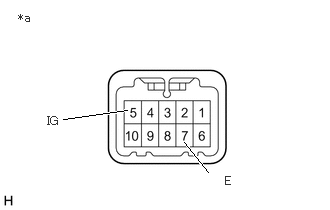
Make sure that there is no looseness in the locking part and the connecting part of the connector.
b.
Disconnect the S-IPA switch (combination switch assembly) connector.
c.
Measure the resistance according to the value(s) in the table below.
- Standard Resistance:
Tester Connection Condition Specified Condition 5 (IG) - 7 (E) Switch pushed Below 50 Ω Switch not pushed 10 kΩ or higher
If the result is not as specified, replace the S-IPA switch (combination switch assembly).
d.
Check that the switch illumination illuminates.
i.
1.365,1.5 0.969,1.917
true
2.813,0.458 2.104,1.104
true
0.188,0.115 0.5,0.313
0.313,0.198
10
false
*a
0.688,1.854 1.115,2.083
0.427,0.229
10
false
ILL+
2.865,0.385 3.281,0.656
0.417,0.271
10
false
ILL-
| *a | Component without harness connected
(S-IPA Switch (Combination Switch Assembly)) |
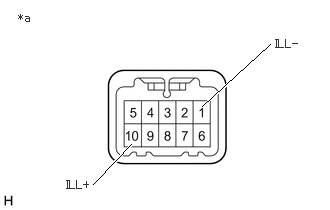
Apply auxiliary battery voltage to the S-IPA switch (combination switch assembly) and check that the switch illumination illuminates.
- OK:
Connection Specified Condition Auxiliary battery positive (+) → Terminal 10 (ILL+)
Auxiliary battery negative (-) → Terminal 1 (ILL-)Illuminates
If the result is not as specified, replace the S-IPA switch (combination switch assembly).