RM3210E
_56
Audio / Visual / Telematics
_047510
AUDIO / VIDEO
_0243407
MICROPHONE
A
AUDIO / VIDEO MICROPHONE REMOVAL
PROCEDURE

 1.REMOVE ROOF CONSOLE BOX ASSEMBLY
86730A
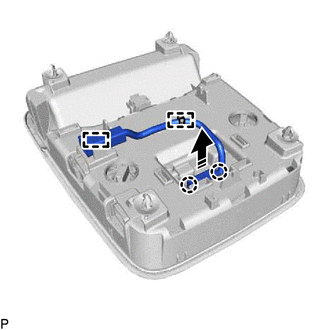
2.REMOVE TELEPHONE MICROPHONE ASSEMBLY (w/o Sliding Roof)
a.
0,0 0,0
false

|
Remove in this Direction |
Disengage the 2 clamps.
b.
Disengage the 2 claws and remove the telephone microphone assembly as shown in the illustration.
86730A
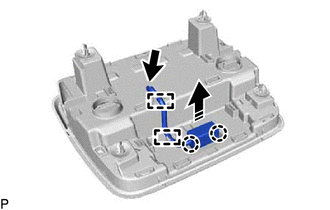
3.REMOVE TELEPHONE MICROPHONE ASSEMBLY (w/ Sliding Roof)
a.
0,0 0,0
false
|
|
Remove in this Direction |
Disconnect the connector.
b.
Disengage the 2 clamps.
c.
Disengage the 2 claws and remove the telephone microphone assembly as shown in the illustration.