HYBRID / BATTERY CONTROL HYBRID VEHICLE CONTROL ECU INSTALLATION
PROCEDURE

 89981
1.INSTALL HYBRID VEHICLE CONTROL ECU (for LHD)
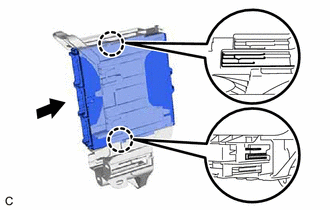
Engage the 2 claws to install the hybrid vehicle control ECU as shown in the illustration.
- NOTICE:
-
Make sure that the hybrid vehicle control ECU is securely installed.
82877
2.INSTALL ECU INTEGRATION BOX RH (for LHD)
Install the ECU integration box RH with the bolt and 2 nuts.
Engage the 3 clamps.
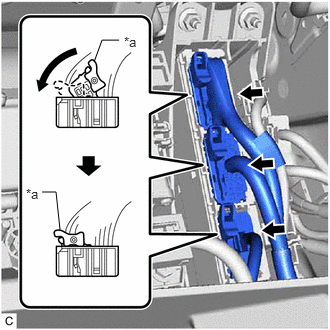
| *a | Lock Lever |
Connect the 3 hybrid vehicle control ECU connectors and move each lock lever as shown in the illustration to lock the connectors.
Connect each connector.
89981
3.INSTALL HYBRID VEHICLE CONTROL ECU (for RHD)
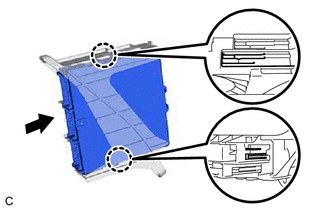
Engage the 2 claws to install the hybrid vehicle control ECU as shown in the illustration.
- NOTICE:
-
Make sure that the hybrid vehicle control ECU is securely installed.
82878
4.INSTALL ECU INTEGRATION BOX LH (for RHD)
Install the ECU integration box LH with the bolt and nut.
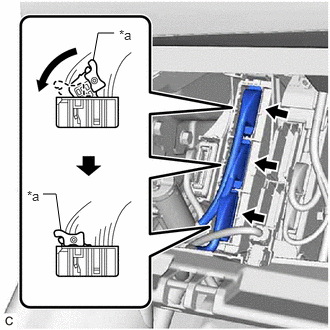
| *a | Lock Lever |
Connect the 3 hybrid vehicle control ECU connectors and move each lock lever as shown in the illustration to lock the connectors.
Connect each connector.
55550
5.INSTALL GLOVE COMPARTMENT DOOR ASSEMBLY
55607
6.INSTALL NO. 2 INSTRUMENT PANEL UNDER COVER SUB-ASSEMBLY
7.CONNECT CABLE TO NEGATIVE AUXILIARY BATTERY TERMINAL
- NOTICE:
-
When disconnecting the cable, some systems need to be initialized after the cable is reconnected.
-
Click hereGeneral>INTRODUCTION>REPAIR INSTRUCTION>INITIALIZATION
8.PERFORM INITIALIZATION