STEERING COLUMN ASSEMBLY (for RHD) > REASSEMBLY |
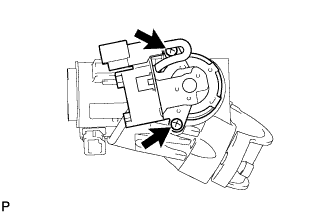
| 1. INSTALL IGNITION SWITCH ASSEMBLY (w/o Smart Entry and Start System) |
|
Install the ignition switch to the steering column bracket upper with the 2 screws.
| 2. INSTALL KEY INTERLOCK SOLENOID (w/o Smart Entry and Start System) |
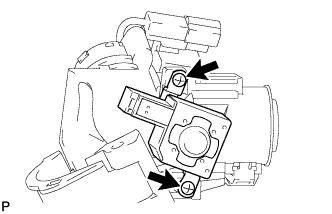 |
for Automatic Transaxle:
Install the key interlock solenoid to the steering column bracket assembly upper with the 2 screws.
| 3. INSTALL UNLOCK WARNING SWITCH ASSEMBLY (w/o Smart Entry and Start System) |
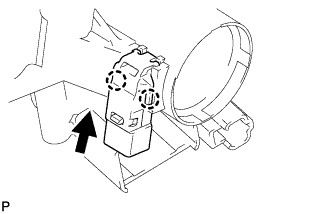 |
Attach the 2 claws to install the unlock warning switch to the steering column bracket upper.
| 4. INSTALL IGNITION SWITCH LOCK CYLINDER ASSEMBLY (w/o Smart Entry and Start System) |
Insert the key and turn it to the ACC position.
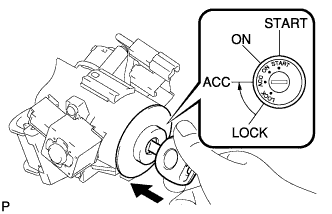 |
Install the ignition switch lock cylinder to the steering column bracket upper.
Make sure that the ignition switch lock cylinder is securely fixed to the steering column upper with switch bracket.
| 5. INSPECT STEERING LOCK OPERATION (w/o Smart Entry and Start System) |
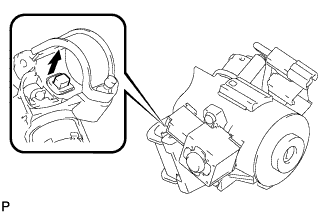 |
Remove the key and check that the steering lock function is activated.
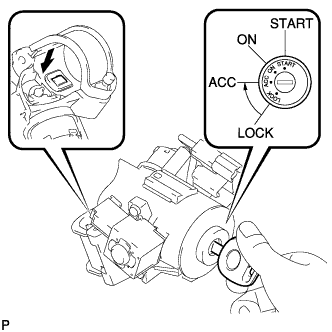 |
Insert the key, turn the ignition switch on (ACC) and check that the steering lock function is deactivated.
| 6. INSTALL STEERING COLUMN UPPER W/SWITCH BRACKET ASSEMBLY (w/o Smart Entry and Start System) |
Fix the steering column in a vise between aluminum plates.
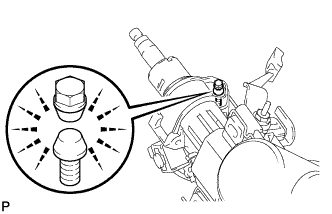 |
Install the steering column upper with switch bracket with a new steering lock set bolt, and then tighten the bolt until is head comes off.
| 7. INSTALL TRANSPONDER KEY AMPLIFIER (w/o Smart Entry and Start System) |
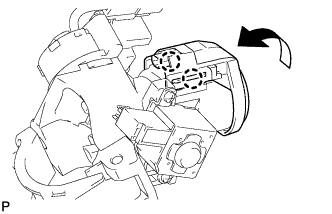 |
Attach the 2 claws and install the transponder key amplifier to the steering column upper with the switch bracket.
| 8. INSTALL STEERING LOCK ACTUATOR ASSEMBLY (w/ Smart Entry and Start System) |
Fix the steering column in a vise between aluminum plates.
|
Install the steering lock actuator with a steering lock set bolt, and then tighten the bolts until their head comes off.