 |
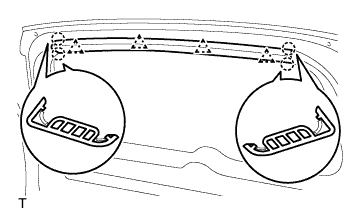
Using a screwdriver, detach the 4 claws and 4 clips and remove the garnish.
- HINT:
- Tape the screwdriver tip before use.
TELEVISION CAMERA > REMOVAL |
| 1. DISCONNECT CABLE FROM NEGATIVE BATTERY TERMINAL |
| 2. REMOVE BACK DOOR CENTER GARNISH |
|
Using a screwdriver, detach the 4 claws and 4 clips and remove the garnish.
| 3. REMOVE BACK DOOR SIDE GARNISH LH |
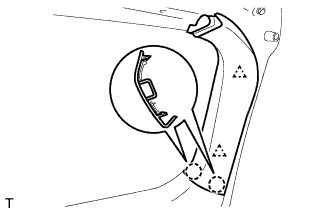 |
Using a screwdriver, detach the 2 claws and 2 clips and remove the garnish.
| 4. REMOVE BACK DOOR SIDE GARNISH RH |
| 5. REMOVE BACK DOOR TRIM BOARD ASSEMBLY |
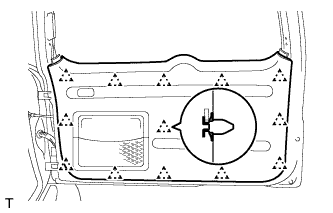 |
Using a screwdriver, detach the 13 clips and remove the trim board.
Remove the 5 screws and the back door trim pocket.
| 6. REMOVE BACK DOOR OUTSIDE GARNISH SUB-ASSEMBLY |
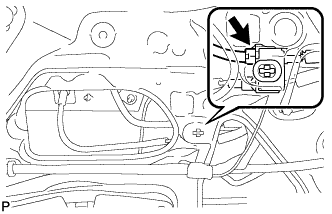 |
Disconnect the connector.
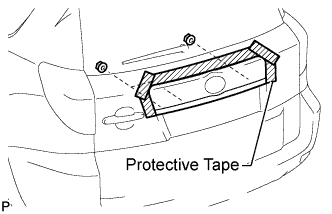 |
Put protective tape around the back door outside garnish.
Remove the 3 nuts.
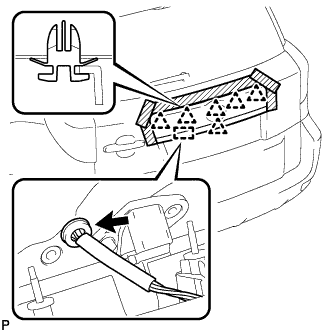 |
Detach the grommet and 5 clips, and remove the back door outside garnish.
| 7. REMOVE TELEVISION CAMERA ASSEMBLY |
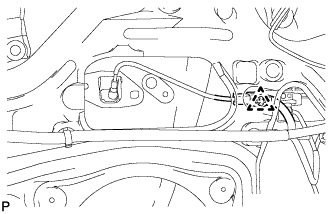 |
Disconnect the television camera connector and detach the clamp.
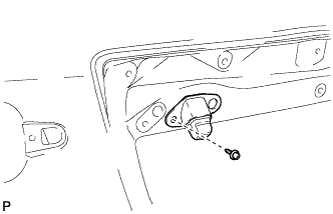 |
Remove the screw and television camera.