 |
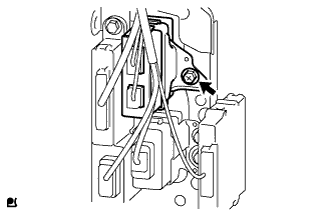
Install the ECU with the bolt.
- Torque:
- 4.5 N*m{ 46 kgf*cm , 40 in.*lbf }
TIRE PRESSURE WARNING ECU (w/ Receiver) > INSTALLATION |
| 1. INSTALL TIRE PRESSURE WARNING ECU AND RECEIVER |
|
Install the ECU with the bolt.
Connect the connector.
| 2. INSTALL GLOVE COMPARTMENT DOOR ASSEMBLY (for LHD) |
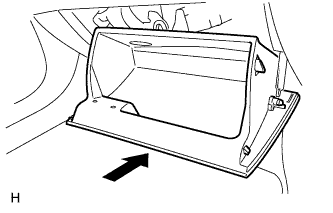 |
Attach the 2 hinges to install the door.
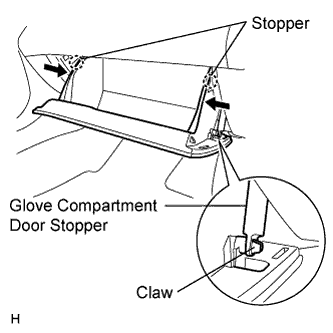 |
Attach the claw to the glove compartment door stopper.
While pushing in the sides of the glove compartment door in the direction indicated by the arrows in the illustration, close the door to engage it to the 2 stoppers.
| 3. INSTALL INSTRUMENT PANEL FINISH PANEL LOWER (for RHD) |
Attach the 8 claws to install the lower instrument panel finish panel.
Install the 2 screws.
| 4. CONNECT CABLE TO NEGATIVE BATTERY TERMINAL |
| 5. REGISTER TRANSMITTER ID |
Prepare all of the transmitter ID data before starting registration.
Set the tire pressure of all wheels (including the spare tire) to the specified value.
Turn the ignition switch off.
Connect the intelligent tester to the DLC3.
Turn the ignition switch on (IG) and the tester on.
Enter the following menus: Chassis / Tire Pressure Monitor / Data List. Then, press "Utility" to move to next screen.
Perform the following procedures displayed on the tester.
Input the IDs (ID1 to ID4) using the tester and transmit them to the tire pressure warning ECU and receiver. Then press "Next".
"ID Registration is complete" screen is displayed. Then, press "Exit".
| 6. INSPECT TIRE PRESSURE WARNING SYSTEM |