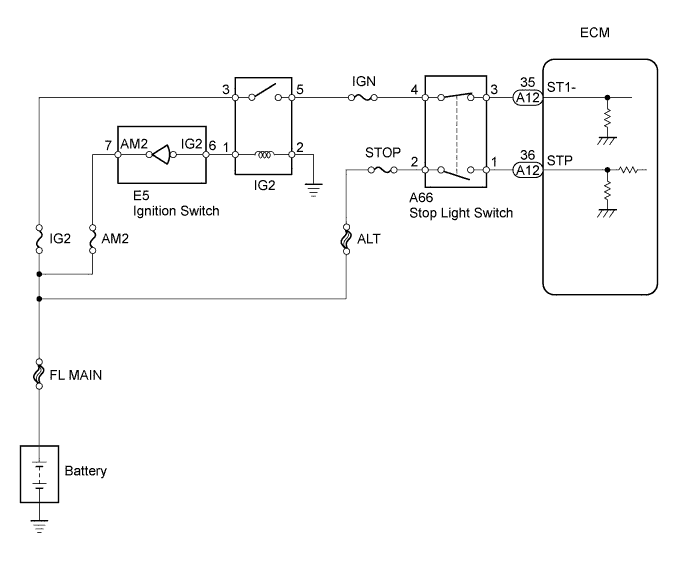
DTC P0504 Brake Switch "A" / "B" Correlation |
DTC P0724 Brake Switch "B" Circuit High |
| Signal | Brake Pedal Released | In Transition | Brake Pedal Depressed |
| STP | OFF | ON | ON |
| ST1- | ON | ON | OFF |
| DTC No. | DTC Detection Condition | Trouble Area |
| P0504 | Conditions (a), (b) and (c) continue for 0.5 seconds or more (1 trip detection logic): (a) Ignition switch to the ON position (b) Brake pedal released (c) STP signal OFF when ST1- signal OFF |
|
| P0724 | The stop light switch remains ON even when the vehicle is driven in a STOP (less than 2 mph (3 km/h)) and GO (19 mph (30 km/h) or more) fashion 5 times. (2 trip detection logic) |
|
| 1.CHECK STOP LIGHT (OPERATION OF STOP LIGHT) |
Check whether the stop lights turn on and off normally when the brake pedal is depressed and released.
|
| ||||
| OK | |
 |
| 2.READ VALUE USING INTELLIGENT TESTER (STP SIGNAL AND ST1 - VOLTAGE) |
 |
Connect the intelligent tester to the DLC3.
Turn the ignition switch to the ON position and turn the tester on.
Enter the following menus: Powertrain / Engine and ECT / Data List / Stop Light Switch.
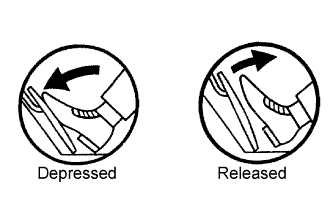
Check the STP signal when the brake pedal is depressed and released.
| Brake Pedal Operation | Specified Condition |
| Depressed | STP signal ON |
| Released | STP signal OFF |
Enter the following menus: Powertrain / Engine and ECT / Data List / ST1.
Check the ST1 signal when the brake pedal is depressed and released.
| Brake Pedal Operation | Specified Condition |
| Depressed | ST1 signal OFF |
| Released | ST1 signal ON |
|
| ||||
| NG | |
|
| 3.INSPECT STOP LIGHT SWITCH ASSEMBLY |
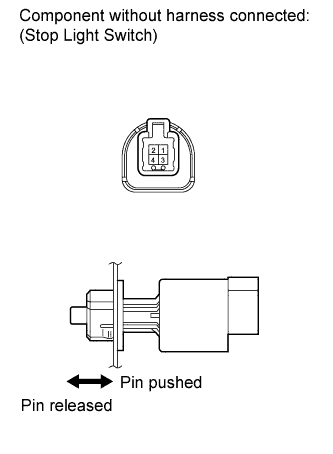 |
Remove the stop light switch assembly.
Measure the resistance according to the value(s) in the table below.
| Switch Position | Tester Connection | Specified Condition |
| Switch pin released | 1 - 2 | Below 1 Ω |
| Switch pin released | 3 - 4 | 10 kΩ or higher |
| Switch pin pushed | 1 - 2 | 10 kΩ or higher |
| Switch pin pushed | 3 - 4 | Below 1 Ω |
Reinstall the stop light switch assembly.
|
| ||||
| OK | |
|
| 4.CHECK ECM (STP, ST1 - VOLTAGE) |
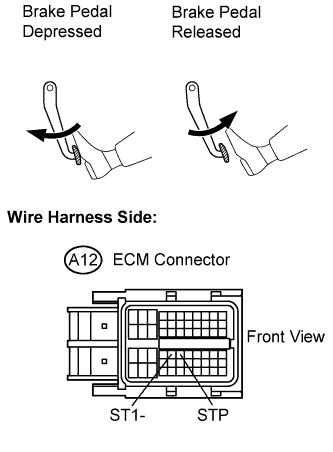 |
Disconnect the ECM connector.
Measure the voltage according to the value(s) in the table below.
| Tester Connection | Brake Pedal Operation | Specified Condition |
| STP (A12-36) - Body ground | Depressed | 9 to 14 V |
| STP (A12-36) - Body ground | Released | 0 to 3 V |
| ST1- (A12-35) - Body ground | Depressed | 0 to 3 V |
| ST1- (A12-35) - Body ground | Released | 9 to 14 V |
|
| ||||
| OK | ||
 | ||
| ||
