 |
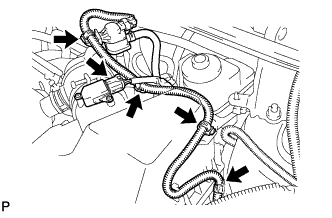
Disconnect the mass air flow meter connector.
ECM > REMOVAL |
| 1. DISCONNECT CABLE FROM NEGATIVE BATTERY TERMINAL |
| 2. REMOVE AIR CLEANER CAP SUB-ASSEMBLY |
|
Disconnect the mass air flow meter connector.
Disconnect the purge VSV connector.
Disconnect the 4 wire harness clamps.
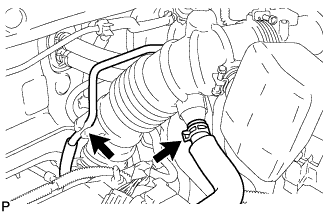 |
Disconnect the No. 2 ventilation hose from the air cleaner hose.
Disconnect the purge line hose from the clamp.
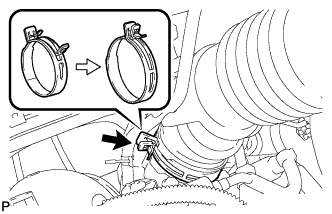 |
Lock the No. 1 air cleaner hose clamp, and then disconnect the No. 1 air cleaner hose from the throttle body.
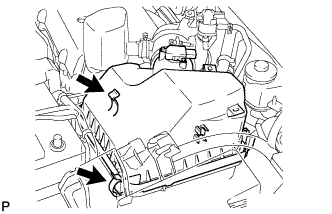 |
Unfasten the 2 hook clamps, and then remove the air cleaner cap.
Remove the air cleaner filter element from the air cleaner case.
| 3. REMOVE AIR CLEANER CASE SUB-ASSEMBLY |
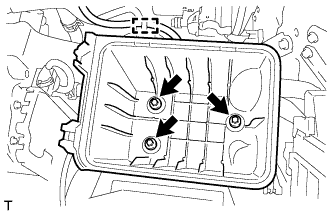 |
Disconnect the wire harness clamp from the air cleaner case.
Remove the 3 bolts and air cleaner case.
| 4. REMOVE ECM |
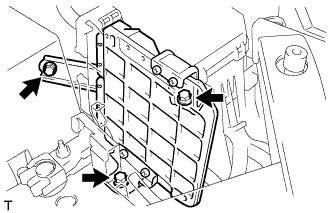 |
Remove the 3 bolts of the ECM with brackets.
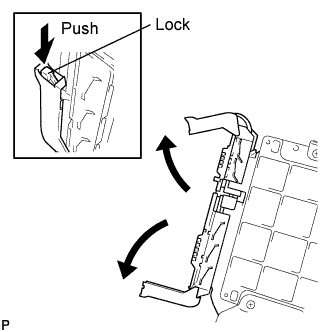 |
Disconnect the 2 ECM connectors.
Raise the 2 levers while pushing the locks on the 2 levers, and disconnect the 2 ECM connectors.
Remove the ECM with brackets.
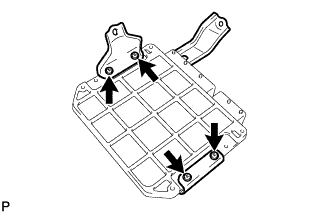 |
Remove the 4 screws and 2 ECM brackets.