 |
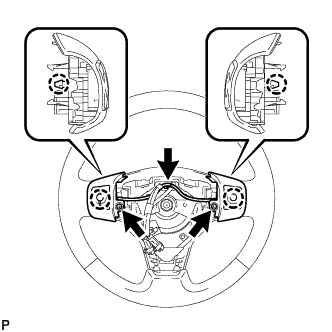
w/ Navigation System (for DVD):
Attach the claw to install the steering pad switch.
Install the screw.
Connect all connectors.
STEERING PAD SWITCH > INSTALLATION |
| 1. INSTALL STEERING PAD SWITCH ASSEMBLY (except 3ZR-FAE) |
|
w/ Navigation System (for DVD):
Attach the claw to install the steering pad switch.
Install the screw.
Connect all connectors.
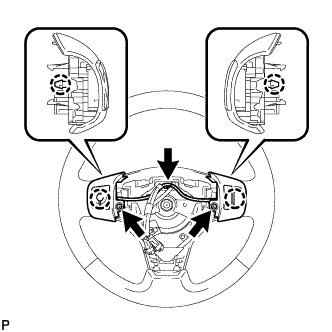 |
w/ Navigation System (for HDD):
Attach the 2 claw to install the steering pad switch.
Install the 2 screw.
Connect all connectors.
| 2. INSTALL STEERING PAD SWITCH ASSEMBLY (for 3ZR-FAE) |
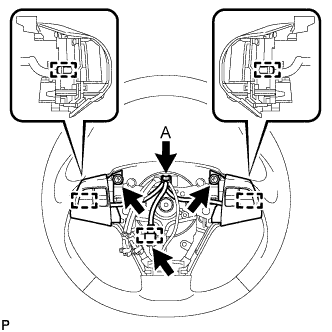 |
w/ Bluetooth:
Attach the 2 pins to install the steering pad switch.
Install the 2 screws.
w/ Paddle Switch:
Connect the connectors and attach the clamp.
w/o Paddle Switch:
Connect connector A.
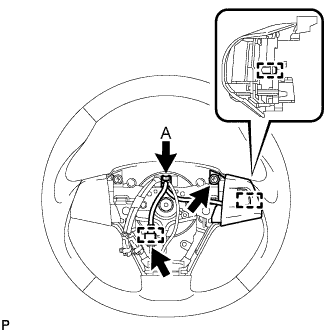 |
w/o Bluetooth:
Attach the pin to install the steering pad switch.
Install the screw.
w/ Paddle Switch:
Connect the connectors and attach the clamp.
w/o Paddle Switch:
Connect connector A.
| 3. INSTALL STEERING PAD ASSEMBLY (except 3ZR-FAE) |
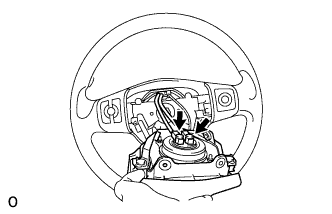 |
Support the steering pad with one hand as shown in the illustration.
Connect the 2 airbag connectors.
Connect the horn connector.
Install the steering pad after confirming that the circumference grooves of the screws are caught on the screw case.
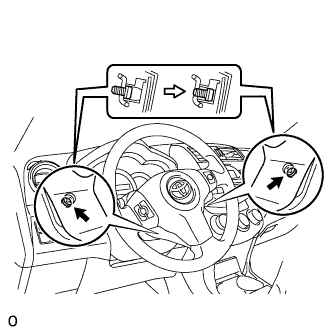 |
Using a T30 "torx" driver, install the 2 screws.
| 4. INSTALL STEERING PAD ASSEMBLY (for 3ZR-FAE) |
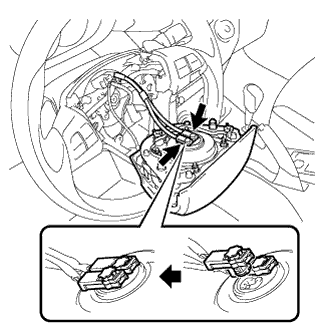 |
Support the steering pad with one hand as shown in the illustration.
Connect the 2 airbag connectors.
Connect the horn connector.
Install the steering pad after confirming that the circumference grooves of the screws are caught on the screw case.
Attach the 2 spring to steering pad.
| 5. CONNECT CABLE TO NEGATIVE BATTERY TERMINAL |