 |
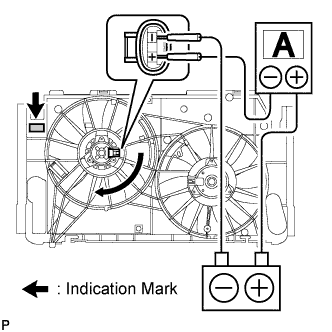
Disconnect the No. 1 fan connector.
COOLING FAN MOTOR > ON-VEHICLE INSPECTION |
| 1. INSPECT NO. 1 COOLING FAN MOTOR |
|
Disconnect the No. 1 fan connector.
Connect the battery and ammeter to the No. 1 fan motor connector.
Check that the No. 1 fan rotates smoothly, and then check the reading on the ammeter.
| Indication Mark | Motor Type | Condition | Specified Condition |
| A | 80 W | at 20°C (68°F) | 5.8 to 7.8 A |
| B, C | 160 W | at 20°C (68°F) | 11.7 to 14.7 A |
Reconnect the No. 1 fan motor connector.
| 2. INSPECT NO. 2 COOLING FAN MOTOR |
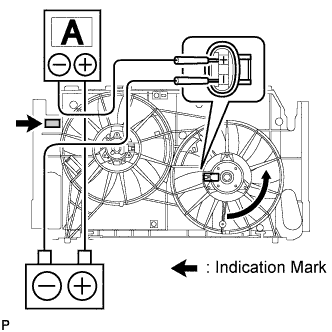 |
Disconnect the No. 2 fan connector.
Connect the battery and ammeter to the No. 2 fan motor connector.
Check that the No. 2 fan rotates smoothly, and then check the reading on the ammeter.
| Indication Mark | Motor Type | Condition | Specified Condition |
| A | 80 W | at 20°C (68°F) | 5.8 to 7.8 A |
| B | 120 W | at 20°C (68°F) | 8.4 to 10.4 A |
| C | 160 W | at 20°C (68°F) | 11.7 to 14.7 A |
Reconnect the No. 2 fan motor connector.