Home › BODY ELECTRICAL › AUDIO / VISUAL › MICROPHONE AMPLIFIER

MICROPHONE AMPLIFIER > REMOVAL

for Preparation Click here


1. DISCONNECT CABLE FROM NEGATIVE BATTERY TERMINAL

NOTICE:
w/ Navigation System (for HDD):
After the ignition switch is turned off, the HDD navigation system requires approximately a minute to record various types of memory and settings. As a result, after turning the ignition switch off, wait a minute or more before disconnecting the cable from the negative (-) battery terminal.


2. REMOVE MAP LIGHT ASSEMBLY


B131951
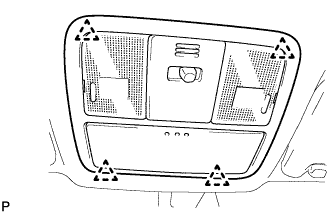
  1. Detach the 4 clips and remove the map light.

  1. Disconnect the light connector.


3. REMOVE AMPLIFIER MICROPHONE ASSEMBLY


    E117387
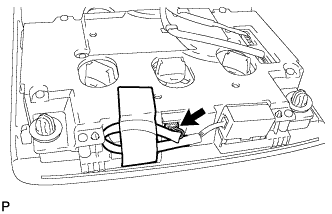
  1. Remove the tape and disconnect the connector.


    B222161
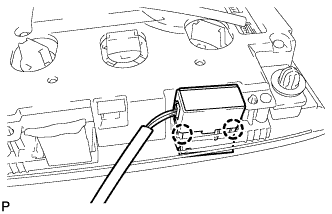
  1. Detach the 2 claws and remove the amplifier microphone.