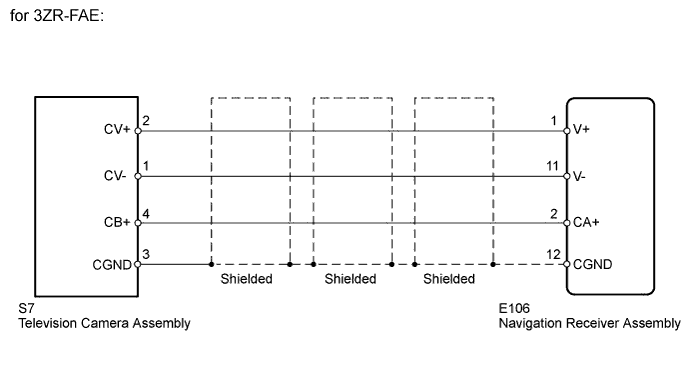
DTC 5C-40 Camera Picture Error |
| DTC Code | DTC Detection Condition | Trouble Area |
| 5C-40 | Synchronous signal from camera cannot be transmitted.. |
|
| 1.CHECK NAVIGATION RECEIVER ASSEMBLY |
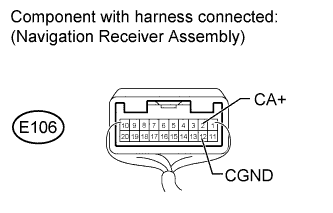 |
for 3ZR-FAE:
Measure the voltage according to the value(s) in the table below.
| Tester Connection | Condition | Specified Condition |
| E106-2 (CA+) - E106-12 (CGND) | Ignition switch ON, shift lever in R | 5.8 to 6.2 V |
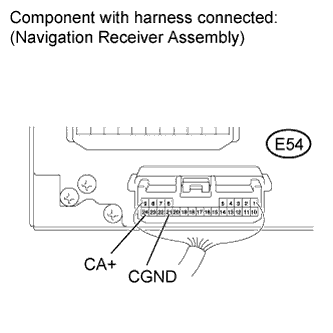 |
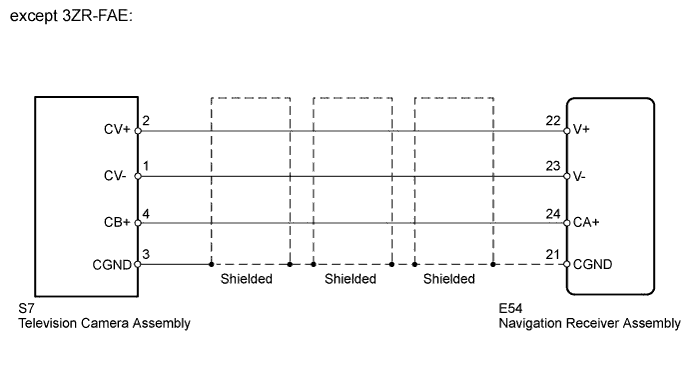
except 3ZR-FAE:
Measure the voltage according to the value(s) in the table below.
| Tester Connection | Condition | Specified Condition |
| E54-24 (CA+) - E54-21 (CGND) | Ignition switch ON, shift lever in R | 5.8 to 6.2 V |
|
| ||||
| OK | |
 |
| 2.CHECK NAVIGATION RECEIVER ASSEMBLY (DISPLAY SIGNAL) |
for 3ZR-FAE:
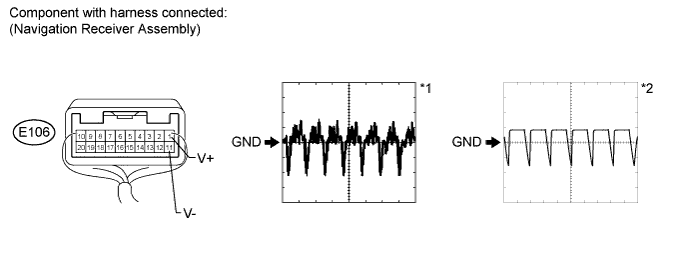
Using an oscilloscope, check the waveform.
| Item | Content |
| Tester Connection | E106-1 (V+) - E106-11 (V-) |
| Tool Setting | 0.2 V/DIV., 50 μs/DIV. |
| Condition |
|
except 3ZR-FAE:
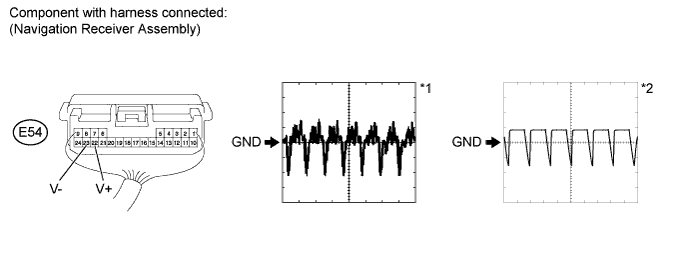
Using an oscilloscope, check the waveform.
| Item | Content |
| Tester Connection | E54-22 (V+) - E54-23 (V-) |
| Tool Setting | 0.2 V/DIV., 50 μs/DIV. |
| Condition |
|
|
| ||||
| OK | ||
 | ||
| ||
| 3.CHECK HARNESS AND CONNECTOR (NAVIGATION RECEIVER - TELEVISION CAMERA) |
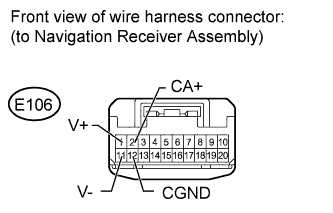 |
for 3ZR-FAE:
Disconnect the E106 navigation receiver assembly connector.
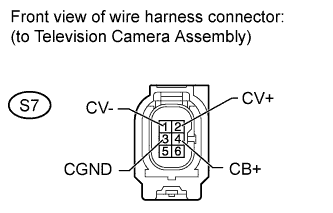 |
Disconnect the S7 television camera assembly connector.
Measure the resistance according to the value(s) in the table below.
| Tester Connection | Condition | Specified Condition |
| E106-1 (V+) - S7-2 (CV+) | Always | Below 1 Ω |
| E106-2 (CA+) - S7-4 (CB+) | Always | Below 1 Ω |
| E106-11 (V-) - S7-1 (CV-) | Always | Below 1 Ω |
| E106-12 (CGND) - S7-3 (CGND) | Always | Below 1 Ω |
| E106-1 (V+) - Body ground | Always | 10 kΩ or higher |
| E106-2 (CA+) - Body ground | Always | 10 kΩ or higher |
| E106-11 (V-) - Body ground | Always | 10 kΩ or higher |
| E106-12 (CGND) - Body ground | Always | 10 kΩ or higher |
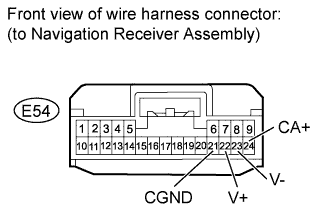 |
except 3ZR-FAE:
Disconnect the E54 navigation receiver assembly connector.
|
Disconnect the S7 television camera assembly connector.
Measure the resistance according to the value(s) in the table below.
| Tester Connection | Condition | Specified Condition |
| E54-22 (V+) - S7-2 (CV+) | Always | Below 1 Ω |
| E54-24 (CA+) - S7-4 (CB+) | Always | Below 1 Ω |
| E54-21 (CGND) - S7-1 (CV-) | Always | Below 1 Ω |
| E54-23 (V-) - S7-3 (CGND) | Always | Below 1 Ω |
| E54-22 (V+) - Body ground | Always | 10 kΩ or higher |
| E54-24 (CA+) - Body ground | Always | 10 kΩ or higher |
| E54-21 (CGND) - Body ground | Always | 10 kΩ or higher |
| E54-23 (V-) - Body ground | Always | 10 kΩ or higher |
|
| ||||
| OK | ||
| ||
| ||

