RM3090E
_56
Audio / Visual / Telematics
_008775
AUDIO / VIDEO
_0048748
AUDIO AND VISUAL SYSTEM(for Radio and Display Type)
J
AUDIO / VIDEO AUDIO AND VISUAL SYSTEM(for Radio and Display Type) Poor Sound Quality in All Modes (Low Volume)
PROCEDURE
1.CHECK AUDIO SETTINGS
a.
0.138,0.104 0.288,0.249
0.149,0.145
10
*a
| *a | Example |
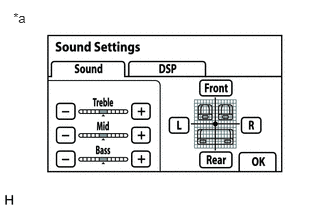
Display the "Sound Settings" screen.
b.
Set "Treble", "Mid" and "Bass" to the initial values and check that sound is normal.
- HINT:
-
Sound quality adjustment measures vary according to the type of amplifier.
- Result:
Proceed to Malfunction disappears Malfunction appears
Malfunction disappears
END (AUDIO SETTINGS IS DEFECTIVE)
Malfunction appears
2.COMPARE WITH ANOTHER VEHICLE OF SAME MODEL
2.COMPARE WITH ANOTHER VEHICLE OF SAME MODEL
a.
Compare with another vehicle of the same model which does not have trouble to see if there is any difference in the sound quality.
- Result:
Proceed to No difference is found Difference is found
No difference is found
END
Difference is found
PROCEED TO NEXT SUSPECTED AREA SHOWN IN PROBLEM SYMPTOMS TABLE