DOOR LOCK WIRELESS DOOR LOCK CONTROL SYSTEM(w/o Entry and Start System) No Answer-Back
DESCRIPTION
In some cases, wireless door lock control functions are normal but the hazard warning light answer-back function does not operate. In such cases, hazard warning light signal outputs from the main body ECU (multiplex network body ECU) may be malfunctioning.
WIRING DIAGRAM
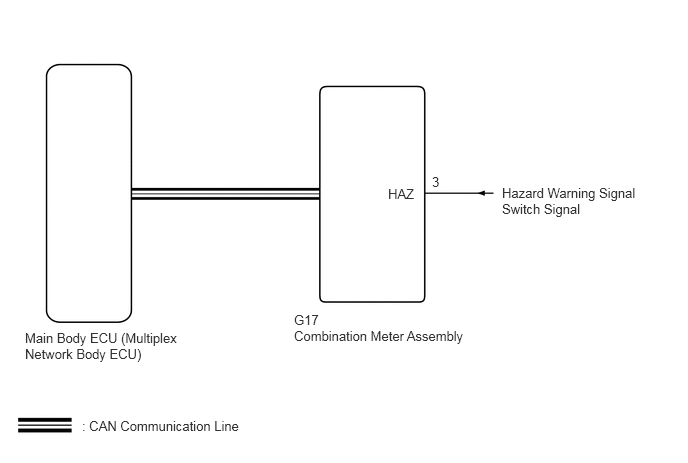
CAUTION / NOTICE / HINT
- NOTICE:
- ·
The wireless door lock control system uses the CAN communication system. Inspect the communication function by following How to Proceed with Troubleshooting. Troubleshoot the wireless door lock control system after confirming that the communication systems are functioning properly.
·When replacing the main body ECU (multiplex network body ECU), make sure to replace it with a new one.
PROCEDURE
Connect the GTS to the DLC3.
Turn the ignition switch to ON.
Turn the GTS on.
Enter the following menus: Customize Setting / Wireless Door Lock.
Select the setting by referring to the table below.
- Wireless Door Lock
-
Tester Display Description Default Setting ECU Hazard Answer Back When the doors are locked by wireless operation, the hazard warning lights flash once.
When the doors are unlocked by wireless operation, the hazard warning lights flash twice.ON 0:OFF,1:ON Main body ECU (Multiplex network body ECU) - 50006 1
- Result:
Proceed to Customize setting is ON Customize setting is OFF
Customize setting is ON
Customize setting is OFF
Check the wireless door lock control function using the door control transmitter assembly.
- Result:
Proceed to Wireless door lock/unlock operates properly Wireless door lock/unlock does not operate properly
Wireless door lock/unlock operates properly
Wireless door lock/unlock does not operate properly
Connect the GTS to the DLC3.
Turn the ignition switch to ON.
Turn the GTS on.
Enter the following menus: Body Electrical / Main Body / Data List.
Read the Data List according to the display on the GTS.
- Body Electrical > Main Body > Data List
-
Tester Display Measurement Item Range Normal Condition Diagnostic Note FR Door Lock Pos Front door RH unlock detection switch signal LOCK or UNLOCK LOCK: Front door RH locked
UNLOCK: Front door RH unlocked- FL Door Lock Pos Front door LH unlock detection switch signal LOCK or UNLOCK LOCK: Front door LH locked
UNLOCK: Front door LH unlocked- RR-Door Lock Pos SW Rear door RH and LH unlock detection switch signal ON or OFF ON: Rear door RH or LH unlocked
OFF: Rear door RH and LH locked*1*2 RL-Door Lock Pos SW Rear door RH and LH unlock detection switch signal ON or OFF ON: Rear door RH or LH unlocked
OFF: Rear door RH and LH locked*1*3
*1: w/ Theft Deterrent System
*2: When checking RR-Door Lock Pos SW, make sure to check it with the rear door LH locked.
*3: When checking RL-Door Lock Pos SW, make sure to check it with the rear door RH locked.
- Body Electrical > Main Body > Data List
-
Tester Display FR Door Lock Pos FL Door Lock Pos RR-Door Lock Pos SW RL-Door Lock Pos SW - 50003 123 196,198,51,52
- Result:
Proceed to OK NG (for Driver door) NG (for Front Passenger door) NG (for Rear LH door) NG (for Rear RH door)
OK
NG (for Driver door)
NG (for Front Passenger door)
NG (for Rear LH door)
NG (for Rear RH door)
Check that the hazard warning light blinks when the hazard warning signal switch is pressed.
- OK:
Hazard warning light signal blinks when the hazard warning signal switch is pressed.
- Result:
Proceed to OK NG
OK
for LHD: Click herePower Source / Network>POWER DISTRIBUTION>MAIN BODY ECU(for LHD)>REMOVAL
for RHD: Click herePower Source / Network>POWER DISTRIBUTION>MAIN BODY ECU(for RHD)>REMOVAL
NG