RM3090E
_56
Audio / Visual / Telematics
_008775
AUDIO / VIDEO
_0049965
INSTRUMENT PANEL SPEAKER
A
AUDIO / VIDEO INSTRUMENT PANEL SPEAKER REMOVAL
CAUTION / NOTICE / HINT
- HINT:
- ·
Use the same procedure for the RH and LH sides.
·The procedure listed below is for the LH side.
PROCEDURE

 55535B
1.REMOVE NO. 2 SPEAKER HOLE COVER
a.
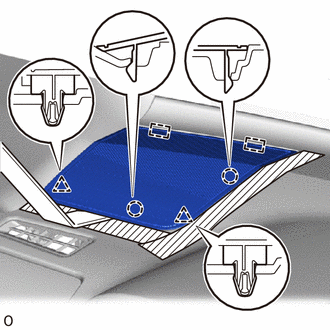
1.063,2.302 0.781,2.365
false

|
Protective Tape |
Apply protective tape as shown in the illustration.
b.
Using moulding remover B, detach the 2 clips, 2 claws and 2 guides and remove the No. 2 speaker hole cover.
86160P
2.REMOVE FRONT NO. 2 SPEAKER ASSEMBLY
- NOTICE:
-
Do not touch the cone part of the speaker.
a.
Remove the 2 bolts and front No. 2 speaker assembly.
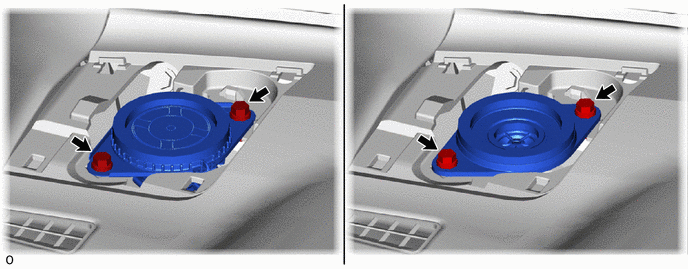
0.031,0.063 0.344,0.219
0.313,0.156
10
true
*A
3.635,0.063 3.948,0.219
0.313,0.156
10
true
*B
| *A | w/ Woofer | *B | w/o Woofer |
b.
Disconnect the connector.